Network Support Services for Businesses
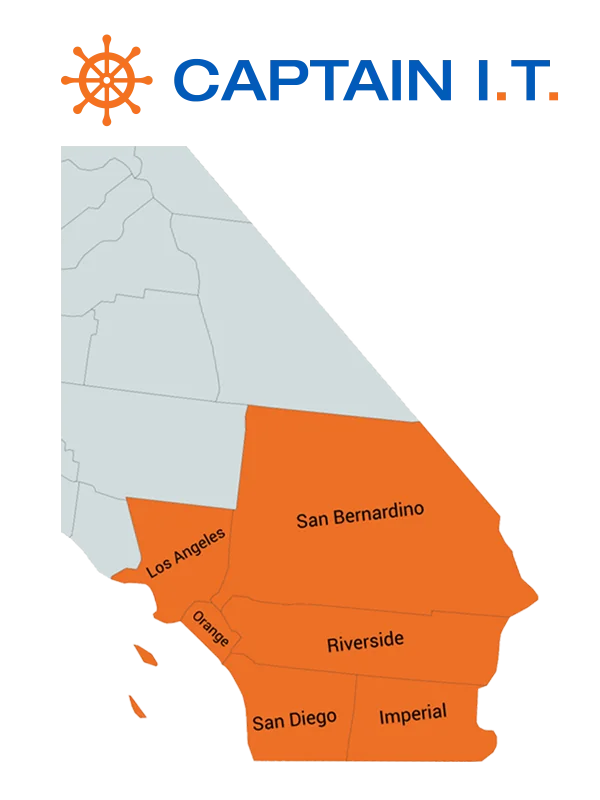
As a trusted network support provider in Southern California, Captain IT helps businesses maintain reliable connectivity, stable network infrastructure, and efficient daily operations. Our network support services cover network design and implementation, router and switch configuration, wireless network support, firewall management, performance monitoring, and troubleshooting. We work with Cisco Wi-Fi, Fortinet firewalls, Ubiquiti equipment, structured cabling, and VoIP systems to maintain connectivity across essential business applications, devices, and communication platforms.
From new office network installations to existing infrastructure upgrades, our network specialists help businesses establish and maintain dependable wired and wireless connections. We assess equipment capacity, investigate recurring outages, monitor network performance, and maintain supported devices to address connectivity issues and changing operational demands. As an experienced MSP, Captain IT also recommends infrastructure improvements, equipment upgrades, and network expansion strategies based on business requirements, existing systems, and future growth plans.
Call Captain IT at (800) 834-9795 to discuss your business network support requirements and schedule a consultation. Our fixed-fee service approach provides network maintenance, monitoring, troubleshooting, and technical assistance based on your infrastructure, connectivity needs, and operational priorities.
What Network Support Services Does Captain IT Provide?
Captain IT offers five core network support services to help businesses establish, protect, maintain, and expand their networking environments. Each service addresses a specific infrastructure requirement, from planning new network installations to identifying technical faults and managing equipment performance. Our network technicians provide assistance based on your existing network architecture, connected devices, and business connectivity requirements.
Our network design and implementation services establish the technical foundation for business connectivity. We evaluate office layouts, device requirements, network capacity, and communication needs before developing an appropriate network architecture. Network technicians plan equipment placement, configure wired and wireless connections, and establish network segments where required. This process supports new office installations, infrastructure replacements, and network deployments that accommodate business applications and connected equipment.
Network security services focus on controlling traffic and protecting infrastructure against unauthorized connections and network-based threats. Captain IT assists with firewall policies, intrusion detection, vulnerability assessments, and network access restrictions. Our network technicians examine security configurations, identify potential exposure points, and apply appropriate controls to supported devices. These measures help businesses manage network access while maintaining connectivity for authorized users, applications, and communication systems.
Business growth often requires additional network capacity, equipment, or connectivity across new workspaces. We assess existing infrastructure to determine whether routers, switches, wireless systems, and related components can accommodate increased demand. Our network technicians plan equipment replacements, capacity improvements, and network extensions while considering compatibility with current systems. We coordinate upgrades to limit operational interruptions and support additional employees, devices, or office locations.
Captain IT investigates network faults by examining affected connections, device conditions, configuration settings, and traffic behavior. Our network support team isolates problems involving failed equipment, incorrect routing, connection interruptions, or network communication errors. Once we identify the underlying cause, we apply the right corrections and verify that the affected service is restored. This structured troubleshooting approach helps businesses address technical incidents without relying on repeated trial-and-error adjustments.
Our network monitoring and management services provide ongoing oversight of supported networking equipment and operating conditions. Network specialists review traffic patterns, device health, interface status, and relevant system alerts to identify developing issues. Maintenance activities may include configuration reviews, equipment checks, and scheduled updates based on operational requirements. Monitoring coverage and recurring management tasks are defined according to the supported infrastructure and agreed service scope.
What Network Infrastructure Does Captain IT Support?
Captain IT supports business network infrastructure, including Cisco wireless systems, Fortinet firewalls, Ubiquiti networking equipment, structured cabling, and VoIP phone systems. Our network support team handles configuration, maintenance, connectivity troubleshooting, and infrastructure adjustments based on equipment needs and your existing network environment.
- Cisco Wi-Fi Support: Captain IT provides Cisco Wi-Fi support for businesses with wireless connectivity problems or that need access point configuration. Our network technicians assess signal strength, identify interference, adjust wireless settings, and evaluate access point placement. We also troubleshoot device connection failures and coverage gaps to help employees maintain stable wireless access throughout offices, meeting rooms, and shared workspaces.
- Fortinet Firewall Support: Our Fortinet firewall support focuses on maintaining network access controls and resolving firewall-related connectivity problems. Captain IT's network specialists configure firewall rules, review security policies, investigate blocked connections, and assess device settings. We assist with firmware updates and configuration adjustments to support authorized network traffic while maintaining appropriate restrictions against unauthorized access to business systems and resources.
- Ubiquiti Network Support: Businesses using Ubiquiti networking equipment receive assistance with wireless deployment, device configuration, and connectivity troubleshooting. Our network support team evaluates access point settings, switch configurations, and network communication problems. We also help plan equipment additions and address wireless coverage limitations when businesses expand their workspaces, connect additional devices, or modify existing network infrastructure to accommodate growth.
- Network Cabling Services: Captain IT provides network cabling services to support physical connections between business networking devices and office equipment. Our network technicians assess cabling requirements, assist with structured cable installation, and investigate damaged or improperly connected wiring. We identify physical connection faults that affect network communication and help organize cabling infrastructure to simplify equipment maintenance, troubleshooting, and future network changes.
- VoIP Phone Support: Our VoIP phone support addresses network connectivity and call quality problems affecting business communication systems. Captain IT's technicians investigate dropped calls, registration errors, bandwidth limitations, and voice transmission delays. We review relevant network configurations and traffic prioritization settings to identify connection problems, helping businesses maintain functional VoIP communications between employees, customers, and external service providers.
Business Network Support Solutions
Captain IT provides business network support solutions that address specific configuration, connectivity, and equipment maintenance requirements. Our network support technicians work with routing systems, network switches, wireless connections, firewalls, and device firmware to resolve technical problems and maintain network functionality. Each solution focuses on an individual component or operating condition within your existing network infrastructure.
- Router Configuration: Router configuration determines how data travels between internal networks, internet connections, and connected business locations. Captain IT's network technicians configure routing settings, IP addressing, gateway connections, and traffic paths based on existing network requirements. We also investigate incorrect routing entries and communication failures between network segments. Proper router settings allow authorized devices and applications to exchange data through the intended network connections.
- Switch Configuration: Our switch configuration support focuses on connecting business devices and managing communication within local area networks. We configure switch ports, virtual LANs (VLANs), and relevant connection settings to support workstations, printers, servers, and other equipment. Captain IT also investigates inactive ports, incorrect VLAN assignments, and switching errors that prevent devices from communicating. These adjustments help maintain organized network connections and appropriate separation between device groups.
- Wireless Coverage Troubleshooting: Employees may experience weak Wi-Fi signals, frequent disconnections, or inconsistent wireless access across different office areas. Captain IT examines access point locations, signal strength, channel interference, and connection behavior to identify coverage limitations. Our network technicians investigate overlapping wireless signals and areas with insufficient access point coverage. Based on our findings, we recommend configuration adjustments, equipment repositioning, or additional access points as needed.
- Network Performance Diagnostics: Slow application response times and delayed data transfers can indicate congestion or underlying infrastructure problems. Our network specialists examine bandwidth utilization, latency, packet loss, and traffic patterns to locate potential bottlenecks. We compare connection performance across affected devices and network segments to identify where transmission quality deteriorates. Captain IT uses these findings to recommend configuration changes, equipment adjustments, or additional capacity when required.
- Firewall Configuration: Captain IT's network support technicians establish traffic permissions and access restrictions according to approved business security requirements. We create and modify firewall rules, review access policies, and investigate settings that interrupt legitimate network connections. Our network support team also examines port restrictions and communication requirements for supported business applications. We coordinate changes with authorized personnel to maintain necessary connectivity while restricting traffic that falls outside established security policies.
- Network Firmware Maintenance: Keeping networking equipment updated requires careful consideration of device compatibility, manufacturer recommendations, and operational risks. Our network technicians review available firmware versions, relevant security advisories, and maintenance requirements for supported routers, switches, firewalls, and wireless devices. Captain IT schedules approved updates around business activities and verifies equipment functionality afterward. This approach addresses applicable software defects and vulnerabilities while reducing the risk of disruption from incompatible updates.

Common Business Network Problems That Require Support
Business networks can experience connectivity failures, performance limitations, equipment malfunctions, and configuration problems that disrupt daily operations. Captain IT helps identify the underlying causes and determine appropriate corrective measures. Understanding common network problems helps businesses recognize when they need professional technical assistance to restore connectivity and maintain essential network functions.
- Frequent Network Outages: Repeated connectivity interruptions can prevent employees from accessing shared files, business applications, and communication systems. These outages may result from failing network equipment, unstable internet connections, or incorrect routing configurations. Captain IT investigates affected network components, reviews connection logs, and identifies recurring failure patterns to determine the right repairs or configuration changes to restore business connectivity.
- Slow Network Performance: Delayed file transfers, sluggish applications, and extended loading times often indicate underlying network performance problems. Bandwidth congestion, excessive latency, overloaded switches, or inefficient traffic routing may contribute to these conditions. Our network specialists review traffic utilization, connection speeds, and equipment capacity to identify bottlenecks and recommend targeted improvements based on network diagnostics.
- Unstable Wi-Fi Connections: Employees experiencing dropped wireless connections or inconsistent signal strength may struggle to access network resources throughout the workplace. Physical obstructions, wireless interference, overloaded access points, and poor equipment placement can affect connectivity. Captain IT assesses signal coverage, wireless channel conditions, and device behavior to identify problem areas and determine suitable adjustments for more consistent wireless access.
- Router or Switch Failures: Malfunctioning routers and switches can interrupt communication between connected devices, network segments, and external services. Hardware deterioration, power problems, firmware defects, or incorrect settings may cause equipment to stop functioning properly. Captain IT’s network support technicians examine device status, connection indicators, and configuration records to distinguish physical failures from software issues and determine whether repairs, adjustments, or replacement are necessary.
- Network Security Misconfigurations: Incorrect firewall policies, unrestricted access permissions, and improperly configured network segments can create security exposure or block legitimate business connections. These problems may arise after equipment changes, software updates, or inconsistent policy management. Captain IT reviews affected security settings, investigates unauthorized access paths, and recommends configuration corrections that align network connectivity with established business security requirements.
- Outdated Network Infrastructure: Aging networking equipment may struggle to accommodate increasing device counts, modern applications, and changing connectivity requirements. Unsupported firmware, limited processing capacity, and incompatible hardware can restrict network functionality or complicate maintenance. Our network support team evaluates equipment condition, manufacturer support status, and capacity limitations to identify components that require planned upgrades or replacement.
Benefits of Network Support Services for Businesses
Professional network support services help businesses maintain stable connectivity, address technical problems, and manage infrastructure as operational requirements change. Captain IT combines network monitoring, preventive maintenance, performance diagnostics, and technical assistance to support essential business systems. These activities provide practical advantages for organizations that depend on wired and wireless networks for daily operations.
Reduced Network Downtime
Proactive equipment monitoring and scheduled maintenance help identify developing network problems before they cause widespread interruptions. Captain IT reviews device conditions, investigates recurring alerts, and addresses maintenance requirements that could affect connectivity. When incidents occur, our network support team isolates affected components and restores functionality, helping businesses reduce avoidable disruptions to daily operations.
Reliable Business Connectivity
Consistent access to network resources allows employees to use shared applications, communicate with colleagues, and complete daily tasks. Captain IT’s network support technicians maintain appropriate device configurations, inspect connection stability, and address infrastructure conditions that affect communication between systems. These activities support dependable wired and wireless connections across workstations, servers, office equipment, and other business devices.
Faster Network Issue Resolution
Access to experienced network support professionals helps businesses investigate technical faults without relying on repeated trial-and-error troubleshooting. Captain IT uses network diagnostics, equipment information, and connection testing to narrow down potential causes. This structured approach helps identify affected components, determine suitable corrective actions, and reduce the time required to restore disrupted network functions.
Improved Network Performance
Efficient network operations depend on appropriate equipment capacity, traffic distribution, and configuration settings. Our network specialists analyze bandwidth consumption, latency, and communication patterns to identify conditions affecting data transmission. Targeted adjustments can address congestion, inefficient routing, and equipment limitations, helping business applications and connected devices operate more consistently under normal workloads.
Scalable Network Infrastructure
Growing businesses often need additional connections, higher network capacity, or infrastructure extensions to accommodate operational changes. Captain IT helps evaluate existing equipment and plan improvements based on projected user counts, connected devices, and location requirements. Planned expansion allows organizations to increase network capacity while retaining compatible infrastructure components where practical.
Better Network Visibility
Understanding network conditions helps businesses make informed decisions about maintenance, equipment replacement, and future investments. Our network support team reviews monitoring data, device health indicators, and recurring technical incidents to identify patterns that need attention. Network reporting and documented findings provide clearer insight into infrastructure performance, helping organizations prioritize corrective work and plan appropriate improvements.
Proactive vs. Reactive Network Support
Proactive network support continuously monitors and maintains network infrastructure to identify potential issues early, while reactive support resolves problems after they occur. The right approach depends on network complexity, business requirements, and budget.
The table below compares both approaches across key network support factors:
| Comparison Factor | Proactive Network Support | Reactive Network Support |
|---|---|---|
| Support Begins | Before issues occur | After issues arise |
| Monitoring | Ongoing network monitoring | Limited or no continuous monitoring |
| Maintenance | Scheduled preventive maintenance | Maintenance when needed |
| Issue Detection | Monitoring alerts and diagnostics | User reports or equipment failures |
| Incident Handling | Early investigation and corrective action | Troubleshooting after disruption |
| Cost Model | Recurring fees | Per-incident or hourly fees |
| Best Suited For | Businesses needing continuous oversight | Businesses with occasional support needs |
How Does Captain IT Deliver Network Support Services?
Captain IT follows a structured approach to network support, covering initial configuration, ongoing maintenance, technical assistance, and infrastructure planning. Our network support team coordinates each activity according to the business’s existing equipment, connectivity requirements, and agreed service scope. This process helps organizations understand how their network infrastructure is managed and how technical issues are addressed.
Initial Setup and Configuration
Our network support technicians begin by reviewing existing equipment, office connectivity requirements, and network architecture. For new installations, we configure routers, switches, wireless access points, and related connections according to the approved design. We assess existing networks to identify necessary changes. We verify device communication, network addressing, and connectivity before completing the agreed configuration work.
Monitoring and Maintenance
Captain IT observes supported network devices and operating conditions to identify faults or maintenance requirements. Our team reviews equipment health, traffic activity, system alerts, and relevant performance indicators. When monitoring reveals unusual behavior, we assess the findings before recommending corrective action. We schedule preventive maintenance based on equipment requirements, operational priorities, and the coverage defined in the service agreement.
Issue Resolution
When a network problem is reported or detected, our technicians assess its impact and identify the affected connections or equipment. We review relevant device logs, configuration records, and diagnostic results to isolate the source of the fault. After applying an appropriate correction, Captain IT tests the affected network functions to confirm whether connectivity has been restored and whether further investigation is necessary.
User Support and Training
Employees receive practical assistance with network-related tasks, such as connecting approved devices, accessing office Wi-Fi, and identifying common connection errors. Our support team explains relevant connection procedures and provides guidance on reporting technical problems. Where appropriate, we help designated staff understand basic network usage requirements, reducing avoidable support requests caused by incorrect device settings or connection procedures.
Security Management
Our network specialists maintain agreed security controls across supported networking equipment. This work may include reviewing firewall settings, examining intrusion detection alerts, and assessing vulnerabilities affecting network infrastructure. We investigate configuration weaknesses and coordinate approved changes with authorized business personnel. Security activities focus on protecting network connections and maintaining appropriate access restrictions within the defined support responsibilities.
Optimization and Scalability
As business requirements change, Captain IT evaluates network capacity, connected device counts, and infrastructure utilization. Our team identifies equipment limitations and configuration adjustments that may improve resource allocation. When expansion is necessary, we recommend suitable changes to network architecture or hardware capacity. We plan larger upgrades separately when they fall outside routine network management responsibilities.
Reporting and Feedback
Captain IT communicates relevant network conditions, completed maintenance activities, and identified technical concerns through agreed reporting procedures. Our team documents recurring incidents, equipment issues, and recommended corrective actions to support informed infrastructure decisions. Business representatives can review these findings, discuss unresolved requirements, and provide feedback that helps align future network support activities with operational priorities.
Why Choose Captain IT for Network Support?
Choose Captain IT for network support services backed by dedicated network technicians, transparent pricing, and reliable infrastructure management for businesses across Southern California. Since 2010, we have supported small and mid-sized businesses with network configuration, equipment maintenance, connectivity troubleshooting, and infrastructure planning. As an experienced Managed Service Provider, we combine proactive monitoring, preventive maintenance, fixed-fee pricing, and flexible service agreements to meet ongoing network support requirements. Our team works with existing network environments to resolve technical issues, maintain business connectivity, and recommend infrastructure improvements. Each support arrangement reflects your network complexity, operational priorities, and specific technical needs.
- Fixed-Fee Pricing: Our fixed-fee pricing helps businesses plan network support expenses, with service inclusions and additional project charges defined in their agreements.
- Dedicated Network Specialists: Captain IT provides access to network specialists who help with equipment configuration, connectivity troubleshooting, infrastructure maintenance, and technical support.
- Network Planning Assistance: We assess your existing network infrastructure and recommend equipment upgrades, capacity adjustments, and connectivity changes based on anticipated business growth.
- Proactive Network Maintenance: Our network technicians perform scheduled equipment checks, review network conditions, and address identified maintenance needs before they cause avoidable disruptions.
- Tailored Service Agreements: Captain IT structures network support agreements around business infrastructure, required coverage, maintenance responsibilities, and clearly defined technical service expectations.
What Clients Say About Us as Their IT Partner


How to Choose a Network Support Provider
To choose a network support provider, assess your business’s infrastructure, connectivity requirements, and technical challenges. Compare providers based on supported equipment, network monitoring, response procedures, and onsite assistance. Review their approach to infrastructure documentation, preventive maintenance, and incident escalation. Examine service agreements for pricing, coverage limitations, and contractual responsibilities to select a provider that meets your operational needs and budget.
- Supported Network Infrastructure: Confirm that the provider supports your existing routers, switches, firewalls, wireless access points, network cabling, and VoIP equipment. Check compatibility with manufacturers such as Cisco, Fortinet, and Ubiquiti, including any specialized configuration requirements. A provider familiar with your equipment can identify appropriate maintenance procedures, troubleshoot device-specific issues, and recommend compatible infrastructure changes.
- Monitoring Coverage: Evaluate which network devices, connections, and performance conditions the provider monitors. Ask whether monitoring includes equipment availability, bandwidth utilization, interface errors, and system alerts. Clarify how detected problems are reported and whether preventive maintenance is included. Monitoring responsibilities should match the importance of your business applications and the operational risks associated with network interruptions.
- Response and Escalation Procedures: Review how the provider categorizes network incidents, acknowledges support requests, and escalates unresolved technical problems. Confirm available support hours and whether critical connectivity failures receive priority handling. Ask about documented response commitments and communication procedures during major incidents. Distinguish initial response times from resolution times, as complex equipment failures may require additional investigation or replacement.
- Onsite Support Capability: Determine whether the provider offers onsite network assistance within your business location and under what conditions technicians can visit. Physical support may be necessary for damaged cabling, failed hardware, equipment installation, or problems that cannot be diagnosed remotely. Confirm scheduling arrangements, geographic coverage, potential visit charges, and whether onsite work requires separate authorization.
- Network Documentation Ownership: Businesses should retain appropriate access to network diagrams, equipment inventories, configuration records, administrator credentials, and documented infrastructure changes. Ask how the provider stores, updates, and shares this information. Clear documentation responsibilities help internal personnel understand the network environment, coordinate vendor assistance, and maintain continuity if support arrangements change or additional technical providers become involved.
- Contract Scope and Pricing: Compare service agreements based on covered equipment, recurring support fees, maintenance responsibilities, and excluded activities. Determine whether hardware purchases, emergency visits, network expansions, and major infrastructure projects involve additional charges. Review renewal conditions, cancellation provisions, and procedures for changing service coverage. A clearly defined agreement helps businesses understand financial commitments and the support they can expect.
Frequently Asked Questions About Network Support Services
How Much Do Network Support Services Cost?
Network support services and managed IT support cost $45 to $250+ per user monthly, or $1,500 to $10,000+ per month for small and mid-sized businesses. Actual pricing depends on network size, equipment complexity, monitoring requirements, support hours, and onsite assistance. Providers may charge recurring fees, hourly rates, or project-based costs. Captain IT offers fixed-fee service options, with pricing determined by the agreed support scope and infrastructure requirements.
What Is Included in a Network Support Agreement?
A network support agreement defines covered equipment, monitoring services, maintenance responsibilities, troubleshooting procedures, and technical support availability. It may include router and switch configuration, firewall management, wireless network maintenance, firmware updates, and connectivity diagnostics. Agreements should also specify response procedures, onsite assistance conditions, reporting expectations, and additional service charges. Before signing, businesses should review exclusions for hardware replacement, major network upgrades, and third-party services to understand their provider’s responsibilities and applicable costs.
What Is the Difference Between IT Support and Network Support?
IT support covers broader technology needs, while network support focuses specifically on business connectivity and network infrastructure. IT support addresses computers, software applications, user accounts, operating systems, and general technical problems. Network support handles routers, switches, firewalls, wireless access points, network traffic, and connection failures. Although these services overlap, network specialists concentrate on maintaining communication between connected devices and resolving infrastructure problems that affect access to business systems, applications, and shared resources.
Can Network Support Services Be Fully Outsourced?
Yes, businesses can fully outsource network support services to an external provider that manages network monitoring, equipment configuration, maintenance, troubleshooting, and infrastructure planning. This arrangement reduces the need for dedicated internal networking personnel while providing access to specialized technical expertise. However, businesses should establish clear responsibilities for equipment ownership, administrator access, security policies, vendor coordination, and incident escalation. The service agreement should define which activities the provider manages and which decisions require business approval.
Is 24/7 Network Support Available?
Yes, Captain IT offers 24/7 network monitoring and technical support to help businesses identify connectivity issues, respond to network disruptions, and maintain reliable operations. Our network support team helps troubleshoot routers, switches, firewalls, and wireless connections. Continuous monitoring helps detect potential equipment failures and performance problems early. Businesses can discuss their specific requirements with Captain IT to confirm after-hours assistance, emergency response procedures, onsite availability, and coverage terms under their network support agreement.
What Happens When a Network Issue Cannot Be Resolved Remotely?
When a network issue cannot be resolved remotely, the support provider may arrange onsite troubleshooting, hardware inspection, or coordination with an equipment vendor. Physical intervention may be necessary for damaged network cables, failed switches, faulty access points, or equipment requiring replacement. Network technicians assess the problem, identify necessary repairs, and recommend corrective actions. Businesses should confirm onsite service availability, scheduling procedures, authorization requirements, and additional charges under their network support agreement.
Contact Captain IT
Contact Captain IT to secure and optimize your IT infrastructure. Whether you need comprehensive managed IT services or robust cybersecurity solutions, our expert team is ready to ensure your business stays productive, secure, and ahead of evolving technology challenges.
Explore how Captain IT can tailor IT solutions that enhance your business’s efficiency and security.