Managed IT Support Services for Businesses
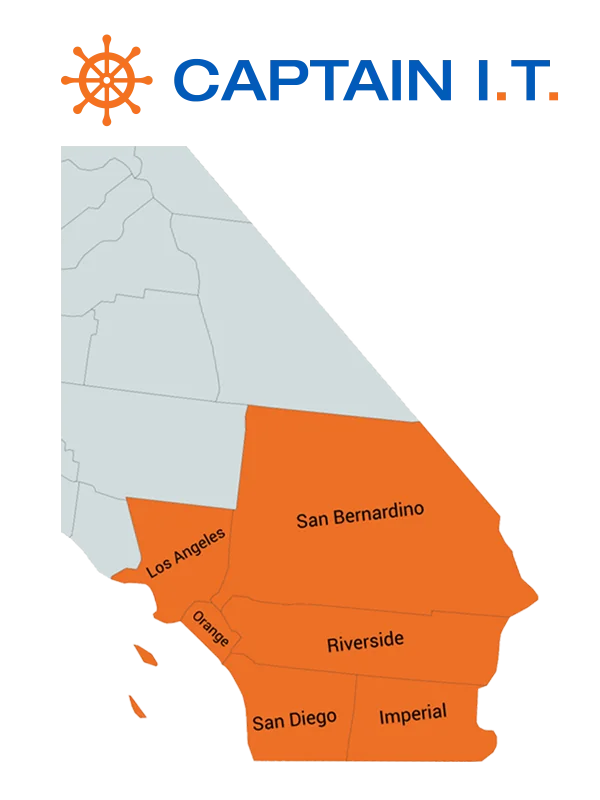
Captain IT provides managed IT support services for small and mid-sized businesses across Southern California, helping organizations maintain reliable technology and address everyday technical challenges. With over 15 years of IT experience, we offer fixed-fee service options that support predictable technology spending. Our IT specialists troubleshoot software errors, resolve device failures, manage user access issues, and maintain workplace systems to minimize operational disruptions and support employee productivity.
Our managed IT support covers workstation troubleshooting, software maintenance, user account administration, system updates, and IT infrastructure coordination. We help businesses organize technical support processes, manage recurring maintenance tasks, and address equipment concerns before they become larger operational problems. Companies can use our services to supplement existing personnel or delegate defined IT responsibilities to an external support team. Each arrangement reflects the organization’s technology environment, staffing needs, and support requirements.
Call Captain IT at (800) 834-9795 to discuss your current technology challenges and request a consultation. Our team can review your existing IT environment, identify support priorities, and recommend suitable service options based on your operational needs and budget.
What Managed IT Support Services Does Captain IT Offer?
Captain IT offers remote IT support, onsite technical assistance, emergency IT support, and help desk services for small and mid-sized businesses. Each service addresses different technology requirements, from resolving everyday employee requests to diagnosing complex hardware failures. Our managed IT support team helps organizations keep systems running, support users, and manage technical issues through the right channels.
Our remote IT support specialists diagnose and resolve technical issues without requiring an office visit. They assist with software errors, email configuration, user account access, operating system problems, and application troubleshooting through secure remote connections. Remote assistance lets employees get technical guidance while continuing to work from their usual locations, reducing unnecessary travel and simplifying routine IT support requests.
When technical problems require physical intervention, Captain IT provides onsite IT support for equipment inspection, hardware installation, workstation setup, and device troubleshooting. Our IT technicians assess problems involving computers, peripherals, and office technology that cannot be fully addressed remotely. Onsite assistance also supports office relocations, equipment replacements, and infrastructure changes that require direct access to business premises.
We provide emergency IT support to help businesses address urgent technology failures that disrupt access to essential applications, files, and systems. Our IT support team investigates critical incidents, identifies affected resources, and determines appropriate recovery actions for server problems, widespread workstation failures, and major service interruptions. Response arrangements depend on incident severity and the terms of each business’s support agreement.
Captain IT provides help desk support to assist employees with everyday technology questions and technical issues. Our IT support team handles password resets, login errors, printer problems, software access requests, and basic device troubleshooting. We also organize incoming requests, document recurring problems, and escalate complex issues to appropriate technical specialists for further investigation.
Managed IT Support Solutions for Businesses
Captain IT provides managed IT support solutions that address hardware failures, software problems, system performance, equipment maintenance, and network reliability. Our IT support team helps businesses maintain their existing technology, identify operational risks, and manage IT resources throughout their useful life. Each solution supports a specific aspect of day-to-day technology management.
- Hardware Troubleshooting: Faulty computers, damaged components, and malfunctioning peripherals can prevent employees from completing routine tasks. Captain IT's support technicians inspect affected devices, identify hardware faults, and recommend appropriate repairs or replacements. We support desktop computers, laptops, printers, and connected office equipment, helping businesses decide whether to restore existing devices or replace them.
- Software Troubleshooting: Application crashes, installation errors, and compatibility problems can disrupt essential business processes. Our IT support team investigates software failures, checks system requirements, reviews error messages, and resolves configuration conflicts. We also help with application updates, operating system compatibility, and software access issues so employees can use business applications without recurring technical interruptions.
- Proactive IT System Monitoring: Our proactive IT system monitoring helps businesses identify technical conditions that may affect device availability and performance. We monitor supported IT systems for resource utilization, service interruptions, and equipment health alerts. Our IT specialists investigate detected abnormalities, assess potential failures, and recommend corrective actions based on system conditions and the monitoring coverage defined in each service agreement.
- Preventive IT Maintenance: Captain IT provides preventive IT maintenance to help businesses reduce technical problems caused by outdated software, missed updates, and equipment deterioration. Our IT technicians perform scheduled system checks, review patch requirements, verify essential configurations, and assess device conditions. These maintenance activities support consistent workstation performance and help businesses address potential issues before they disrupt employee productivity.
- IT Asset Lifecycle Management: We provide IT asset lifecycle management to help businesses manage equipment from initial deployment through replacement and retirement. Our IT team tracks device inventories, reviews equipment age, coordinates hardware upgrades, and identifies systems approaching the end of their useful life. We also help businesses plan technology purchases, maintain equipment records, and make informed replacement decisions based on operational requirements.
- Network Monitoring: Our network monitoring services help businesses maintain stable connectivity between workstations, servers, and shared network resources. Captain IT tracks supported network devices, connection availability, and performance indicators to identify potential disruptions. Our network specialists investigate connectivity alerts, assess equipment faults, and address conditions that may affect access to business systems. Monitoring coverage follows the devices and services defined in each support agreement.
- Managed IT Support for Remote Workforces: Captain IT provides managed IT support for remote workforces by helping employees resolve technical problems outside traditional office environments. Our remote support technicians troubleshoot workstation errors, software malfunctions, VPN connectivity issues, and account access failures through secure remote sessions. Help desk assistance allows employees to report problems, receive troubleshooting guidance, and communicate with IT technicians throughout the resolution process. Support availability and geographic coverage depend on the services included in each business's agreement and specific operational requirements.

Common Business Challenges Addressed by Managed IT Support
Recurring system failures, unresolved support requests, and unexpected repair costs can place significant pressure on business operations. Captain IT addresses these challenges through structured troubleshooting, preventive maintenance, and coordinated technical assistance. Our managed IT support services help businesses identify the causes of recurring problems, manage technology expenses, and maintain essential systems without overburdening internal IT personnel.
- Frequent IT System Downtime: Unexpected server interruptions, application failures, and workstation crashes can prevent employees from completing essential tasks. Captain IT helps businesses investigate recurring outages, identify contributing factors, and implement corrective measures. Our IT technicians review system health, examine failure patterns, and address maintenance requirements to reduce avoidable disruptions and support consistent access to business applications and resources.
- Delayed Technical Issue Resolution: Unresolved support requests can leave employees waiting for access to applications, devices, or essential files. Our managed IT support team organizes incoming requests, assesses issue severity, and routes complex problems to the right specialists. We follow clear escalation procedures and document troubleshooting activities to help businesses coordinate technical assistance and reduce unnecessary delays when multiple employees experience technology problems.
- Recurring Hardware Problems: Aging computers, failing storage drives, and defective peripherals can generate repeated repair requests and interrupt employee workflows. Captain IT assesses device condition, investigates recurring faults, and helps businesses choose the right repair or replacement option. Our IT technicians also review equipment history and maintenance requirements, allowing organizations to prioritize hardware improvements and plan replacements before additional failures affect operations.
- Unpredictable IT Support Expenses: Unexpected repair bills, emergency service charges, and unplanned equipment purchases can complicate technology budgeting. Our team offers fixed-fee managed IT support options that help businesses establish more predictable recurring service expenses. We clarify covered activities and identify potential additional costs in service agreements, helping organizations evaluate maintenance needs, anticipate replacement expenses, and make informed IT spending decisions.
- Limited Internal IT Resources: Small IT teams often manage competing responsibilities, including employee support, system administration, equipment maintenance, and technology projects. Captain IT provides external technical assistance to help distribute these workloads without requiring businesses to hire specialists for every function. Our managed IT support services let internal staff focus on organizational priorities while our team handles agreed technical responsibilities and routine support activities.
Benefits of Managed IT Support for Businesses
Managed IT support helps businesses maintain reliable technology, control support expenses, and improve employee efficiency. Captain IT provides technical expertise, ongoing system maintenance, and structured assistance to address operational challenges. These services let organizations manage technology needs without adding pressure to internal resources.
Reduced Business Downtime
Reliable access to business applications and devices is essential for uninterrupted operations. Captain IT helps minimize avoidable downtime by identifying system vulnerabilities, addressing recurring technical faults, and maintaining supported equipment. Regular system checks and timely troubleshooting reduce the likelihood of preventable interruptions, allowing employees to access essential technology with fewer disruptions to scheduled work.
Faster Technical Issue Resolution
Quick access to qualified technical assistance helps businesses resolve problems before they affect additional employees. Our IT support specialists assess reported issues, identify likely causes, and apply appropriate troubleshooting procedures. Established support workflows also help prioritize urgent incidents and escalate complex cases, reducing time spent diagnosing problems and coordinating assistance across different technical resources.
Predictable IT Support Costs
Consistent technology spending makes financial planning easier for growing organizations. Captain IT’s fixed-fee managed IT support options provide defined recurring charges for agreed services, helping businesses reduce uncertainty around routine support expenses. Clear service agreements outline included activities and potential additional charges, helping decision-makers allocate budgets for maintenance, equipment replacements, and future technology needs.
Access to IT Support Specialists
Maintaining expertise across different business technologies can be difficult for organizations with limited internal staffing. Captain IT provides access to IT support specialists familiar with workstations, operating systems, business applications, and infrastructure administration. Businesses can obtain assistance with specialized technical problems without maintaining separate full-time positions for every support function, improving access to relevant expertise when needed.
Improved Employee Productivity
Technology problems can interrupt employee concentration and delay important business activities. Managed IT support gives staff a defined channel for reporting issues involving applications, devices, and account access. Captain IT helps employees resolve technical issues and return to their responsibilities, reducing time spent troubleshooting independently or waiting for assistance from already busy colleagues.
Proactive Issue Prevention
Preventive oversight helps businesses identify emerging technology problems before they cause major disruptions. Captain IT reviews system conditions, maintenance needs, and equipment health indicators to detect potential issues. Our IT technicians recommend appropriate updates, configuration adjustments, and corrective actions based on the risks identified. This approach supports more consistent system performance and reduces reliance on emergency repairs.
Managed IT Support vs. Traditional IT Support
Unlike traditional break-fix support, which addresses technical problems after they occur, managed IT support provides ongoing monitoring, preventive maintenance, and technical assistance, while in-house IT relies on internal employees to manage these responsibilities. These approaches differ in maintenance coverage, staffing requirements, service availability, and cost structures. Businesses should compare these factors based on their technology needs, operational priorities, and available resources.
The table below compares managed IT support, break-fix support, and in-house IT across key service factors:
| Comparison Factor | Managed IT Support | Break-Fix Support | In-House IT |
|---|---|---|---|
| Support Approach | Ongoing technical management | Assistance after problems occur | Internal technology management |
| System Monitoring | Continuous or scheduled, based on agreement | Usually not included | Depends on internal capabilities |
| Preventive Maintenance | Planned maintenance activities | Requested separately | Managed by internal staff |
| Issue Resolution | Structured support and escalation | Incident-based troubleshooting | Handled by available employees |
| Cost Structure | Recurring service fees | Hourly or per-incident charges | Salaries, benefits, and tools |
| Technical Expertise | Access to external IT specialists | Expertise varies by provider | Depends on employee skills |
| Scalability | Service scope can be adjusted | Support purchased as needed | May require additional hiring |
| Best Suited For | Businesses needing ongoing IT assistance | Businesses with occasional technical issues | Organizations requiring dedicated internal IT control |
How Does Captain IT Deliver Managed IT Support?
Captain IT delivers managed IT support through six stages: initial consultation, IT environment assessment, support proposal development, client onboarding, service implementation, and ongoing assistance. Our team evaluates existing systems, identifies technical requirements, defines service responsibilities, and establishes support procedures. This structured approach aligns managed IT services with business operations, infrastructure needs, and agreed coverage.
Initial Consultation
We begin by discussing your business's technology challenges, existing IT resources, and support expectations. Our team identifies recurring technical problems, employee assistance requirements, and areas where external support may be needed. This conversation helps establish your priorities and determine which managed IT support options warrant further evaluation.
IT Environment Assessment
Captain IT reviews your current technology environment to understand its configuration, condition, and support requirements. The assessment may cover workstations, servers, business applications, network equipment, and existing maintenance practices. Our IT specialists identify key technical concerns, document infrastructure dependencies, and determine which systems need ongoing administration or troubleshooting support.
Support Proposal Development
Based on the assessment, we prepare a managed IT support proposal outlining recommended services, coverage responsibilities, and pricing. The proposal identifies relevant support activities, such as help desk assistance, system monitoring, and routine maintenance. Businesses can review the proposed scope, clarify exclusions, and discuss adjustments before approving a service agreement.
Client Onboarding
Once the agreement is approved, Captain IT coordinates the transition into managed IT support. Our team collects necessary equipment information, establishes authorized system access, and documents technical contacts and support procedures. We also explain how employees can submit requests and how designated business representatives can communicate with our support specialists.
Service Implementation
Our IT technicians configure the tools and processes required to deliver the agreed services. Implementation may involve setting up monitoring, organizing device records, reviewing system configurations, and establishing maintenance schedules. Captain IT coordinates these activities with business representatives to account for existing technology arrangements and minimize disruption to daily work.
Ongoing IT Support
After implementation, Captain IT handles technical requests and performs the maintenance activities included in the service agreement. Our IT specialists investigate reported problems, review relevant system alerts, and coordinate corrective actions when necessary. We also discuss changing technology requirements with business representatives so we can review support coverage as equipment, staffing, and operational needs evolve.
Why Choose Captain IT for Managed IT Support?
Choose Captain IT for managed IT support backed by experienced professionals, transparent pricing, and flexible service arrangements. Since 2010, we have assisted small and mid-sized businesses across Southern California with workplace technology management and technical support. Our services combine fixed-fee pricing, responsive support, and multi-level technical expertise to meet different business needs. We provide support options that reflect your existing IT environment, employee needs, and operational priorities, helping you establish clear responsibilities without unnecessary contractual complexity or additional internal staffing demands.
- Fixed-Fee Pricing Structure: Our fixed-fee pricing provides predictable monthly IT support expenses, helping businesses plan budgets and understand covered services before committing.
- Quick Response: Captain IT responds to technical requests through established support channels, prioritizing urgent issues based on their impact on business operations.
- No Long-Term Contracts: Our flexible service arrangements allow businesses to access managed IT support without mandatory long-term contracts, subject to agreed service terms.
- Experienced IT Professionals: Since 2010, our IT professionals have assisted businesses with technical troubleshooting, system administration, equipment maintenance, and workplace technology requirements.
- Multi-Level IT Support: Captain IT provides Level 1 through Level 3 technical support, escalating complex issues to specialists with appropriate troubleshooting expertise when needed.
- Tailored IT Support: We align managed IT support services with your business infrastructure, workforce needs, existing technical resources, and agreed service coverage.
Industries We Support with Managed IT Support
Captain IT provides managed IT support services for organizations across industries with distinct technology infrastructure, cybersecurity, compliance, and operational requirements. Our support specialists handle workstation maintenance, business applications, network connectivity, user access, system monitoring, and technical troubleshooting. Service arrangements account for existing infrastructure, employee requirements, security policies, and applicable regulatory or contractual obligations.
Construction
Across offices, field locations, and active job sites, employees need dependable access to project documentation, scheduling applications, and communication systems. Our managed IT support team handles workstation maintenance, remote troubleshooting, software errors, and connectivity issues affecting construction workflows. Technical assistance follows established access permissions, cybersecurity policies, data-sharing procedures, and contractual requirements while supporting communication between field personnel and administrative teams.
Manufacturing
Production facilities rely on connected workstations, business applications, and network infrastructure to coordinate inventory, scheduling, and operational activities. Our IT specialists troubleshoot hardware failures, maintain supported software, monitor system conditions, and resolve employee support requests. Maintenance activities account for production schedules, equipment dependencies, access restrictions, cybersecurity requirements, and applicable customer or contractual controls to support reliable technology operations.
Healthcare
Medical practices require dependable clinical applications, secure patient information handling, and consistent access to essential technology systems. Our healthcare IT support specialists assist with electronic health record (EHR) connectivity, workstation troubleshooting, user account management, and infrastructure maintenance. Technical activities follow established HIPAA-related security procedures, access controls, and safeguards for electronic protected health information (ePHI), supporting applicable compliance efforts without implying that managed IT support alone guarantees regulatory compliance.
Nonprofit Organizations
Limited budgets, small administrative teams, and sensitive donor information create specific technology management challenges for mission-driven organizations. Our team provides help desk assistance, device maintenance, account administration, and troubleshooting for fundraising and financial applications. Support activities consider established data-handling policies, donor privacy requirements, access permissions, and applicable compliance obligations, including PCI DSS requirements for organizations processing payment card information.
What Clients Say About Us as Their IT Partner


How to Choose a Managed IT Support Provider
Choosing a managed IT support provider requires evaluating technical expertise, service availability, response procedures, and contractual terms. Businesses should compare providers based on their ability to support existing technology, resolve employee issues, and accommodate changing operational requirements. The following factors help organizations assess service capabilities, understand support responsibilities, and select a provider that aligns with their infrastructure needs and budget.
- Technical Support Coverage: Review the range of technologies and technical issues covered under the provider's services. Confirm support for workstations, servers, operating systems, business applications, user accounts, and network infrastructure. Determine whether hardware troubleshooting, software maintenance, system monitoring, and employee assistance are included. Coverage should match your existing IT environment and account for any specialized applications or equipment.
- Support Availability: Check when employees can access technical assistance and which support channels are available. Evaluate help desk hours, remote assistance, emergency coverage, and onsite service options. Businesses operating outside standard office hours should clarify after-hours arrangements and applicable charges. Confirm whether continuous system monitoring includes access to live IT technicians or operates under separate support conditions.
- Response and Escalation Procedures: Examine how the provider receives, prioritizes, and resolves technical support requests. Ask about incident severity classifications, response commitments, and escalation procedures for unresolved problems. Providers offering Level 1 through Level 3 support should explain how requests move between technical specialists. Clear procedures help businesses understand how critical incidents receive attention and how employees receive updates during troubleshooting.
- Provider Experience: Assess the provider's experience supporting businesses with similar infrastructure, workforce sizes, and industry requirements. Review relevant technical capabilities, supported technologies, and experience handling complex system problems. Organizations with compliance obligations should also evaluate familiarity with applicable security controls and data-handling requirements. Request relevant client references or examples of comparable technical work when available.
- Contract Terms: Examine the service agreement for included responsibilities, coverage limitations, renewal conditions, and cancellation requirements. Confirm whether the provider requires a long-term commitment and how businesses can modify support coverage as their needs change. Review provisions concerning administrator access, equipment ownership, documentation, and service termination to understand how technical responsibilities are managed throughout the agreement.
- Pricing Transparency: Compare recurring service fees, included support activities, and potential additional charges before selecting a provider. Ask whether onsite visits, emergency assistance, hardware purchases, and major technology projects are billed separately. Fixed-fee pricing can help businesses plan routine IT expenses, but the agreement should clearly define exclusions and billing conditions to prevent unexpected costs.
Frequently Asked Questions About Managed IT Support
How Much Does Managed IT Support Cost?
Managed IT support costs $100 to $250+ per user per month or $49 to $150+ per device per month depending on workforce size, infrastructure complexity, cybersecurity tools, monitoring requirements, and support coverage. Businesses may pay additional charges for hardware purchases, major upgrades, or projects outside their agreements. Captain IT offers fixed-fee managed IT support options, with final pricing determined by the covered systems, required services, and agreed technical responsibilities for each organization.
What Does a Managed IT Support Agreement Include?
A managed IT support agreement includes defined technical services, support availability, maintenance responsibilities, pricing, and escalation procedures. Coverage may include help desk assistance, workstation troubleshooting, system monitoring, software updates, user account management, and network support. The agreement should also identify supported devices, response commitments, onsite assistance conditions, reporting expectations, and service exclusions. Before signing, businesses should review additional charges, cancellation provisions, and equipment responsibilities to understand the provider’s obligations and their own contractual commitments.
Is Managed IT Support Available 24/7?
Yes, Captain IT offers 24/7 monitoring, help desk support, and emergency IT support for businesses that need technical coverage outside standard working hours. These services help organizations identify system alerts, report urgent problems, and obtain assistance when critical technology issues arise. However, monitoring availability, live technician access, and on-site response are distinct service components. Businesses should confirm the specific coverage, after-hours escalation procedures, and response commitments included in their managed IT support agreement.
How Quickly Are Emergency IT Support Requests Handled?
Emergency IT support response times depend on incident severity, service coverage, and the response commitments specified in the agreement. Critical incidents, such as widespread system outages or major application failures, take priority over routine technical requests. Captain IT evaluates reported emergencies, performs initial diagnosis, and escalates complex problems to appropriate specialists. Businesses should verify acknowledgment targets, technician availability, after-hours procedures, and onsite response conditions before relying on specific emergency support timelines or resolution expectations.
What Happens When Remote IT Support Cannot Resolve an Issue?
When remote IT support cannot resolve an issue, Captain IT may escalate the request to advanced technical specialists or arrange onsite assistance when physical intervention is necessary. IT Technicians review previous troubleshooting results, investigate underlying causes, and determine whether hardware inspection, equipment replacement, or vendor coordination is required. Problems involving damaged components or inaccessible devices may require direct access. Onsite scheduling, service availability, authorization requirements, and additional charges depend on the applicable support agreement.
What Are L1, L2, and L3 IT Support Levels?
L1, L2, and L3 represent three levels of technical support organized by issue complexity and required expertise. Level 1 handles initial troubleshooting, password resets, and common software problems. Level 2 investigates advanced application errors, system configuration issues, and recurring technical failures. Level 3 addresses complex infrastructure problems requiring specialized knowledge or deeper technical investigation. Captain IT provides multi-level IT support, moving unresolved requests between specialists based on technical requirements and escalation procedures.
What Is Not Included in Managed IT Support?
Managed IT support excludes services outside the agreed coverage, such as hardware purchases, major infrastructure replacements, custom software development, and extensive technology projects. Additional charges may apply to office relocations, equipment installations, specialized consulting, or onsite work beyond contracted allowances. Cybersecurity assessments, compliance audits, and third-party licensing may also require separate arrangements. Captain IT defines included responsibilities and service exclusions within its agreements so businesses can distinguish routine support from separately billed work.
What Is the Difference Between Managed IT Support and Managed IT Services?
Managed IT support focuses on resolving technical issues and maintaining employee technology, while managed IT services encompass broader technology management and strategic responsibilities. Support includes help desk assistance, device troubleshooting, software maintenance, and incident resolution. Managed IT services may additionally cover cybersecurity management, cloud administration, infrastructure planning, backup management, and IT consulting. Captain IT offers both approaches, allowing businesses to choose technical assistance or broader management coverage based on their infrastructure and operational needs.
How Managed IT Support Helps Growing Businesses?
Managed IT support helps growing businesses accommodate expanding workforces, additional devices, and increasing technology requirements without overburdening internal IT resources. Captain IT assists with employee onboarding, workstation configuration, user account setup, and rising technical support requests. Our team also evaluates technology needs when businesses open new locations, introduce applications, or expand departments. Support coverage can be adjusted to reflect changes in workforce size, equipment inventories, and operational requirements, subject to the service agreement terms.
How Are IT Support Requests Prioritized and Escalated?
Captain IT prioritizes IT support requests based on issue severity, business impact, and technical complexity. Employees report problems through available support channels, where Level 1 (L1) technicians diagnose issues and resolve common problems such as login errors and software issues. Unresolved requests escalate to Level 2 (L2) specialists for advanced troubleshooting or Level 3 (L3) experts for complex infrastructure and system failures. Specific escalation triggers, response times, and priority classifications depend on the agreed service terms.
Contact Captain IT
Contact Captain IT to secure and optimize your IT infrastructure. Whether you need comprehensive managed IT services or robust cybersecurity solutions, our expert team is ready to ensure your business stays productive, secure, and ahead of evolving technology challenges.
Explore how Captain IT can tailor IT solutions that enhance your business’s efficiency and security.