Cybersecurity threats are a growing concern for businesses as cybercriminals develop more sophisticated tactics to exploit system vulnerabilities and human behavior to access sensitive data and systems. SMBs and enterprises must constantly adapt to these evolving threats, as failure to do so puts their security infrastructure and overall business continuity at significant risk.
The financial impact of cybercrime is staggering. According to Anne Neuberger, Former US Deputy National Security Advisor for Cyber and Emerging Technologies, the global annual cost of cybercrime will exceed $23 trillion by 2027. The effects are especially devastating for industries like e-commerce, where cyberattacks can result in website outages, data theft, customer distrust, and major financial losses. For example, an e-commerce platform could suffer from a credit card information breach, resulting in legal consequences and damage to its reputation.
Mitigating these threats requires a multi-layered approach, including strong encryption, regular system updates, employee training, and robust incident response plans. Businesses must also collaborate with cybersecurity experts and adopt proactive measures to prevent attacks before they escalate into a full-blown crisis.
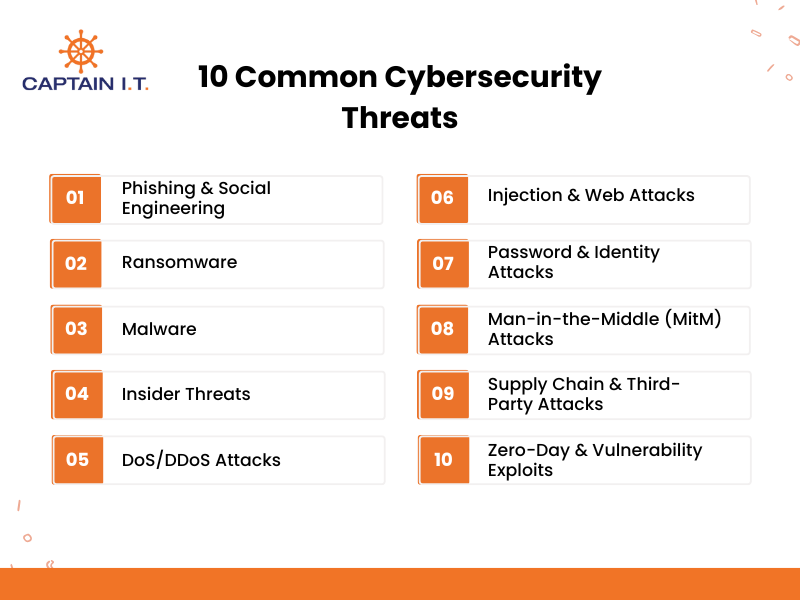
10 common cybersecurity threats are:
- Phishing & Social Engineering: Fraudulent attempts to deceive individuals into revealing personal or financial information.
- Ransomware: Malicious software that locks systems or encrypts data, demanding payment for access.
- Malware: Software that damages or accesses systems without authorization.
- Insider Threats: Employees misusing access to steal data or damage systems.
- DoS/DDoS Attacks: Attacks that overwhelm a system with fake traffic, making it unavailable to users.
- Injection & Web Attacks: Attacks that exploit vulnerabilities in web applications to gain access.
- Password & Identity Attacks: Exploiting weak or stolen credentials to access accounts.
- Man-in-the-Middle (MitM) Attacks: Intercepting communication channels to steal data.
- Supply Chain & Third-Party Attacks: Exploiting vulnerabilities in external vendors to infiltrate an organization’s network.
- Zero-Day & Vulnerability Exploits: Attacks targeting software vulnerabilities before they are patched.
What are the Common Types of Cybersecurity Threats?
Common types of cybersecurity threats include phishing or social engineering, malware, ransomware, DDoS attacks, insider threats, and man-in-the-middle (MitM) attacks. These threats exploit vulnerabilities in an organization’s IT systems, networks, and human behavior, with each type presenting its own unique risks.
Phishing & Social Engineering
Social engineering is a manipulation technique used by cybercriminals to trick people into giving them access to sensitive information like passwords and bank details. Phishing, a form of social engineering, involves scammers impersonating legitimate businesses, such as banks or customer support agencies, to trick individuals into revealing personal details and credentials to steal from them. A prominent example of this occurred between 2013 and 2015, when attackers sent fake invoices of $100 million pretending to be a supplier to Facebook and Google, which they paid.
These attacks exploit human trust by creating a sense of urgency or fear, prompting people to act quickly without verifying the request’s authenticity. Since these attacks manipulate human behavior rather than technical weaknesses, they are difficult to prevent with traditional security measures alone.
- Email Phishing: Emails posing as legitimate organizations to steal personal information.
- Smishing: SMS with links to harmful websites or malware.
- Vishing: Voice-based phishing, where attackers impersonate trusted individuals over the phone.
- Spear-Phishing: Phishing attacks targeting specific individuals or companies.
- Whaling: Spear-phishing aimed at high-profile targets, such as executives.
- Pretexting: Attackers create a fabricated scenario to convince victims to disclose confidential information.
- Baiting: Enticing offers, like free software or a prize, lure victims into revealing personal information or installing malware.
Ransomware
One of the most widespread cyberattacks, ransomware locks users out of their systems, encrypts files, and demands a ransom for restoring access or providing a decryption key. Often spread through phishing, malicious downloads, or exploiting vulnerabilities, these attacks can cause significant financial damage, data leaks, and operational disruption. According to Norton Antivirus, by 2031, ransomware attacks will occur every 2 seconds, with global losses reaching $265 billion annually.
Ransomware attacks frequently target large-scale businesses, government agencies, and critical infrastructure, as cybercriminals know these victims are more likely to pay the ransom to restore normal operations. However, paying the ransom does not guarantee data recovery. Yet many victims are left with few options when facing severe disruption, and comply with the demands.
- Encrypting Ransomware: Encrypts files and demands payment in cryptocurrencies for the decryption key.
- Screen Locker: Locks users out of their system or device, preventing all access to files.
- Scareware: Tricks victims into thinking their computer is infected with a virus, prompting them to pay for fake antivirus software.
- Doxware/Leakware: Threatens to leak sensitive data unless the ransom is paid.
Malware
Malicious software, also known as malware, damages, disrupts, or gains unauthorized access to data, computer systems, and networks. It can take various forms, including viruses, worms, Trojans, and spyware, all of which can cause significant damage by stealing data, corrupting files, or taking control of systems. Malware is typically spread through email attachments, infected websites, or security vulnerabilities (like an inactive firewall or antivirus software).
Once installed, malware can infiltrate networks, steal sensitive information, and cause financial loss, as these are also used as ransomware. As malware evolves, it becomes more sophisticated, making it harder to detect and defend against using traditional security measures. To prevent these from installing in your system, it is necessary to keep the firewall active and update the system regularly.
- Virus: Replicates and spreads to other systems, causing system failures or data loss.
- Trojan: Disguises itself as a legitimate program to gain unauthorized system access.
- Worm: Self-replicating malware that spreads through networks to steal data, delete files, and create backdoors for hackers.
- Spyware: Monitors and collects personal information without the user’s knowledge.
- Ransomware: Encrypts files and demands a ransom for decryption.
- Adware: Displays or downloads unwanted ads, slowing down systems or exposing users to additional malware.
- Rootkit: Hides its presence or the presence of other malware on a system, making detection difficult.
Insider Threats
Individuals within an organization who misuse their authority to access systems for malicious or negligent purposes are considered insider threats. These threats can come from employees, contractors, or business partners who have legitimate access to sensitive data and systems but exploit that access to cause harm. Insider threats can result in data theft, system sabotage, or the unintentional spread of malware, often with severe consequences for an organization’s security and reputation.
Unlike external threats, which target vulnerabilities from the outside, insider threats are difficult to detect because they involve trusted individuals with authorized access. These threats can lead to significant data breaches, financial losses, lawsuits, and a loss of customer trust. An infamous example occurred when a Boeing employee was found to have stolen military manufacturing information for Chinese intelligence from 1979 to 2006.
- Malicious Insiders: Employees or contractors who intentionally misuse their access to steal data or damage systems.
- Negligent Insiders: Employees who unintentionally cause harm by mishandling sensitive data or falling for phishing attacks.
- Third-Party Insiders: Contractors or vendors with access to systems who exploit their privileges for malicious reasons.
- Unintentional Data Leaks: Insiders who expose confidential information due to carelessness or lack of awareness.
Denial-of-Service (DoS/DDoS) Attacks
Denial-of-Service (DoS) and Distributed Denial-of-Service (DDoS) attacks overwhelm a system, network, or website with a massive amount of fake traffic, consuming bandwidth and making it unavailable to real users. In a DoS attack, the attacker uses a single infected device to flood the target with traffic, while in a DDoS attack, multiple devices (botnets) are used, increasing the attack’s scale and complexity. These attacks can crash or slow down websites, disrupting services and denying access to legitimate users.
Competitors may use DDoS attacks to slow down a business’s website to drive their customers away. Attackers may also use them for extortion or as a distraction for other malicious actions, such as data breaches. The severe impact of DoS and DDoS attacks highlights the importance of using defenses like firewalls, packet filtering, and intrusion detection systems.
Common types of DoS/DDoS attacks include:
- Volumetric Attacks: Flood the target with massive amounts of traffic to overwhelm bandwidth and cause network congestion.
- Protocol Attacks: Exploit weaknesses in network protocols, consuming server or firewall resources, and causing connection interruptions or server crashes.
- Application Layer Attacks: Target specific features of a website or service, such as HTTP requests, to exhaust CPU or memory resources.
Injection & Web Attacks
Injection attacks occur when an attacker inserts malicious code into an input field (search bar, login form, or comment box) on a website to manipulate the website’s system or gain unauthorized access to sensitive data. A common example is SQL Injection, where attackers use harmful SQL commands to interact with a website’s database and extract or modify data.
Web attacks target specific vulnerabilities in web applications by exploiting weak input validation or security flaws to steal sensitive information or disrupt the site’s functionality. Attackers can inject harmful scripts or commands into form fields, URL parameters, or cookies, allowing them to access unauthorized data, alter content, or cause system malfunctions.
- SQL Injection: Malicious SQL queries are inserted into input fields to manipulate, delete, or extract data from the website’s database.
- Cross-Site Scripting (XSS): Scripts are injected into trusted websites, executing in users’ browsers to steal data or redirect them to harmful sites.
- Command Injection: System-level commands are inserted into input fields to execute unauthorized commands on the server.
- Code Injection: Harmful code is inserted into input fields to make the website run unauthorized or malicious code, compromising the system.
Password & Identity Attacks
Password and identity attacks aim to gain unauthorized access to accounts or systems by exploiting weak, predictable, or stolen credentials. These attacks involve techniques like brute-force or credential stuffing, where attackers try multiple combinations of usernames and passwords to gain access. Since many users still rely on weak or reused passwords, these attacks can be highly effective, with 16 billion passwords leaked in 2025 alone, according to Forbes.
Once attackers obtain valid login credentials, they can steal sensitive data, conduct fraud, or impersonate the victim for further criminal activities. Strong password policies, multi-factor authentication (MFA), and regular password updates are essential to defending against password and identity attacks.
- Brute-Force Attacks: Attempting every possible password combination until the correct one is found.
- Credential Stuffing: Using stolen usernames and passwords from previous breaches to access multiple accounts on different websites.
- Dictionary Attacks: Guessing passwords by using a list of common words, phrases, and password types (special dates, names, phone numbers, or locations).
- Password Spraying: Trying common passwords across many accounts instead of just one.
- Phishing: Tricking individuals into revealing their login credentials or personal information via fake emails or websites.
Man-in-the-Middle (MitM) Attacks
Man-in-the-Middle (MitM) attacks occur when an attacker intercepts, reads, and alters communication between two parties without their knowledge. These attacks are common in unencrypted communication channels, such as public Wi-Fi, where attackers can eavesdrop on data transmission. The attacker may steal sensitive information like login credentials or bank details, or inject malicious content into the communication.
MitM attacks exploit weaknesses in encryption or the lack of it. This makes it crucial for users and businesses to use secure communication channels, such as HTTPS, and implement strong encryption protocols like AES-256 to prevent data interception. Additionally, using a Virtual Private Network (VPN) can protect data by encrypting traffic.
- ARP Spoofing: Manipulating ARP tables or cache to intercept network traffic.
- SSL Stripping: Downgrading secure HTTPS to HTTP connections to steal data.
- DNS Spoofing/Cache Poisoning: Altering DNS records to redirect web traffic to malicious websites.
- Email Hijacking: Gaining unauthorized access to email accounts.
- Session Hijacking: Capturing session tokens or cookies to impersonate users and gain unauthorized access.
- Rogue Wi-Fi: Setting up fake Wi-Fi networks to intercept data.
- IP Spoofing: Sending packets with a falsified IP address to bypass security systems.
Supply Chain & Third-Party Attacks
Supply chain and third-party attacks target vulnerabilities in external vendors, service providers, partners, or contractors with access to an organization’s network. These attacks exploit the trust between organizations and their third-party providers, enabling cybercriminals to infiltrate systems without directly attacking the target organization.
In many cases, attackers compromise software or hardware updates or exploit weak security practices from third-party providers to access sensitive data. As these attacks bypass traditional defenses, organizations need to assess and manage the security of their third-party relationships carefully.
Real examples of supply chain and third-party attacks:
- SolarWinds Attack (2019): Hackers compromised SolarWinds, a software provider, and inserted malicious code into updates for its Orion platform. This gave the attackers the ability to spy on systems and steal data from over 18,000 individual customers, corporations, and government agencies.
- Target Data Breach (2013): Attackers gained access to Target’s network through a third-party vendor, Fazio Mechanical Services, by using phishing. They installed malware on Target’s POS systems, stealing 40 million credit card details and 70 million personal records.
Zero-Day & Vulnerability Exploits
Zero-day exploits target vulnerabilities in software or hardware that are discovered by hackers before the vendor or developers become aware of them. Since no patch or fix is available at the time of discovery, organizations are unprepared for the attack, making these attacks extremely damaging to their operation and finances. Hackers can use these exploits to gain unauthorized access, steal data, or disrupt operations entirely, unless a patch is implemented quickly.
Once the vulnerability is publicly disclosed, it is no longer a zero-day, but it still poses a significant risk if organizations fail to apply patches or updates. Prevention of zero-day vulnerability exploits requires continuous monitoring and proactive vulnerability management.
Real examples of zero-day vulnerability exploits:
- Stuxnet (2010): A worm targeting Iran’s nuclear facilities, exploiting multiple zero-day vulnerabilities in Microsoft Windows to cause physical damage.
- EternalBlue (2017): An NSA-developed exploit targeting a Windows vulnerability was stolen and used in attacks that caused over $1 billion in damages.
- Heartbleed (2014): A vulnerability in OpenSSL that allowed attackers to steal sensitive data from servers by exploiting flaws in encrypted communications.
What Are the Solutions for Cybersecurity Threats?
Effective solutions for cybersecurity threats include implementing backups, strong encryption, regular updates, multi-factor authentication (MFA), employee training, and disaster recovery plans. These measures protect sensitive data, preventing unauthorized access and mitigating potential risks of data breaches, system compromises, and financial losses. By ensuring proper implementation of cybersecurity measures, businesses can significantly reduce cyberattack risks.
Activate Incident Response Plan
An effective Incident Response Plan (IRP) outlines the steps to take immediately after an attack is detected, helping to minimize damage and ensure a quick, organized response. The plan should clearly define roles and responsibilities, assign specific tasks to team members, and provide detailed steps for containment, eradication, and recovery. When tested and updated regularly, it helps organizations respond swiftly and efficiently to various scenarios, reducing downtime and minimizing damage during a cybersecurity breach.
The U.S. Cybersecurity and Infrastructure Security Agency (CISA) outlines the following steps for activating an Incident Response Plan:
- Assign an Incident Manager (IM) who leads the response, manages communication, and ensures timely actions.
- Assign a Technical Manager (TM) who brings in technical experts and coordinates the technical response.
- Assign a Communications Manager (CM) who interacts with external stakeholders, handles media inquiries, and provides updates.
- Prepare incident response contacts like external technicians or law enforcement, and ensure they are accessible.
- Conduct attack simulations to test the plan and ensure all team members understand their roles during an incident.
Restore Data from Backups
Data recovery from backups is crucial for mitigating the impact of cybersecurity attacks, hardware failures, or accidental data loss. Having regular backups ensures that an organization can restore its systems and data to a known, secure state. Businesses typically use cloud backups for remote storage, external hard drives for offline storage, and network-attached storage (NAS) for centralized data in larger networks. To maximize protection, organizations should follow the 3-2-1 backup rule: maintaining 3 copies of data, 2 on different media, and 1 offsite. It is also essential to regularly test recovery processes to ensure efficient restoration during an attack or failure.
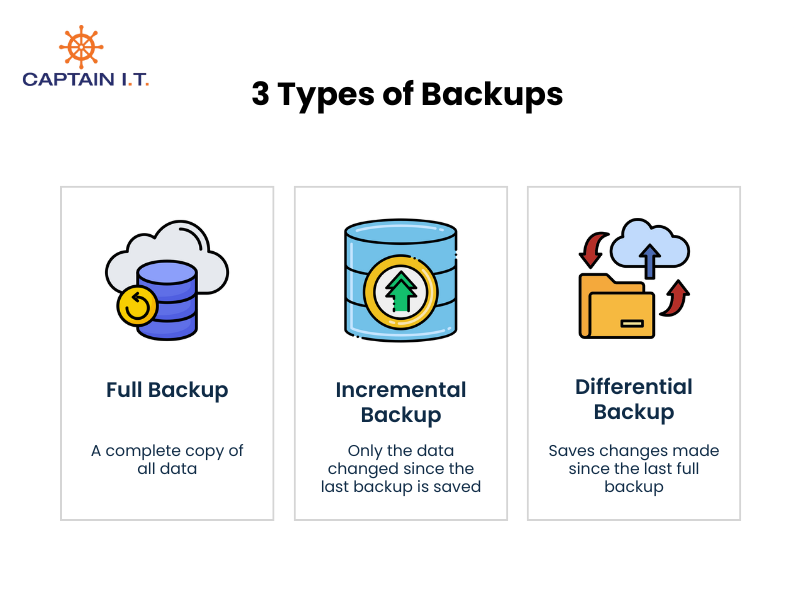
3 types of backups include:
- Full Backup: A complete copy of all data
- Incremental Backup: Only the data changed since the last backup is saved
- Differential Backup: Saves changes made since the last full backup
Remove Malware
Malware removal involves identifying, isolating, and eliminating malicious software from infected systems. This requires prompt action because a slow response can result in malware spreading across networks and compromising sensitive data. Once the malware is removed, it is essential to address any vulnerabilities or system damage caused by the attack. Organizations must also keep antivirus software up to date, conduct regular system scans, and take a proactive approach to malware prevention by educating users and strengthening security measures
5 key steps in malware removal and recovery include:
- Detects the malware using antivirus software, then assess the extent and impact of the infection.
- Isolate infected systems by disconnecting them from the internet and any offline connections to prevent further spread.
- Quarantine or delete the malware using automated scanning tools or by booting in safe mode to ensure complete removal.
- Apply security patches or system updates to fix vulnerabilities exploited by the malware and prevent future attacks.
- Restore the system from clean backups and secure its functionality to ensure full operational capacity without residual threats.
Investigate and Analyze the Breach
Investigating and analyzing data breaches helps understand how the attack happened, what went wrong, and what actions to take moving forward. A forensic investigation traces the attack’s origin and methods by examining data from affected systems. Following this, root cause analysis helps identify underlying issues, such as weak security policies, outdated software, or human error, that allowed the breach to occur. This thorough process of forensic investigation and root cause analysis not only addresses immediate issues and finds the cause, but also prevents future incidents, improves security, and enhances response plans.
5 steps to investigate and analyze the breach:
- Collect data from affected systems to look at logs, network activity, and file changes that can reveal how the attack took place.
- Analyze the attack pattern to understand how the attackers got in and what systems or data were compromised.
- Identify security gaps in systems, policies, or practices that allowed the data breach to happen.
- Fix the issues by updating security measures, applying patches, and training employees to prevent similar attacks.
- Document the findings to improve future security and share lessons learned with everyone involved.
Apply Security Patches
Applying security patches after a breach helps address and prioritize the critical vulnerabilities that attackers exploited, and delaying this step can leave systems open to further exploitation. Patching vulnerabilities immediately is also crucial for preventing additional damage and securing systems against future threats. To reduce the risk of future breaches and ensure ongoing protection from various threats, regular patch management should be an integral part of every organization’s cybersecurity strategy.
5 key steps to apply security patches include:
- Identify the vulnerabilities that were exploited during the breach through system audits and forensic analysis.
- Apply patches or updates to fix the vulnerabilities in affected software, hardware, and network systems.
- Test patches to ensure they function correctly without introducing new issues.
- Prioritize critical patches to address the most severe vulnerabilities that present the highest risk.
- Monitor systems after patching to detect any signs of new vulnerabilities or attacks, and to verify that the patches are effective.
Isolate Affected Systems
Isolating affected systems after a data breach prevents further breaches across the network. When infected systems are separated from unaffected devices and networks, it prevents the spread of the attack and helps secure other areas of the organization. This technique is crucial for protecting sensitive data and ensuring that the breach does not escalate. Effective isolation not only limits the damage but also facilitates a more efficient recovery process. It is a critical strategy for maintaining operational security and focusing efforts on resolving the incident.
Insolation techniques for affected systems:
- Physical Isolation (Air-Gapping): Physically disconnecting critical systems from the network or internet to prevent data exchange with compromised systems.
- Network Segmentation: Dividing the network into smaller segments to prevent the attack from spreading across the entire infrastructure.
- Isolating Infected Systems: Disconnecting infected systems from the network to stop malware from spreading.
- Using Virtual LANs (VLANs): Creating isolated virtual networks within the same physical infrastructure to safeguard critical systems.
- Firewalls: Implementing firewalls to block unauthorized access and control traffic between different network segments.
- Application Isolation: Minimizing interactions between applications to reduce the risk of cross-application vulnerabilities.
Revoke Access and Reset Credentials
Reset the passwords and limit access to compromised accounts immediately after detecting a breach to prevent further unauthorized access. Revoking access to affected systems ensures attackers cannot maintain control, while resetting passwords and implementing multi-factor authentication (MFA) makes stolen credentials useless. This process is vital to secure sensitive data, regain control over the network, and prevent further exploitation by the attacker.
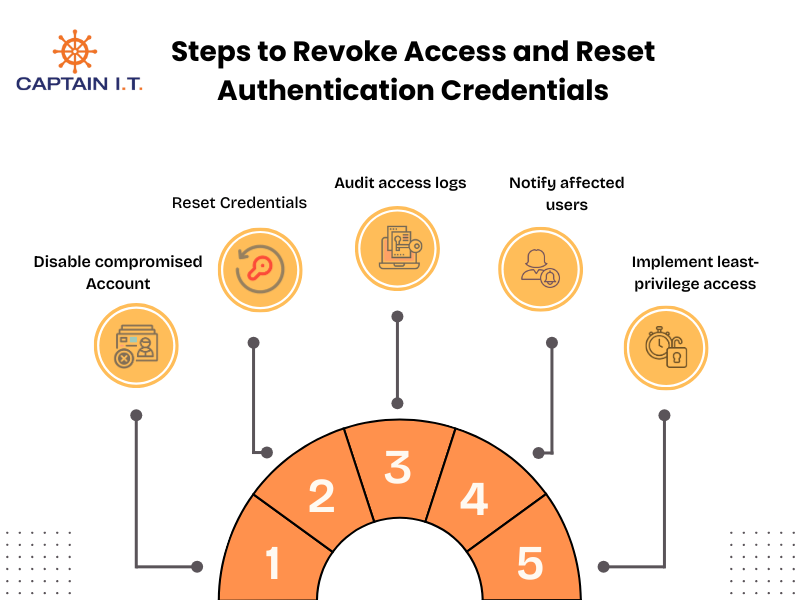
Key steps in access revocation and credential reset include:
- Disable compromised user accounts or block their access to critical systems.
- Reset passwords and MFA tokens to ensure stolen credentials are no longer valid or useful to the attackers.
- Audit access logs to identify any unauthorized activity or potential damage before the breach was detected.
- Notify affected users of the breach, instruct them to update their credentials, and review their account activity.
- Implement least-privilege access by adjusting user permissions so employees can only access the systems and data that are necessary for their duties.
Hunt for Remaining Threats
Threat hunting is the process of searching for threats and signs of malicious activity within a computer or a network that may have been missed during initial detection. Unlike traditional detection methods that rely on alerts, threat hunting involves actively seeking out malware, suspicious behavior, or indicators of compromise (IoCs). By identifying threats early, organizations can stop attackers before they start severely damaging the systems and strengthen their defenses against future cyberattacks.
You can hunt for threats in the following ways:
- Log Analysis: Reviewing system, network, and security logs to identify unusual patterns, failed login attempts, or other signs of suspicious activity.
- Using Threat Hunting Tools (SIEM): Utilizing tools like OSSEC, Elastic, Splunk, or other security information and event management (SIEM) solutions to detect anomalies.
- Advanced Persistent Threat (APT) Detection: Monitoring for signs of sophisticated attacks, such as long-term, stealthy intrusions that bypass traditional defenses.
- Network Traffic Analysis: Monitoring network traffic for unusual patterns or connections to known malicious IP addresses.
- Endpoint Detection and Response (EDR): Analyzing endpoint activity to detect signs of malware or other threats that may not have been flagged by initial security measures.
- Behavioral Analytics: Using machine learning to assess normal user behavior and compare it to system activity to identify deviations like unusual login times.
Report to Legal and Compliance Authorities
Reporting the breach to legal authorities is crucial after a cybersecurity incident to ensure that an organization meets all regulatory requirements and properly addresses the breach. This involves notifying relevant regulatory bodies, informing victims, and following legal procedures related to data protection laws. Complying with these actions helps avoid legal penalties and protects the organization’s reputation among customers and stakeholders.
Key legal and compliance obligations following a cybersecurity incident are:
- Reporting to regulatory bodies: Notifying the appropriate data protection agencies or industry regulators, in compliance with laws like GDPR, HIPAA, or CCPA.
- Notifying affected individuals: Informing customers or employees whose personal data have been compromised, as required by breach notification laws.
- Documenting the breach: Maintaining a detailed record of the breach, including actions taken and recovery efforts, to comply with legal and audit requirements.
- Cooperating with law enforcement: Working with local police, international law enforcement agencies, or the FBI when necessary to investigate criminal activity.
- Proof of diligent attempt: Demonstrating that the organization took reasonable and proactive steps to prevent the breach and mitigate its impact.
- Reviewing and updating compliance policies: Adjusting compliance policies and procedures to ensure adherence to current laws and prevent future incidents.
Activate Disaster Recovery Plan
Activating the disaster recovery plan (DRP) immediately after a cyberattack helps restore systems and data quickly. This minimizes downtime, ensures business continuity, and protects essential operations. A clear and well-documented DRP enables organizations to respond efficiently, limiting the impact of the attack. Immediate activation of the plan also helps recover critical systems and data quickly, allowing for an orderly recovery and restoring normal operations as quickly as possible.
A clear and well-documented Disaster Recovery Plan must include:
- Risk Assessment: Identify and evaluate potential risks and threats.
- Roles and Responsibilities: Determine who is responsible for each task in the recovery process.
- Recovery Objectives: Set clear recovery goals like Recovery Time Objectives and Recovery Point Objectives to determine how quickly systems need to be restored.
- Data Backup: Ensure critical data is regularly backed up and can be quickly restored.
- Communication: Establish a communication plan to keep parties informed and coordinated during recovery.
- Vendor Coordination: Coordinate with third parties to restore services or obtain recovery resources.
- Testing and Training: Regularly test the DRP and train employees to keep them prepared for an actual incident.
- Documentation: Maintain up-to-date documentation that outlines recovery procedures, systems, and contacts.
Collaborate With Cybersecurity Service Providers to Strengthen Risk Management
Partnering with a cybersecurity consultant is essential for organizations looking to enhance their security framework and manage cyber risks effectively. These experts bring specialized knowledge, advanced tools, and strategic insights that protect businesses from cyberattacks and maintain strong defenses against ever-increasing online threats.
By collaborating with Managed Security Service Providers (MSSPs), security consultants, and third-party auditors, businesses gain continuous monitoring, expert insights, and resources to reduce vulnerabilities and improve their overall security framework. This partnership with a cybersecurity service provider not only reduces the likelihood of cyberattacks but also strengthens the overall security framework, providing peace of mind for organizations.