Help desk support is a centralized service that serves as the first point of contact for users seeking assistance with technical issues, general inquiries, or service requests. It aims to resolve common problems such as password resets, software glitches, and connectivity issues, typically via phone, chat, or email, ensuring smooth operations and maintaining productivity.
Beyond troubleshooting, help desk support provides significant benefits, such as reducing downtime and improving incident and ticket management. It includes various types of support, including IT, software-specific, and network support. Each of these types plays a key role in delivering efficient solutions, maintaining clear communication, and enhancing customer satisfaction. Ultimately, help desk support is vital for maintaining operational efficiency, delivering a positive user experience, and serving as a critical component for both SMBs and larger enterprises.
What Are the Benefits of Help Desk Support?
A help desk support system offers benefits such as higher customer satisfaction, faster issue resolution, and enhanced team productivity for both SMBs and larger enterprises. By providing a structured and efficient support system, help desk support can help organizations meet their growing demands while keeping costs in check.
7 benefits of help desk support are:
- Improves customer satisfaction: With help desk support in place, customers can receive fast, efficient, and 24/7 support, ensuring user issues are resolved with minimal friction.
- Speeds up issue resolution: Using a centralized help desk system with ticketing software enables teams to organize and prioritize requests instantly.
- Increases operational efficiency: Through automation and streamlined workflows, a help desk support system can manage a higher volume of cases with minimal manual effort.
- Boosts employee productivity: Quickly resolves technical disruptions, such as software crashes or forgotten passwords, so employees can remain focused.
- Reduces business costs: Helps a business’s bottom line by minimizing costly downtime and reducing reliance on expensive, ad-hoc external IT consultants.
- Enhances communication and collaboration: Facilitates clear, documented communication between support agents and end users, improving transparency.
- Provides scalability with business growth: As a business grows, help desk support can scale accordingly, ensuring that the support function remains effective, regardless of company size.
What Are the Challenges in Help Desk Support?
The challenges in help desk support include overwhelming ticket volume, limited automation, recurring issues, and long resolution times, especially if MSP is at fault. These issues can hinder efficiency, slow response times, and negatively impact service quality, affecting both small businesses (SMBs) and larger enterprises.
4 major challenges in help desk support are:
- High ticket volume
A sudden surge or a constant flow of incoming tickets can quickly overwhelm the help desk team. This saturation leads to backlogs, increased stress for agents, and ultimately, slower response times for the end-user. - Lack of automation
Without automated systems for ticket management, categorization, and basic tasks such as password resets, agents are left performing repetitive manual work. This inefficiency pulls resources away from addressing more complex issues and slows overall service delivery. - Recurring issues
Issues such as frequent software crashes, recurring connectivity problems, or ongoing user complaints often point to unresolved underlying issues. These recurring issues strain the support team, forcing them to handle the same problems repeatedly, which drains resources and decreases efficiency. - Long resolution times
Complex technical issues or vague user descriptions can make diagnosing problems difficult. As a result, resolution times extend, frustrating users and lowering overall service quality. Prolonged resolutions also affect the team’s ability to manage incoming requests, creating a cycle of inefficiency.
What Are the Different Types of Help Desk Support?
Help Desk Support comes in several forms, the most common being IT, network, software-specific, enterprise, and remote. These types of help desk support vary depending on the business’s technical requirements, the users involved, and whether support is remote or on-site. However, each type plays a crucial role in maintaining business continuity and ensuring efficient, effective support.

IT Help Desk Support
IT help desk support focuses on troubleshooting technical issues related to core IT systems, such as hardware failures, software glitches, password resets, and basic network problems. For SMBs, this is often the primary line of defense, providing essential resources like FAQs, technical documentation, and knowledge bases. These resources ensure that both internal users and external customers receive timely assistance, whether they are resolving a total system crash or a minor device malfunction.
Network Help Desk Support
Specializing in network-related issues, network help desk support addresses problems such as connectivity issues, firewall configurations, and network security concerns. This type of support plays a crucial role in ensuring seamless communication and uninterrupted access to network resources. From troubleshooting internet outages to resolving internal security breaches, maintaining network stability and security is essential in a business environment.
Software-Specific Help Desk Support
Dedicated to resolving software issues, such as CRM systems and enterprise resource planning (ERP) tools, software-specific help desk support assists users with installation challenges, functionality problems, and configuration difficulties. By providing support tailored to the software in use, this help desk support ensures that programs run smoothly and users can overcome technical obstacles. It is also essential for keeping software applications optimized and enhancing the overall user experience.
Enterprise Help Desk Support
Enterprise Help Desk Support caters to large organizations, providing comprehensive support for complex IT systems, software, and hardware across multiple departments. It handles company-wide technical issues, ensuring that all components of the IT infrastructure operate efficiently. This type of support is essential for maintaining operational continuity at scale, managing diverse systems, and responding to enterprise-level technical needs.
Outsourced Help Desk Support
In outsourced help desk support, a business partners with a third-party service provider to manage their help desk operations. Outsourcing allows companies to reduce costs and focus on their core business functions while leaving technical support and customer service to external experts. By outsourcing help desk support, businesses, especially SMBs, can benefit from specialized knowledge and ensure continuous support without maintaining in-house resources.
Remote Help Desk Support
Remote help desk support enables IT technicians to resolve issues without being physically present by utilizing remote access software to troubleshoot and assist users. This support model offers great flexibility, enabling businesses to deliver efficient, real-time solutions to users regardless of location. It is especially effective for software troubleshooting and system configuration, ensuring quick, accurate responses for remote teams and global operations. For SMBs, this support is particularly valuable, as it delivers immediate technical solutions while keeping costs low by eliminating the need for on-site visits.
On-Site Help Desk Support
On-Site Help Desk Support offers personalized, in-person assistance for users experiencing hardware issues, installations, or more complex IT problems that cannot be resolved remotely. This type of support is ideal for addressing issues that require hands-on intervention, offering quick troubleshooting and specialized attention. By providing face-to-face assistance, it ensures a tailored and efficient solution for more intricate technical challenges.
What’s the Difference Between Service Desk vs. Help Desk?
A help desk is reactive, focusing on quickly fixing immediate user problems, while a service desk is a broader, strategic function that manages the entire IT service lifecycle. The scope, focus, methods, and goals of the two differ significantly. A help desk is mainly concerned with providing fast, tactical solutions to technical issues, ensuring minimal downtime for users. In contrast, a service desk takes a more comprehensive, proactive approach, while also addressing long-term service improvement, incident management, and aligning IT services with business goals.
Difference between help desk and service desk
| Aspect | Help Desk | Service Desk |
| Focus | Resolving specific technical incidents and service requests | Managing the complete IT service offering, aligning with business objectives |
| Scope | Narrow, primarily break-fix support for end-users | Broad, encompassing incident, problem, change, and request management, plus service catalog, asset management, and knowledge management |
| Goal | Minimize user downtime and restore functionality quickly | Continuous service improvement, proactive problem prevention, and strategic IT alignment |
| Methods | Ticketing, troubleshooting, and escalating technical issues | Develops self-help resources (catalogs, training), manages system changes, handles large-scale issues, and analyzes trends |
| Approach | Tactical and reactive, addressing immediate needs | Strategic and proactive, focusing on long-term IT service management and business goals |
| Outcome | Quick resolution of specific issues to restore user productivity | Ongoing service optimization, reduced IT incidents, and better alignment with organizational needs |
How to Set Up Help Desk Support?
To set up help desk support, start by defining your business needs, then choose the software that best meets those needs, and set it up across support channels. Additionally, create a knowledge base, train your team, and test the help desk support system before officially launching it. Following these steps will ensure a successful and efficient implementation of help desk support within your business.
Steps to Set Up Help Desk Support:
- Define Your Help Desk Goals: Set clear objectives, such as improving customer satisfaction (CSAT) scores, reducing initial response times, or streamlining resolution workflows to guide your setup.
- Choose the Right Help Desk Software: Select a help desk software that fits your budget and scale. Ensure it includes essential features like robust ticket management, multi-channel support, and reporting.
- Set Up a Ticketing System: Use a ticketing system to assign, track, and resolve issues efficiently. Set categories, priorities, and automate workflows for better handling.
- Establish Support Channels: Determine where your users are most active and open channels like email, phone, live chat, or dedicated self-service portals to meet their needs.
- Create a Knowledge Base: Build a comprehensive knowledge base with FAQs, guides, and troubleshooting tips to enable users to resolve common issues independently.
- Train Your Support Agents: Provide comprehensive training on your chosen help desk software, internal escalation procedures, and soft skills to ensure high-quality customer interactions.
- Define SLAs (Service Level Agreements): Set SLAs to define expected response times, resolution times, and service quality to maintain transparency with users and ensure consistent service delivery.
- Implement Reporting and Analytics: Configure dashboards to track key performance indicators (KPIs) like average handle time and ticket volume to identify bottlenecks early.
- Test the System: Run end-to-end simulations of the ticketing process and automation rules to identify and fix bugs before the official launch.
- Monitor and Continuously Improve: Use ongoing feedback and performance data to refine your workflows, ensuring the help desk evolves alongside your business’s growing needs.
What Are the Career Opportunities in Help Desk Support?
Help Desk Support offers a range of career opportunities, from entry-level roles like Help Desk Technician to mid-level positions such as IT Support Specialist, and senior-level roles like Help Desk Manager. Whether your interest lies in resolving technical issues, enhancing system functionality, or delivering exceptional customer service, there are various career paths within help desk support to suit your skills and ambitions.
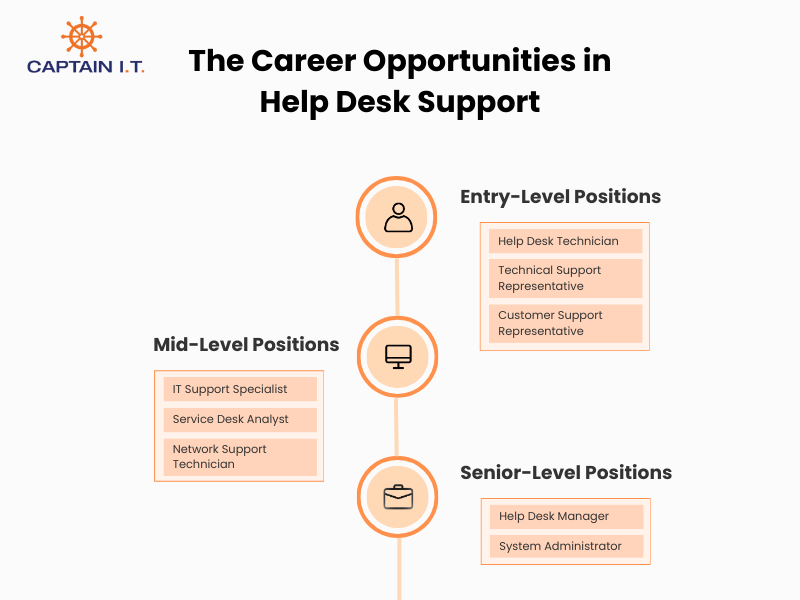
Entry-Level Positions
Entry-level roles in help desk support typically focus on addressing immediate user problems and providing basic technical support. This position is often the first step in a career, serving as a stepping stone for career progression in the help desk field. For entry-level help desk support positions, individuals need foundational skills in troubleshooting, customer service, and technical communication.
Common entry-level roles in help desk support:
- Help Desk Technician
- Technical Support Representative
- Customer Support Representative
Mid-Level Positions
As individuals gain experience, they can move into mid-level positions that require more advanced technical knowledge and problem-solving abilities. Compared to entry-level positions, mid-level professionals are expected to manage more complex technical issues, support larger teams, and have a deeper understanding of IT systems and networking. Additionally, leadership skills and the ability to troubleshoot and solve problems independently are essential at this stage.
Common mid-level roles in help desk support:
- IT Support Specialist
- Service Desk Analyst
- Network Support Technician
Senior-Level Positions
Senior roles in help desk support involve overseeing teams, managing high-level technical issues, and ensuring the overall efficiency of the support operation. These positions require strong leadership, decision-making abilities, and experience in handling escalated issues. Senior professionals are also responsible for setting strategic direction, managing critical incidents, and ensuring that the help desk operates smoothly to meet the organization’s needs.
Common senior-level roles in help desk support:
- Help Desk Manager
- System Administrator
Skills and Certifications for Help Desk Support Careers
A successful career in help desk support requires a combination of strong soft skills, such as communication and patience, and solid technical knowledge of operating systems and hardware. Additionally, certifications such as CompTIA A+ further validate expertise and enhance career prospects in help desk support.
Essential skills for help desk support jobs:
- Customer Service: Empathy, patience, and strong communication (verbal and written) are essential for addressing user concerns and ensuring a positive experience.
- Problem-Solving: Analytical thinking, attention to detail, and troubleshooting skills are critical for efficiently diagnosing and resolving issues.
- Technical Foundations: Knowledge of hardware, software, mobile devices, operating systems (Windows, macOS, Linux), networking, and cloud computing is essential for support roles.
- Security Awareness: Basic understanding of security protocols and best practices is crucial for providing secure support.
- Automation: Familiarity with scripting languages like Python is increasingly valuable as automation becomes more prominent in IT operations.
Key certifications for help desk support jobs:
- CompTIA A+: The standard entry-level certification for IT support, covering hardware, software, and troubleshooting.
- Google IT Support Professional Certificate: A comprehensive beginner’s certification for fundamental IT skills.
- ITIL Foundation: Focuses on IT service management best practices and processes, essential for advancing in service desk roles.
- Microsoft Certified (Fundamentals): Validates basic knowledge of Microsoft services.
- Cisco Certified Technician (CCT): Ideal for those focused on network hardware and foundational networking skills.
What Are the Roles and Responsibilities in Help Desk Support?
The roles and responsibilities in help desk support focus on providing technical assistance, ensuring system functionality, and maintaining communication with customers to resolve issues effectively. While these responsibilities can vary depending on the specific position, they generally include:
- Provides Technical Support
Resolves technical issues, including hardware, software, and network problems, ensuring that business operations run smoothly without disruptions. - Manages Service Requests and Incidents
Logs, tracks, and resolves service requests and incidents that affect business processes, ensuring swift resolution to maintain productivity. - Ensures System Maintenance and Updates
Regularly maintains systems and applies software updates to prevent issues related to outdated technology, enhancing system performance and reliability. - Handles Customer Communication and Issue Tracking
Maintains clear communication with customers, tracks issues efficiently, and ensures timely resolution, improving overall customer satisfaction. - Provides Remote or On-Site Support
Offers support both remotely (via phone or online tools) and on-site for more complex issues, ensuring flexible and effective solutions. - Monitors and Reports on Help Desk Performance
Tracks the performance of the help desk, generates reports, and identifies areas for improvement to ensure consistent and efficient service delivery.
What Tools and Technologies Are Used in Help Desk Support?
Help desk professionals use a range of tools and technologies, such as help desk software, ticketing systems, and live chat tools. These tools help streamline operations, automate processes, and improve the overall customer support experience. By utilizing the right technologies, even small businesses can deliver high-quality, enterprise-level assistance.
Tools and technologies used in help desk support are:
- Help Desk Software
This software is essential for managing tickets, tracking issues, and maintaining a record of customer interactions. It streamlines workflows by ensuring every support request is logged, categorized, and assigned to the appropriate agent for efficient handling. - Ticketing Systems
Used to manage customer queries, ticketing systems categorize, prioritize, and assign issues to the right support agents. This system helps ensure requests are addressed promptly, improving both response times and overall efficiency. - Remote Desktop Tools
These tools allow the help desk team to access users’ computers remotely, providing the ability to troubleshoot and resolve technical issues without needing to be physically present. This capability accelerates problem resolution, especially for software and network-related concerns. - Knowledge Base Software
Knowledge base software is a valuable resource for storing and organizing solutions to common problems. It enables users to find answers independently and helps agents deliver quicker resolutions by having ready access to frequently used solutions. - Live Chat Tools
Enabling real-time communication, live chat tools facilitate immediate interaction between support agents and users. This method provides quick assistance, addresses customer inquiries without delay, and enhances overall service efficiency. - Customer Relationship Management (CRM) Systems
CRM systems play a crucial role in managing customer interactions by tracking service history and providing insights into customer needs and preferences. With this data, help desk agents can offer more personalized support, improving service quality and customer satisfaction. - Automation Tools
These tools automate repetitive tasks such as ticket assignment, password resets, and routine system checks. By handling these tasks automatically, they free up help desk agents to focus on more complex issues that require critical thinking and expertise. - Collaboration Tools
Tools like Slack, Microsoft Teams, and Zoom enhance communication within support teams, enabling them to collaborate, share resources, and resolve issues more effectively. These platforms ensure seamless teamwork, especially in handling urgent or complex support cases. - Monitoring Tools
Monitoring tools track the performance of IT systems, helping detect potential issues before they escalate. By identifying problems early, these tools enable proactive support, minimizing system downtime and ensuring consistent service availability.
How Much Does Help Desk Support Cost?
Help desk support typically ranges from $20 to $250+ per user/month, depending on factors such as business size, support needs, and the level of service required. If you are opting for Managed Service Providers (MSPs), they often charge $25-$50/user/month for basic remote support, while fully managed services range from $100-$250+/user/month or $6-$40 per ticket. Hourly rates for help desk support can vary from $50 to $225+, depending on the issue’s complexity and the required expertise.
Additionally, help desk software costs generally range from $9 to $82+/month, with additional fees per agent based on features such as ticket management, automation, and reporting. For small and medium-sized businesses (SMBs), costs tend to be lower but are still influenced by the complexity and scope of support services.
What Is the Future of Help Desk Support?
The future of help desk support is transitioning to a hybrid model that blends advanced AI and automation with human expertise. This shift moves support from a reactive, break-fix approach to a proactive, strategic one. Trends such as intelligent chatbots, enhanced self-service options, omnichannel support, and a stronger focus on cybersecurity and predictive analytics will become more standard in handling more complex issues.
- AI and Automation Growth
AI and automation are increasingly integrated into help desk support to handle repetitive tasks and provide faster, more efficient resolutions via chatbots and virtual assistants. This allows human agents to focus on more complex inquiries while streamlining operations and improving response times. - Multi-Channel Support Integration
The need for multi-channel support, combining chat, email, phone, and social media, will continue to grow. Offering seamless customer service across all these platforms ensures that businesses can meet their customers where they are, improving accessibility and responsiveness. - Rise of Self-Service Options
Self-service tools like AI-powered chatbots and comprehensive knowledge bases will become more prevalent. These options allow customers to resolve common issues independently, reducing strain on support teams and improving overall operational efficiency. - More Remote Support Solutions
As remote work becomes more prevalent, businesses will rely more on remote support solutions. Help desk teams can assist users from anywhere, ensuring efficient, flexible support without on-site visits. - Proactive Support Focus
The future of help desk support will emphasize proactive, rather than reactive, support. Predictive analytics will allow businesses to anticipate and resolve issues before they escalate, preventing disruptions and improving system reliability. - Predictive Support Through Machine Learning
Machine learning will help desk teams to identify patterns and predict potential future issues. This anticipatory approach will help resolve problems before they impact users, further enhancing the efficiency and effectiveness of support services.
How to Integrate Help Desk Support into Your Business Operations?
To integrate help desk support into your business operations, start by aligning the system with your business goals. This ensures the help desk supports overall productivity, enhances customer satisfaction, and streamlines workflows. The next step is to decide whether to build an in-house support team or partner with MSPs. For many businesses, especially SMBs, MSPs offer a cost-effective and scalable solution by providing the necessary expertise and resources to handle help desk operations efficiently without the overhead of maintaining an internal team.
After making your decision, the next step is to select the right tools and help desk software that align with your business needs. It is essential to define clear support objectives and ensure the system can scale as your business grows. When implemented correctly, help desk support improves operational efficiency, reduces downtime, and boosts overall business performance.