Protecting small and medium-sized businesses (SMBs) from cyber threats requires employee training, multi-factor authentication (MFA), strong password management, antivirus software, firewalls, secure Wi-Fi, regular data backups, system updates, and data encryption. Together, these controls reduce exposure to phishing, ransomware, unauthorized access, and data breaches while supporting stable business operations.
Small businesses are prime targets of cyberattacks due to their limited resources and perceived vulnerability when compared to large businesses with internal IT teams. According to a Mastercard survey of over 5,000 SMBs, 46% have experienced a cyberattack, and one in five have filed for bankruptcy or shut down. Additionally, 80% of them reported spending time rebuilding trust with clients and partners. To avoid similar incidents, small businesses must carefully implement affordable and effective cybersecurity strategies, as outlined in this guide.
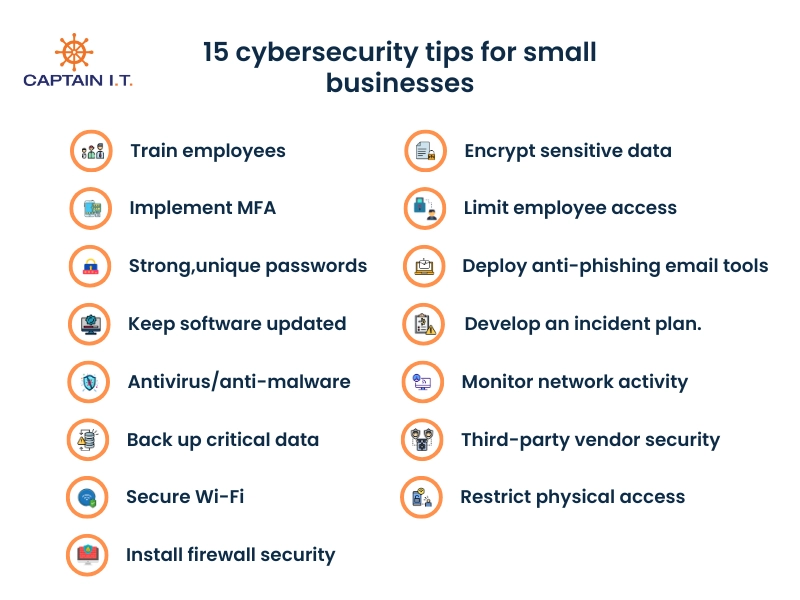
Here are 15 cybersecurity tips for small businesses:
- Train employees in security principles and phishing awareness
- Implement multi-factor authentication (MFA) for all business accounts
- Use strong, unique passwords and a password manager
- Keep all software and systems updated with the latest security patches
- Deploy antivirus/anti-malware software on all devices
- Back up critical business data regularly
- Secure your Wi-Fi network with WPA3 encryption and strong passwords
- Install and maintain firewall security for your internet connection
- Encrypt sensitive data both at rest and in transit
- Limit employee access based on job roles
- Implement email security measures and anti-phishing tools
- Create and document an incident response plan
- Monitor network activity for suspicious behavior
- Assess and manage third-party vendor security risks
- Restrict physical access to devices and network infrastructure
1. Train Employees in Security Principles and Phishing Awareness
Small businesses benefit from employee training that enforces secure internet use, strong password security, and clear penalties for policy violations. These practices guide employees on how to handle sensitive business data and reduce risky behavior during daily operations. IBM research shows that 95% of cybersecurity incidents involve human error, which explains why SMBs face higher exposure without structured training. Phishing attacks exploit this exposure by using deceptive links or attachments to steal credentials. Regular security training and phishing simulations address this risk by reinforcing correct behavior, helping employees recognize threats, avoid unsafe actions, and maintain secure work practices.
2. Implement Multi-Factor Authentication (MFA) for all Business Accounts
SMBs can improve account security by adding Multi-Factor Authentication (MFA) or 2-Factor Authentication (2FA) to all business accounts. This approach works by requiring multiple verification steps, such as a password combined with a one-time code (OTP) or biometric checks like fingerprints or face scans on phones with work email access. As password theft is common but severe, this added layer prevents attackers from accessing accounts even when login credentials are compromised. To support adoption across SMBs, MFA methods should remain user-friendly and avoid disrupting daily workflows. Tools such as Google Authenticator generate time-sensitive codes that enable secure access without complexity. Clear setup guidance ensures employees complete MFA enrollment and strengthens protection against unauthorized access.
3. Use Strong, Unique Passwords and a Password Manager
When employees of a small business use strong, unique passwords, it reduces the risk of brute-force attacks and unauthorized access to business-related accounts. Weak passwords like “123456,” “password,” “qwerty,” birthdays, and names are easily guessed and leave accounts vulnerable. Stronger passwords require at least 12 characters with a combination of uppercase and lowercase letters, numbers, and special characters such as @, #, or $. Regular password updates further reduce exposure, although this process can become difficult to manage at scale. To address this challenge, SMBs should consider using password managers to generate and securely store complex passwords, which helps small businesses prevent reuse and avoid credential-related security failures.
4. Keep all Software and Systems Updated with the Latest Security Patches
By regularly updating all software and systems, SMBs reduce the risk of cybercriminals exploiting unpatched vulnerabilities to access sensitive data. To stay informed about active threats, businesses can consult the Known Exploited Vulnerabilities Catalog from the U.S. Cybersecurity and Infrastructure Security Agency (CISA), which tracks weaknesses currently targeted by attackers. This visibility matters because exploited vulnerabilities often lead directly to real-world breaches. In January 2025, for example, the New York Blood Center reported a cyberattack that exposed patient and financial data of nearly 200,000 individuals after attackers exploited unpatched software. By monitoring such advisories, SMBs can prioritize updates for operating systems, applications, and security tools, and enable automatic updates to ensure patches are applied without delay.
5. Deploy Antivirus/Anti-Malware Software on all Devices
Affordable antivirus tools can effectively detect and block threats like viruses, trojans, ransomware, and spyware, providing small businesses with robust protection at lower costs. As SMBs often lack the resources of larger companies, they are seen as prime targets by cybercriminals, with almost 45% of all cyberattacks targeting them. This makes it even more crucial for small businesses to install antivirus and anti-malware software on all devices. For best outcomes, enforce the practice of equipping all devices with up-to-date antivirus software, setting up automatic scans, enabling real-time protection, and updating on time to prevent emerging threats.
6. Back up Critical Business Data Regularly
To ensure quick recovery from cyberattacks, system failures, or human errors, SMBs should regularly back up critical business data. Ransomware attacks, for example, often lock local small businesses out of their systems by encrypting their e-commerce data, but having up-to-date backups allows them to restore data promptly without paying a ransom. To ensure redundancy and further improve data security, a combination of local backups (external SSDs) and cloud-based solutions (AWS, Microsoft Azure, or Google Cloud) can be used. To make sure these are fully utilised with minimal human error, it is necessary to automate the backup processes and regularly test their functionality. By implementing such backup strategies, SMBs can minimize downtime and quickly recover from unexpected data loss.
7. Secure Your Wi-Fi Network with WPA3 Encryption and Strong Passwords
Every small and medium-sized business should enable WPA3 encryption on its Wi-Fi network to ensure the highest level of protection against cyberattacks. WPA3 is the latest Wi-Fi standard and offers better security than previous versions, making it harder for attackers to break into the network through brute force or dictionary attacks. After enabling WPA3, create a strong Wi-Fi password that includes a mix of letters, numbers, and special characters. Additionally, SMBs must always avoid using default router passwords, as they are easier for hackers to guess. For a simple yet highly effective addition to network security, SMBs can hide their network’s SSID to make their Wi-Fi invisible to unauthorized users.
8. Install and Maintain Firewall Security for Your Internet Connection
When firewalls are installed, they allow SMBs to monitor network traffic, block unauthorized incoming traffic, and prevent online threats from reaching your business’s network. They can also be integrated into various antivirus software and paired with network segmentation to defend against malware by identifying suspicious behavior. Firewalls also help ensure compliance with security regulations, keep remote work environments secure by protecting data access, and log suspicious traffic, providing valuable insight into potential risks. Modern firewalls are also capable of notifying business owners of threats in real-time, making them key to safeguarding SMB networks from evolving cyberattacks.
9. Encrypt Sensitive Data Both at Rest and in Transit
SMB owners should strictly enforce encryption protocols to convert critical business data to an unreadable format that can only be deciphered with the proper decryption key, preventing hackers from reading it even if they gain access to the data. Whether the data is stored on servers (at rest) or being transferred over networks (in transit), encryption provides a strong barrier against unauthorized access. Using encryption protocols like AES-256 (Advanced Encryption Standard) for data at rest and SSL/TLS for data in transit ensures robust protection during both storage and transmission. This practice not only secures company data but also prevents reputational damage, avoids legal penalties, and helps ensure compliance with privacy laws like HIPAA, GDPR, and local state laws.
10. Limit Employee Access Based on Job Roles
When providing access to business data, SMBs must authorize each employee to access only the data, accounts, software, and systems necessary for their specific job roles. By implementing Role-Based Access Control (RBAC), employees cannot access information unrelated to their duties, reducing the risk of accidental or intentional data breaches. This is called the principle of least privilege, which minimizes the exposure of sensitive data and limits potential damage in case of a compromised account. Small businesses must also regularly review and update access permissions as employees change roles or leave the company to ensure that only authorized individuals have access to critical business resources and client information.
11. Implement Email Security Measures and Anti-Phishing Tools
Small businesses can greatly reduce email-related risks when their employees are trained to recognize phishing attempts early. Phishing attacks rely on cybercriminals impersonating trusted sources, such as banks or business partners, to steal sensitive information. These attacks often use email spoofing to fake sender addresses and include malicious links, executable files (.exe), or scripts (.js) in attachments. A U.S. Chamber of Commerce survey reports that 60% of SMBs experience phishing at some point, which shows how frequently email systems are targeted. Reducing this risk requires anti-phishing tools, spam filters, email encryption, and multi-factor authentication (MFA) for business email accounts, especially those used for payments.
12. Create and Document an Incident Response Plan
By maintaining a clear incident response plan (IRP) that defines actions to take during a breach or cyberattack, SMBs can greatly reduce disruption when security incidents occur. The planning process starts by involving internal teams and explaining what each employee is responsible for during an incident. Regular quarterly reviews and simulation exercises help validate this plan, reveal gaps, and prepare staff for unexpected scenarios. When an incident occurs, assigning an incident manager and a technical manager ensures coordinated communication and technical control. A complete IRP also documents procedures for identifying, containing, and eradicating threats, restoring data, and communicating with stakeholders. Finally, a clear post-incident reporting supports continuous improvement and reduces downtime during future events.
13. Monitor Network Activity for Suspicious Behavior
Monitoring network activity helps small businesses detect early signs of unauthorized access before systems or data are compromised. This detection depends on intrusion detection systems (IDS) and security monitoring tools that surface abnormal patterns, such as unfamiliar IP addresses, unusual data transfers, or unexpected connection attempts. These indicators often coincide with behavioral warning signs, including abnormal login times, unplanned changes in user access, or large volumes of business-critical data accessed outside normal hours. Tracking these signals together enables faster threat recognition. With alerts in place, SMBs can respond quickly to contain incidents, limit further damage, and protect customer data, financial records, and intellectual property.
14. Assess and Manage Third-Party Vendor Security Risks
Small businesses often rely on third-party vendors (MSPs) for cloud storage, payment processing, or software development, and this may introduce security risks that can directly affect business data. These risks increase when vendors fail to follow compliant security protocols, which places sensitive information at risk beyond internal controls. The impact is especially high for small businesses in finance and healthcare, where regulations such as HIPAA and GDPR require strict data protection. Weak vendor security practices often become indirect entry points for attackers. Security Scorecard reports that 35.5% of breaches in 2024 involved third parties, which shows how frequently vendor gaps are exploited. Managing this exposure requires regular security assessments, vendor audits, and verification that partners meet data protection standards and security best practices.
15. Restrict Physical Access to Devices and Network Infrastructure
For SMBs, restricting physical access to business devices reduces the risk of data theft, tampering, and unauthorized access. Computers, laptops, and scanners should remain accessible only to trusted personnel, with storage areas secured through locks or access control systems. These controls limit opportunities for misuse while establishing clear accountability for device handling. Additional safeguards, such as physical tracking on critical equipment, support recovery if devices are stolen. Employee awareness also matters, since understanding the legal consequences of mishandling company equipment encourages compliance with access policies. CCTV monitoring and access logs reinforce oversight by recording device entry and movement. Together, these measures help SMBs protect business assets and reduce the likelihood of physical security-related data breaches.
Why Cybersecurity Matters for Small Businesses?
Cybersecurity measures are essential for small businesses to protect sensitive data, financial assets, and reputation from cyberattacks. Phishing, ransomware, and data breaches can result in client data theft and disrupt operations, causing financial losses and downtime. Through employee training, multi-factor authentication, data encryption, regular backups, and antivirus installation, businesses can reduce vulnerabilities and safeguard critical information.
Proactively securing systems with cybersecurity services from Managed Service Providers (MSPs) helps SMBs minimize cyber threats while enhancing credibility and reputation. MSPs provide the expertise to combat evolving risks, ensure regulatory compliance, and prevent costly penalties, making investing in cybersecurity services a smart business strategy for growth and customer loyalty.