Keeping your cybersecurity up to date is essential because cyberattacks can result in stolen identities, financial loss, and exposure of personal or sensitive information. Nearly every aspect of daily life, from banking to communication, depends on online accounts and devices, and even a minor security lapse can lead to serious consequences.
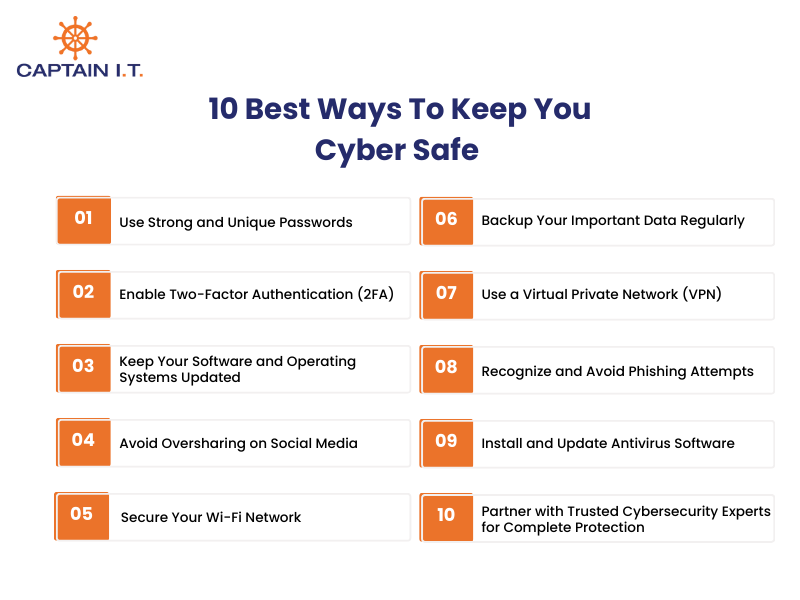
The best ways to stay safe online include using strong, unique passwords and enabling two-factor authentication (2FA). It also involves keeping software and operating systems up to date, avoiding oversharing on social media, and securing Wi-Fi networks. Additional measures include backing up important data, using a Virtual Private Network (VPN), recognizing and avoiding phishing attempts, installing and updating antivirus software, and partnering with trusted cybersecurity experts.
Together, these steps reduce your vulnerability to cyberattacks, safeguard sensitive data, and maintain your online privacy. By consistently applying these practices, you strengthen your digital defenses, minimize the risk of identity theft and malware infections, and ensure comprehensive protection for your devices, accounts, and personal information.
1. Use Strong and Unique Passwords
Strong, unique passwords are created by assigning a different password to each account and ensuring each is at least 16 characters long. Effective passwords rely on randomness by combining uppercase and lowercase letters, numbers, and special symbols, such as ‘&kHXF5b.’ Passphrases offer another reliable option: combine four to seven unrelated words, such as ‘BlueTigerPizzaRainbow,’ to make them both long and easier to remember. This approach also requires never reusing passwords across platforms and using a password manager to generate, store, and autofill secure credentials safely.
Passwords serve as the first line of cybersecurity protection, and weak or reused passwords increase the risk of unauthorized access and data breaches. When the same password is reused, a single breach can compromise multiple accounts. After implementation, accounts become harder to access without permission, sensitive data remains protected, and overall cyber attack prevention improves through stronger password security.
2. Enable Two-Factor Authentication (2FA)
Two-factor authentication is enabled by navigating to account security settings on platforms such as Google, Facebook, and banking apps, then activating an additional verification step after password entry. This process includes selecting an authentication method, with app-based authenticators preferred over SMS for stronger login security. Users scan a QR code using an authenticator app, verify the generated code, and securely store backup recovery codes in case the primary device is unavailable.
This additional layer of account verification strengthens cybersecurity protection by requiring verified access beyond passwords alone. Even if login credentials are exposed, attackers cannot access the account without the second authentication factor. Once 2FA is enabled, unauthorized login attempts are blocked more effectively, identity misuse declines, and overall cyber attack prevention improves through secure login validation.
3. Keep Your Software and Operating Systems Updated
Timely software and operating system updates should be maintained by enabling automatic updates on all devices, including PCs, smartphones, and applications, so security patches are applied as soon as they are released. Restarting devices weekly ensures these updates install correctly and close known vulnerabilities. When automatic updates are unavailable, installing updates within a few days limits the time attackers can exploit exposed systems. To avoid malware disguised as fake updates, software and patches must only be downloaded from trusted sources such as official websites and verified app stores.
Unpatched software creates clear entry points for cyber attacks because attackers actively target known weaknesses. Applying updates removes these vulnerabilities before they can be exploited. After implementation, devices remain stable, malware infections occur less often, and overall cybersecurity protection improves. Consistent updates strengthen cyber threat prevention by maintaining a secure and controlled operating environment.
4. Avoid Oversharing on Social Media
Avoid oversharing on social media by auditing your profiles and removing personal details such as birthdates, phone numbers, and home addresses. Adjust privacy settings to restrict posts to friends only, disable automatic geotagging, and separate private and public accounts when necessary. Delay travel posts until after returning home and review photos for identifying details such as address plaques or work badges. Pausing before posting and avoiding online quizzes that collect personal data also helps reduce unnecessary exposure.
Publicly shared information increases cyber risk because attackers rely on it for phishing and social engineering. According to Tessian’s How to Hack a Human report, 84 percent of people share personal information weekly, providing data commonly used in phishing attempts. Once oversharing is reduced, identity exposure declines, social engineering attacks become less effective, and cyber safety improves by keeping digital footprints controlled and private.
5. Secure Your Wi-Fi Network
Securing a Wi-Fi network begins with changing the default router administrator credentials and network (SSID) passwords to unique, complex passwords. Once access controls are strengthened, enable encryption using WPA3 or WPA2-AES to protect data transmitted across the network. Renaming the default SSID helps prevent exposing router brands or personal details, while regular firmware updates close known security gaps. Further risk reduction comes from disabling unused features such as Wi-Fi Protected Setup and remote management, which attackers often exploit as entry points.
When Wi-Fi networks remain unsecured, attackers can intercept data, access connected devices, or spread malware without detection. Weak router configurations increase exposure, especially when smart devices share the same network as primary systems. After securing Wi-Fi, data moves through encrypted channels, guest and IoT devices remain isolated, and unauthorized access attempts decline. These combined controls improve cyber safety by reducing attack surfaces and maintaining tighter network control.
6. Backup Your Important Data Regularly
Regularly backing up important data involves creating multiple secure copies of files and updating them on a consistent schedule. A reliable approach is the 3-2-1 rule, which keeps three copies of data on two different media types, such as cloud storage and an external hard drive, with one copy stored off-site. This practice includes using automated cloud backups, maintaining offline backups on external drives that are disconnected when not in use, and encrypting stored data. Critical files like documents, photos, and financial records should always be included.
When backups are missing, ransomware can permanently lock files, hardware failure can erase years of data, and recovery often becomes impossible without paying attackers or accepting total loss. Malware commonly targets connected storage first, which is why offline and off-site copies matter. Once a structured backup strategy, such as encrypted cloud storage combined with external drives, is implemented, data can be restored within minutes rather than days. This reduces downtime, prevents ransom payment pressure, and preserves access to sensitive files, strengthening cyber safety through reliable data recovery.
7. Use a Virtual Private Network (VPN)
A Virtual Private Network (VPN) is implemented by installing a reputable, paid VPN service on devices and activating it before connecting to the internet, especially on public Wi-Fi. A VPN creates an encrypted tunnel for internet traffic, routes data through secure servers, and masks the user’s IP address to prevent exposure. This practice includes enabling strong encryption, configuring the VPN on mobile devices and laptops, and activating it in environments such as cafes, airports, hotels, or remote work settings where networks are untrusted.
Without encryption, attackers on shared networks can intercept traffic, steal login credentials, or monitor online activity. When a VPN is active, data remains encrypted even on insecure Wi-Fi, reducing the risk of session hijacking and data theft. After implementation, online privacy improves, tracking is limited, and sensitive information stays protected. Consistent VPN use strengthens cyber safety by securing data in transit and reducing exposure to network-based attacks.
8. Recognize and Avoid Phishing Attempts
Phishing attempts are recognized by carefully reviewing messages for warning signs such as urgent or threatening language, generic greetings, spelling errors, and unexpected links or attachments. This practice includes hovering over links to verify the true destination, checking sender addresses for subtle misspellings, and treating requests for passwords, credit card details, or verification codes as suspicious. Any unusual request should be verified directly with the organization using a known phone number or official website rather than replying to the message.
These attacks succeed by exploiting fear, urgency, and trust to pressure users into acting without verification. Once sensitive information is shared or a malicious link is clicked, attackers can access accounts, steal data, or commit fraud. By learning to pause before clicking and confirm requests, attack success rates drop sharply. Enabling multi-factor authentication, using a password manager, keeping software up to date, and reporting suspicious messages further strengthen cyber safety against social engineering threats.
9. Install and Update Antivirus Software
Antivirus software should be installed from reputable vendors such as Norton, Bitdefender, McAfee, or built-in solutions like Microsoft Defender. Once installed, users should enable automatic updates and real-time scanning to detect malware, spyware, and ransomware as soon as they appear. Regular full-system scans, scheduled at least twice a month, help ensure that no threats go undetected. Keeping all operating systems, browsers, and applications updated complements antivirus protection by patching vulnerabilities that malware often exploits.
Unprotected devices, on the other hand, are vulnerable to malicious attacks that can compromise sensitive data and system functionality. With updated antivirus software, threats are identified and neutralized before they can cause harm. After implementation, devices are continuously monitored, infection risks are minimized, and cybersecurity is strengthened. Combining antivirus protection with strong passwords, multi-factor authentication, and secure networks ensures comprehensive defense against evolving cyber threats.
10. Partner with Trusted Cybersecurity Experts for Complete Protection
Partnering with experienced cybersecurity experts ensures comprehensive protection beyond individual measures. Trusted professionals assess vulnerabilities, implement advanced security tools, monitor networks for threats, and provide guidance on best practices such as password management, multi-factor authentication, and regular data backups. Working with cybersecurity experts also includes incident response planning, threat detection, and ongoing security audits to prevent breaches before they occur.
Relying solely on personal cybersecurity measures leaves gaps that sophisticated attacks can exploit. By consulting with a certified cybersecurity provider, individuals and organizations can significantly reduce exposure to malware, phishing, ransomware, and network intrusions. After engaging experts, digital assets are continuously monitored, vulnerabilities are mitigated proactively, and overall cyber resilience improves.