SharePoint helps businesses centralize document management, enable real-time collaboration, track document versions, automate approval workflows, improve internal communication, strengthen data security, integrate seamlessly with Microsoft 365, provide secure access to files from anywhere, customize team sites, and scale operations as business needs grow. Together, these capabilities create a centralized digital workplace that improves productivity, streamlines business processes, and supports secure collaboration across the organization.
Beyond these core capabilities, the benefits of SharePoint vary by business size. Small businesses benefit from shared file access, reduced owner dependency, and lower server costs, while medium-sized businesses improve document standardization, repeatable approval workflows, and role-based permission control. Enterprise businesses gain scalable intranets, compliance support, and secure collaboration for distributed teams, allowing them to manage information across complex organizational structures.
SharePoint also supports intranets, knowledge management, project tracking, and business workflows. Following implementation best practices and governance helps businesses maximize their long-term value. As SharePoint environments become more complex, many businesses partner with managed service providers (MSPs) to support implementation, governance, security, and ongoing administration, helping them maximize the platform’s long-term value.
10 benefits of using SharePoint for businesses are:
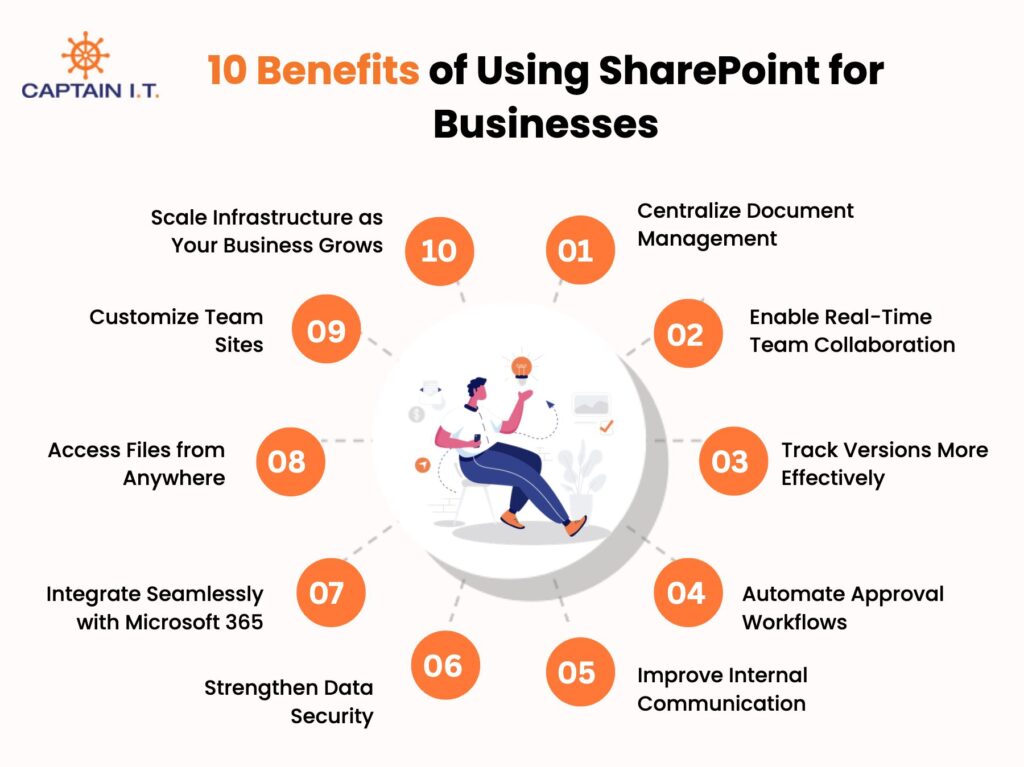
- Centralize Document Management
- Enable Real-Time Team Collaboration
- Track Versions More Effectively
- Automate Approval Workflows
- Improve Internal Communication
- Strengthen Data Security
- Integrate Seamlessly with Microsoft 365
- Access Files from Anywhere
- Customize Team Sites
- Scale Infrastructure as Your Business Grows
- Centralize Document Management
SharePoint centralizes document management by providing a single, organized platform for storing, managing, and controlling business files. Instead of keeping documents across network drives, personal folders, or email attachments, businesses can store contracts, policies, project files, and operating procedures in shared document libraries.
According to Gartner, 70% to 90% of enterprise data is unstructured, meaning much of it remains difficult to search, manage, or use without a centralized platform. SharePoint helps solve this challenge by organizing documents in shared libraries with metadata, search capabilities, and automatic version tracking, allowing teams to co-author files in real time while maintaining an accurate document history.
- Enable Real-Time Team Collaboration
Real-time collaboration is easier to achieve when SharePoint allows multiple employees to work on the same Microsoft Word, Excel, or PowerPoint document simultaneously. Co-authoring keeps everyone working on the latest version, while comments and mentions enable team members to communicate directly within files instead of relying on lengthy email threads.
As per a Forrester Total Economic Impact study commissioned by Microsoft, SMBs using SharePoint and OneDrive together cut file-storage time by 45% and file-sharing time by 25%, saving each employee about 14 minutes a day time reclaimed for higher-value work instead of managing versions and duplicate files. For SMBs, SharePoint helps teams collaborate through Microsoft Teams using the latest document version, reducing duplicate files, improving communication, and accelerating decision-making.
- Track Versions More Effectively
SharePoint automatically records every document revision, giving businesses a complete history of changes. Employees can compare previous versions, restore earlier copies, and identify who modified a document and when. According to IDC, knowledge workers spend about 2.5 hours a day, almost 30% of their workday, searching for information. Automatic version history saves a new version whenever a document is edited, creating a complete record of every change over time.
For small and medium-sized businesses (SMBs), SharePoint makes version tracking more effective by giving every employee access to a complete document history in one shared location. Instead of creating multiple copies or relying on manual file backups, teams can restore previous versions, identify who made each change, and continue working without losing important information.
- Automate Approval Workflows
When businesses need to manage recurring approvals efficiently, SharePoint streamlines the process through automated approval workflows. Using Power Automate, organizations can route purchase requests, expense claims, PTO requests, contract reviews, and policy approvals to the appropriate reviewers without relying on manual email chains.
As approval processes become more frequent, SharePoint helps SMBs manage them without adding administrative overhead. Automated notifications keep employees informed at every stage, while real-time status tracking allows managers to monitor requests without constant follow-ups. This helps SMBs process routine approvals faster, improve transparency, and maintain consistent business operations with limited resources.
- Improve Internal Communication
As businesses grow, SharePoint helps improve internal communication by serving as a centralized intranet where employees can access company news, HR policies, department pages, announcements, calendars, and employee resources from one location. Departments can publish updates, maintain knowledge bases, and share training materials from one centralized location.
This approach helps SMBs, with SharePoint serving as a single source of truth, replace scattered emails, reduce repeated questions, and improve team communication. Forrester Research has shown that when people collaborate and share content in the cloud rather than emailing attachments, they can save up to 100 minutes per week. This allows employees to collaborate more efficiently while maintaining a single source of truth for business content.
- Strengthen Data Security
Small and medium-sized businesses (SMBs) handle sensitive business and customer information daily, making SharePoint a secure platform for protecting confidential data through encryption, role-based access controls, and compliance capabilities. Granular permissions restrict access at the site, library, folder, and file levels, ensuring only authorized employees can access sensitive content.
According to the IBM Cost of a Data Breach Report 2025, the global average cost of a data breach reached US$4.44 million, highlighting the importance of strong security controls. Beyond access management, SharePoint encrypts data in transit and at rest while supporting audit logs, Data Loss Prevention (DLP), and secure document management to help SMBs reduce security risks and protect confidential business information.
- Integrate Seamlessly with Microsoft 365
One of the key benefits of SharePoint for SMBs is its seamless integration with Microsoft 365 applications, allowing teams to manage documents and collaborate without switching between multiple platforms. SharePoint works closely with Microsoft Teams, OneDrive, Outlook, Word, Excel, and PowerPoint to create a connected Microsoft 365 workspace.
Over 3.7 million businesses worldwide used Microsoft 365 in 2025, giving SharePoint a massive built-in install base to integrate with (Teams, Outlook, OneDrive, Power Automate, etc.) (Source: Dynamics Connect ). Documents shared in Microsoft Teams are stored in SharePoint, allowing employees to access and edit the same files across Teams, Word, and Outlook. This integration reduces duplicate work and keeps content consistent across Microsoft 365.
- Access Files from Anywhere
Accessing business files from any location becomes more efficient with SharePoint, allowing employees to securely retrieve documents from any internet-connected device, whether they are working in the office, at home, or on the go. Metadata, document tags, content types, and filtered views help users quickly locate files by owner, department, project, status, or date instead of navigating complex folder structures.
This centralized access is particularly valuable for small and medium-sized businesses (SMBs) that support remote or hybrid teams. Employees can securely access the latest documents without relying on local storage or network drives, while advanced search capabilities reduce time spent locating information. As a result, SharePoint helps SMBs improve collaboration, accelerate decision-making, and maintain business continuity regardless of where employees are working.
- Customize Team Sites
Different teams often require dedicated workspaces to manage their documents, resources, and daily activities, and SharePoint makes this possible through customizable team sites. Businesses can create separate sites for departments such as HR, sales, finance, or project teams using built-in templates, document libraries, pages, calendars, and lists that match their operational needs.
Instead of storing information across multiple locations, each team works within its own organized workspace while remaining connected to the broader organization. This improves content organization, simplifies collaboration, and gives site owners control over permissions and updates, allowing team sites to adapt as business priorities and projects evolve.
- Scale Infrastructure as Your Business Grows
SharePoint provides a scalable foundation that grows with your business without disrupting existing operations or requiring a new document management platform. As organizations expand, the platform continues to support increasing volumes of documents, users, and business processes while maintaining consistent performance within the Microsoft 365 environment.
This flexibility allows SMBs to scale efficiently, while managed service providers (MSPs) can support ongoing administration, security, and governance as business needs evolve. Whether opening new locations, supporting larger teams, or managing more business content, SharePoint maintains a centralized workspace that keeps information organized, accessible, and ready to support long-term business growth.
What are the Benefits of SharePoint for Small Businesses?
The benefits of SharePoint for small businesses include shared file access, reduced dependency on individual employees, and lower infrastructure costs by eliminating the need for dedicated file servers. These capabilities help small businesses centralize documents, maintain business continuity, and collaborate more efficiently as their operations grow.
Below are the key benefits of SharePoint for small businesses:
- Shared file access
SharePoint provides a central location for small businesses to store and manage business documents, making it easier for employees to find, share, and collaborate on files. For example, a small business can use a SharePoint site as a centralized document repository, allowing employees to securely access project files from any device instead of searching through multiple folders, drives, or email attachments. This improves productivity, reduces duplicate files, and ensures everyone works from the latest document version.
- Reduced owner dependency
For small businesses, SharePoint reduces dependence on individual employees by storing important documents in shared libraries rather than in personal inboxes or drives. Clear permissions ensure that authorized team members can continue to access files even if someone leaves the company or changes roles. This helps maintain continuity for small businesses by ensuring important documents remain accessible during employee transitions.
- No extra server costs
A key benefit of SharePoint for small businesses is eliminating the need for dedicated file servers, helping small businesses reduce upfront infrastructure and ongoing maintenance costs. By using SharePoint Online within Microsoft 365, small businesses can securely store and manage documents without investing in additional server hardware. This cloud-based approach enables small businesses to lower IT expenses while providing secure, centralized access to business files that supports day-to-day operations and future growth.
What are the Benefits of SharePoint for Medium-Sized Businesses?
The benefits of SharePoint for medium-sized businesses include standardized document management across departments, repeatable approval workflows, and role-based permission control that improves operational consistency and governance. These capabilities help growing medium-sized businesses maintain consistent business processes, strengthen collaboration between departments, and securely manage increasing volumes of business information.
Key benefits of SharePoint for medium-sized businesses are:
- Department document standards
By centralizing document libraries and standardizing file organization, SharePoint helps medium-sized businesses maintain consistent document standards across every department. Metadata, naming conventions, and version control ensure HR, finance, operations, and other teams manage files using the same structure. This helps medium-sized businesses reduce duplicate documents, improve consistency, and retrieve business information more efficiently.
- Repeatable approval workflows
Through automated approval workflows, SharePoint enables medium-sized businesses to process recurring requests using a consistent review process. Power Automate routes purchase requests, invoice approvals, leave requests, and policy reviews to the appropriate reviewers while tracking every approval stage. This reduces manual follow-ups, improves process visibility, and keeps medium-sized business operations running efficiently.
- Role-based permission control
Using role-based permission control, SharePoint allows medium-sized businesses to secure business information by limiting access to authorized employees. Permissions can be assigned at the site, library, folder, or file level based on employee roles, departments, or projects. This helps medium-sized businesses protect confidential content, simplify access management, and maintain stronger governance as teams expand.
What are the Benefits of SharePoint for Enterprise Businesses?
The benefits of SharePoint for enterprise businesses include a scalable intranet, compliance support, and secure access for distributed teams. These capabilities help enterprise businesses manage large volumes of business information while maintaining consistent governance and collaboration across multiple locations.
Key benefits of SharePoint for enterprise businesses are:
- Large-scale intranet structure
SharePoint gives enterprise businesses a centralized intranet that keeps employees, departments, and business locations connected through a single communication platform. Department sites, company news, employee directories, and knowledge hubs organize business information in one place. This helps enterprise businesses deliver consistent communication, reduce information silos, and improve access to organizational resources.
- Compliance support
With centralized compliance controls, SharePoint enables enterprise businesses to manage sensitive business information throughout its lifecycle. Retention policies, audit logs, access controls, and version history improve document governance by protecting confidential content, monitoring document activity, and supporting regulatory requirements. As a result, enterprise businesses strengthen compliance, reduce operational risk, and maintain secure information management.
- Distributed team access
Through Microsoft 365, SharePoint enables enterprise businesses to provide secure access to shared business content, allowing employees across multiple offices and geographic locations to collaborate on documents in real time from the latest file version. By keeping documents available from a single platform, SharePoint helps enterprise businesses eliminate information silos and support coordinated decision-making across locations.
What are the Limitations of SharePoint for Business?
The limitations of SharePoint for businesses include list view thresholds, sync and file path limits, storage constraints, deleted-item retention policies, a learning curve for users, and limited customization that requires proper planning and ongoing management. Understanding these constraints helps businesses design a well-structured SharePoint environment that supports long-term performance, usability, and governance.
7 limitations of SharePoint for businesses are:
- List view threshold: SharePoint limits how many items can be processed in a single view to maintain performance in large document libraries. Businesses should use metadata, indexed columns, and filtered views instead of displaying thousands of items at once to keep libraries responsive.
- Sync limits: Synchronizing large numbers of SharePoint files can affect OneDrive sync performance and user experience. Keeping only frequently accessed libraries synced while opening other files directly in SharePoint Online helps maintain reliable sync performance.
- File path limits: Long folder structures and lengthy file names can create path length restrictions that affect file access and synchronization. Organizing content with metadata and simpler library structures helps businesses avoid path-related issues and improve document accessibility.
- Storage limits: Storage capacity grows with Microsoft 365 licensing, but businesses should monitor usage as document volumes increase. Regular storage planning helps organizations manage growing content while avoiding additional storage costs and performance concerns.
- Deleted item retention: Removed SharePoint files remain available in the recycle bin for a limited retention period before permanent removal. Businesses should understand retention policies and recovery timeframes to prevent accidental data loss and support effective document management.
- Learning curve: SharePoint offers extensive document management capabilities, but users need training to use the platform effectively. Providing guidance on document libraries, metadata, permissions, and collaboration features helps businesses improve adoption and reduce user errors.
- Customization limits: SharePoint supports extensive customization, but overly complex configurations can increase administration and maintenance effort. Businesses should prioritize standard features and carefully planned customizations to simplify long-term management and future platform updates.
What is SharePoint Used For in Business?
SharePoint is used in business as an intranet, knowledge base, project tracking platform, request management system, employee resource hub, and centralized repository for policies and standard operating procedures (SOPs). These business uses help organizations centralize information, improve collaboration, and streamline everyday operations across departments.
Below are the 6 business use cases of SharePoint:
- SharePoint as an Intranet: Provides a centralized platform for company news, announcements, team sites, and internal communication.
- SharePoint as a Knowledge Base: Organizes policies, procedures, onboarding guides, FAQs, and other business knowledge using searchable document libraries.
- SharePoint for Project Tracking: Supports project management with shared documents, task lists, calendars, and team collaboration.
- SharePoint for Purchase Requests and Internal Tickets: Automates request submission, approval workflows, status tracking, and internal service requests.
- SharePoint for Employee Resource Hubs: Gives employees centralized access to HR documents, onboarding materials, company resources, and announcements.
- SharePoint for Policy and SOP Libraries: Stores policies, standard operating procedures (SOPs), and compliance documents with version control and secure access.
How Can Businesses Use SharePoint Effectively?
Businesses can use SharePoint effectively by planning implementation, organizing documents, managing permissions, assigning ownership, automating workflows, and training users. Following these best practices helps businesses build a secure, well-governed, and scalable SharePoint environment that supports efficient collaboration and long-term document management.
Key methods businesses can use SharePoint effectively are:
- Coordinate SharePoint setup with IT: Plan sites, permissions, governance, and Microsoft 365 integration before deployment.
- Plan document library structure: Organize libraries by department, project, client, or business process to simplify document management.
- Use metadata instead of deep folders: Classify documents using metadata for faster search, filtering, and document retrieval.
- Limit workflows to repeatable processes: Automate recurring approvals such as purchase requests, leave requests, and document reviews.
- Define SharePoint, Teams, OneDrive, and Outlook roles: Use each Microsoft 365 application for its intended purpose to avoid duplicate content and workflow confusion.
- Set permission rules before rollout: Establish role-based access controls to protect sensitive business information from the beginning.
- Assign site owners and content owners: Give clear ownership for maintaining sites, documents, and business content.
- Train users on file, site, and permission rules: Help employees understand document management, sharing, and collaboration best practices.
- Review stale sites, files, and access regularly: Perform routine governance reviews to remove outdated content, inactive sites, and unnecessary permissions.