Azure helps businesses with on-demand scalability, flexible computing, usage-based cost control, stronger data security, complete regulatory support, business continuity, Microsoft product integration, and hybrid cloud flexibility. Other benefits of Azure for businesses include hybrid cloud flexibility, centralized cloud management, remote work access, advanced data insights, and faster application deployment.
Beyond these core advantages, Azure supports specialized business needs through services such as Azure Virtual Desktop, Azure AI Foundry, Azure API Management, Azure Blob Storage, and Azure Stack Hub. These services simplify desktop virtualization, AI development, data integration, API governance, analytics, disaster recovery, and hybrid cloud management from a unified cloud platform. Azure also delivers tailored advantages for startups, small businesses, and medium-sized organizations by reducing infrastructure costs, strengthening governance, supporting secure remote work, and enabling phased cloud adoption.
Here are the 12 top benefits of Azure for business:
- On-Demand Infrastructure Scalability
Azure enables businesses to achieve on-demand infrastructure scalability by dynamically adjusting compute, storage, and networking resources in real time to match changing operational requirements. The platform automatically adjusts compute, storage, and networking resources to support fluctuating demand, allowing applications to maintain consistent performance during seasonal peaks, unexpected traffic surges, or periods of rapid business growth. Services such as Azure Virtual Machine Scale Sets and Azure Kubernetes Service (AKS) automate resource allocation based on predefined performance thresholds, reducing the need for manual intervention.
This consumption-based scalability helps organizations align infrastructure capacity with actual business demand instead of provisioning for worst-case scenarios. As unused resources are released when workloads decline, businesses avoid paying for idle capacity while maintaining operational efficiency. For example, an online retailer can automatically expand application resources during Black Friday promotions and scale them back after the event, balancing customer experience with cloud cost optimization.
- Flexible Compute, Storage, and Networking
Through a comprehensive ecosystem of modular Infrastructure-as-a-Service (IaaS) and Platform-as-a-Service (PaaS) capabilities, organizations including small and medium businesses (SMB) maintain structural adaptability tailored to diverse technical requirements. Engineering teams retain granular control over architectural decisions, allowing them to mix and match virtual machine configurations, high-throughput storage tiers, and custom virtual networks. This modularity ensures that legacy software, custom applications, and modern cloud-native workloads run on infrastructure optimized specifically for their unique technical profiles.
Azure also supports technological flexibility by enabling hybrid and multi-cloud strategies that simplify modernization without forcing risky, full-scale rewrites. Development teams can selectively migrate specific components to managed cloud services while leaving complex legacy systems on virtualized compute instances. As a result, businesses can continuously evolve their technology stacks over time, adopting emerging cloud tools without disrupting daily operations.
- Usage-Based Cost Control
With a transparent pay-as-you-go financial model, Azure enables businesses to maintain rigid financial governance by shifting massive upfront capital expenditures (CapEx) into predictable, manageable operational expenses (OpEx). Instead of a fixed rate, with Azure organizations pay strictly for the compute, storage, and bandwidth they consume down to the second, avoiding the heavy financial commitment of purchasing, maintaining, and refreshing physical server hardware. This consumption-based model democratizes access to enterprise-grade infrastructure for businesses of any size.
The platform also drives long-term cost control through granular financial management tools like Azure Cost Management and automated budget alerting. Organizations maximize savings by leveraging Reserved Instances or Savings Plans for predictable workloads, yielding discounts up to 72% compared to standard pay-as-you-go pricing. By combining clear financial visibility with flexible purchasing models, leadership can accurately forecast cloud spend and reinvest savings into strategic growth initiatives.
- Stronger Business Data Security
Azure helps businesses defend critical digital assets through a multi-layered security framework backed by Microsoft’s continuous global threat monitoring. Built upon zero-trust principles, the platform enforces strict identity verification, least-privilege access controls, and comprehensive data encryption both at rest and in transit. Its defense-in-depth architecture creates a resilient security perimeter that protects vital organizational data against increasingly sophisticated cyber threats.
Integrating AI-driven threat intelligence platforms like Microsoft Sentinel allows security teams to identify and neutralize emerging vulnerabilities in real time. Continuous behavioral analytics enable security operations personnel to detect suspicious activities and automate incident response before a breach occurs. Consequently, enterprises can innovate safely and manage critical data with confidence that their cloud environment meets rigorous enterprise security standards.
- Regulatory Compliance Support
By offering an industry-leading compliance portfolio covering over 100 global, regional, and industry-specific certifications (including GDPR, HIPAA, PCI-DSS, and ISO 27001), organizations can navigate complex legal standards more easily. According to Microsoft Trust Center documentation, Azure maintains the largest compliance coverage of any cloud provider, featuring over 50 specific certifications tailored directly to global regions and individual countries. Azure’s underlying infrastructure is engineered from the ground up to satisfy these strict regulatory standards, significantly reducing the compliance burden on internal IT teams.
Integrated monitoring tools like Azure Policy and Microsoft Defender for Cloud continuously track infrastructure configurations against active compliance frameworks. These systems generate automated assessment reports, highlight configuration drift, and offer actionable remediation steps to resolve non-compliant settings. This automated oversight reduces administrative overhead while shielding businesses from costly compliance fines and legal exposure.
- Reliable Business Continuity
Azure helps businesses maximize uptime and operational resilience through a robust high-availability architecture deployed across globally distributed availability zones. By distributing application redundancy across physically isolated data centers equipped with independent power and networking, Azure guarantees uptime SLAs up to 99.99% for critical workloads. This geographical redundancy protects services against local hardware failures, regional power outages, and natural disasters.
Through Azure Site Recovery and automated geo-redundant backups, organizations establish aggressive Recovery Time Objectives (RTO) and Recovery Point Objectives (RPO) for rapid disaster recovery. In the event of a catastrophic disruption, automated failover mechanisms seamlessly redirect traffic to secondary regions with minimal data loss. This resilience ensures that business operations continue uninterrupted, safeguarding revenue and brand reputation during unforeseen emergencies.
- Microsoft Product Integration
Microsoft Azure integrates seamlessly with Microsoft’s business ecosystem, allowing organizations to extend existing applications, identities, and data into the cloud without complex custom integrations. According to Forrester Consulting, enterprises leveraging native Microsoft product integration with Azure achieve an average 150% Return on Investment (ROI) over three years through reduced migration friction and licensing optimizations. Connecting tools like Microsoft 365, Entra ID, Windows Server, Dynamics 365, and Power BI creates a unified technology environment with streamlined data sharing and consistent identity management.
This deep integration allows organizations relying on Microsoft software to modernize their infrastructure while retaining familiar workflows. By bridging productivity applications, databases, and analytics platforms through Azure, businesses simplify user administration, improve cross-departmental collaboration, and accelerate cloud adoption with minimal operational disruption.
- Hybrid Cloud Flexibility
By utilizing Azure ExpressRoute and Azure Arc to bridge on-premises data centers with public cloud infrastructure, organizations maintain seamless cross-environment connectivity with Azure. Recognizing that complete cloud migration is not always feasible due to latency, data sovereignty, or legacy hardware constraints, Azure enables consistent management across all environments. Organizations can run sensitive workloads locally while running scale-dependent applications in the public cloud.
Through Azure Arc, Microsoft extends management, security governance, and PaaS services directly to on-premises servers, edge locations, or competing public clouds. This unified control plane ensures that corporate security policies, patching schedules, and resource tagging are enforced consistently everywhere. Businesses achieve the operational speed of the cloud while retaining full governance over sensitive data located on-premises.
- Centralized Cloud Management
Centralized management layers within Azure, like the Azure Portal, Azure CLI, and Azure Resource Manager, simplify IT oversight by allowing engineering personnel to govern, monitor, and manage distributed cloud resources from one interface globally. According to Microsoft IT benchmark reports, implementing centralized governance through Infrastructure-as-Code (IaC) on Azure reduces manual deployment errors by over 80%. This centralized infrastructure provides complete visibility into resource health, operational metrics, and access controls across all deployed services.
With native support for Infrastructure-as-Code (IaC) tooling, including Azure Bicep and Terraform, engineering teams achieve full programmatic control of environments within Azure. Developers can define complex infrastructure environments in code templates, enabling automated, repeatable deployments with zero manual configuration errors. This programmatically managed infrastructure, combined with central policy enforcement, maintains consistent standards across production, staging, and development environments.
- Remote Workforce Access
Azure helps businesses support modern distributed teams by providing secure remote access to business applications and cloud-hosted virtual desktops from any device, anywhere in the world. Internal enterprise studies reveal that deploying Azure Virtual Desktop (AVD) can lower desktop virtualization deployment costs by up to 34% compared to traditional on-premises Virtual Desktop Infrastructure (VDI) solutions. Solutions like Azure Virtual Desktop (AVD) deliver personalized Windows environments optimized for performance, ensuring employees experience the same capability remotely as they would in an office setting. This seamless connectivity maintains organizational productivity regardless of physical location.
Enforcing context-aware conditional access rules and mandatory multi-factor authentication across Azure secures remote productivity across all endpoints. Corporate data resides securely within the Azure cloud rather than on local employee devices, drastically reducing the risk of data loss from stolen or compromised hardware. Organizations can comfortably support bring-your-own-device (BYOD) policies while maintaining total control over sensitive corporate information.
- Advanced Data Insights
By deploying Azure’s built-in artificial intelligence, machine learning services, and enterprise analytics platforms like Azure Synapse, businesses transform raw operational data into actionable business intelligence. According to an IDC study, organizations leveraging Azure analytics extract value from enterprise data up to 27% faster than those using traditional on-premises data warehouses. To achieve this speed, Azure seamlessly ingests structured and unstructured data from disparate channels, consolidating it into unified data lakes that eliminate information silos.
Building directly on this unified data foundation, integrated Azure AI tools power predictive modeling, customer behavior analysis, and real-time operational reporting without requiring custom infrastructure. By converting raw historical data into these strategic insights, leadership can make faster data-driven decisions, accurately forecast market demand, and gain a durable competitive advantage.
- Faster Application Deployment
Managed developer tools, serverless compute models, and automated CI/CD pipelines via Azure DevOps and GitHub Actions significantly shorten development lifecycles on Azure. According to the Accelerate State of DevOps Report, high-performing development teams utilizing automated CI/CD pipelines release code up to 208 times more frequently with a 7x lower change failure rate.
By abstracting server management and software dependencies, engineering teams can focus entirely on writing high-quality code, reducing time-to-market for new digital features and customer enhancements. Furthermore, leveraging Azure Kubernetes Service (AKS) simplifies microservices orchestration. Developers can package applications into lightweight, reliable containers across development, testing, and production environments, allowing organizations to deploy software updates continuously with minimal operational risk.
What Are the Benefits of Azure Virtual Desktop?
Benefits of Azure Virtual Desktop include multi-session cost savings, simplified desktop management, and secure remote desktop access. These advantages help businesses replace locally managed desktops with cloud-hosted Windows environments that employees can access from virtually any location. Unlike traditional remote access solutions, Azure Virtual Desktop centralizes desktop delivery, allows multiple users to share computing resources efficiently, and gives IT teams greater control over user access and desktop administration.
- Multi-session cost savings: Azure Virtual Desktop allows multiple users to share supported Windows computing resources, helping businesses reduce desktop infrastructure and operating costs.
- Simplified desktop management: IT teams can centrally deploy, update, monitor, and manage desktop environments without maintaining individual physical workstations.
- Secure remote desktop access: Employees can securely access their assigned Windows desktops and business applications from virtually any location through centrally managed user authentication and access controls.
What Are the Benefits of Azure AI Foundry?
Benefits of Azure AI Foundry include broad enterprise model access, AI agent orchestration, and built-in AI evaluation. These capabilities help businesses build, test, deploy, and govern AI applications from a single managed platform. Unlike general Azure AI services that provide individual AI models, Azure AI Foundry combines model selection, prompt engineering, AI agent orchestration, model evaluation, and governance into one unified environment, simplifying enterprise AI development while maintaining greater control over deployment and compliance.
- Broad enterprise model access: Azure AI Foundry provides access to multiple foundation and open-source models, allowing businesses to compare, test, and select the most suitable model for their AI applications.
- AI agent orchestration: Businesses can coordinate AI agents, tools, and workflows within a single platform to automate complex business processes and multi-step tasks.
- Built-in AI evaluation: Integrated evaluation tools help development teams measure model quality, performance, safety, and reliability before deploying AI applications into production environments.
What Are the Benefits of Azure Managed Disks?
Benefits of Azure Managed Disks include automated VM disk management, flexible storage tier selection, and built-in disk redundancy. These capabilities simplify virtual machine storage administration while improving infrastructure reliability and workload performance.
- Automated VM disk management: Azure automatically provisions, manages, and scales VM disks, reducing manual storage administration.
- Flexible storage tier selection: Choose Standard HDD, Standard SSD, Premium SSD, or Ultra Disk tiers to match workload performance and cost requirements.
- Built-in disk redundancy: Managed disks support built-in redundancy options that improve data durability and VM availability during infrastructure failures.
What Are the Benefits of Azure API Management?
Benefits of Azure API Management include centralized API governance, policy-based traffic control, and self-service developer documentation. Each of these capabilities helps businesses publish, secure, monitor, and manage APIs from a single platform while improving developer productivity.
- Centralized API governance: Azure API Management provides a single platform for publishing, securing, monitoring, and managing APIs consistently across multiple applications and services.
- Policy-based traffic control: Built-in policies help control authentication, rate limiting, caching, and request routing to improve API security and reliability.
- Self-service developer documentation: An integrated developer portal enables developers to discover APIs, access documentation, test endpoints, and request API access independently.
What Are the Benefits of Azure Blob Storage?
The benefits of Azure Blob Storage include scalable unstructured data storage, lower storage costs, and automated data lifecycle management. Azure Blob Storage helps businesses store and manage large volumes of unstructured data without maintaining physical storage infrastructure. Azure Blob Storage enables organizations to scale storage on demand, optimize storage costs with tiered pricing, and automate data retention policies while ensuring reliable access to business data.
- Scalable unstructured data storage: Azure Blob Storage stores virtually unlimited amounts of files, media, backups, logs, and application data, automatically scaling as storage needs grow.
- Tiered storage cost control: Hot, Cool, and Archive storage tiers help businesses reduce storage costs by matching data to its access frequency.
- Automated data lifecycle management: Lifecycle policies automatically move or delete data based on age or usage, simplifying retention management and reducing storage costs.
What Are the Benefits of Azure Data Factory?
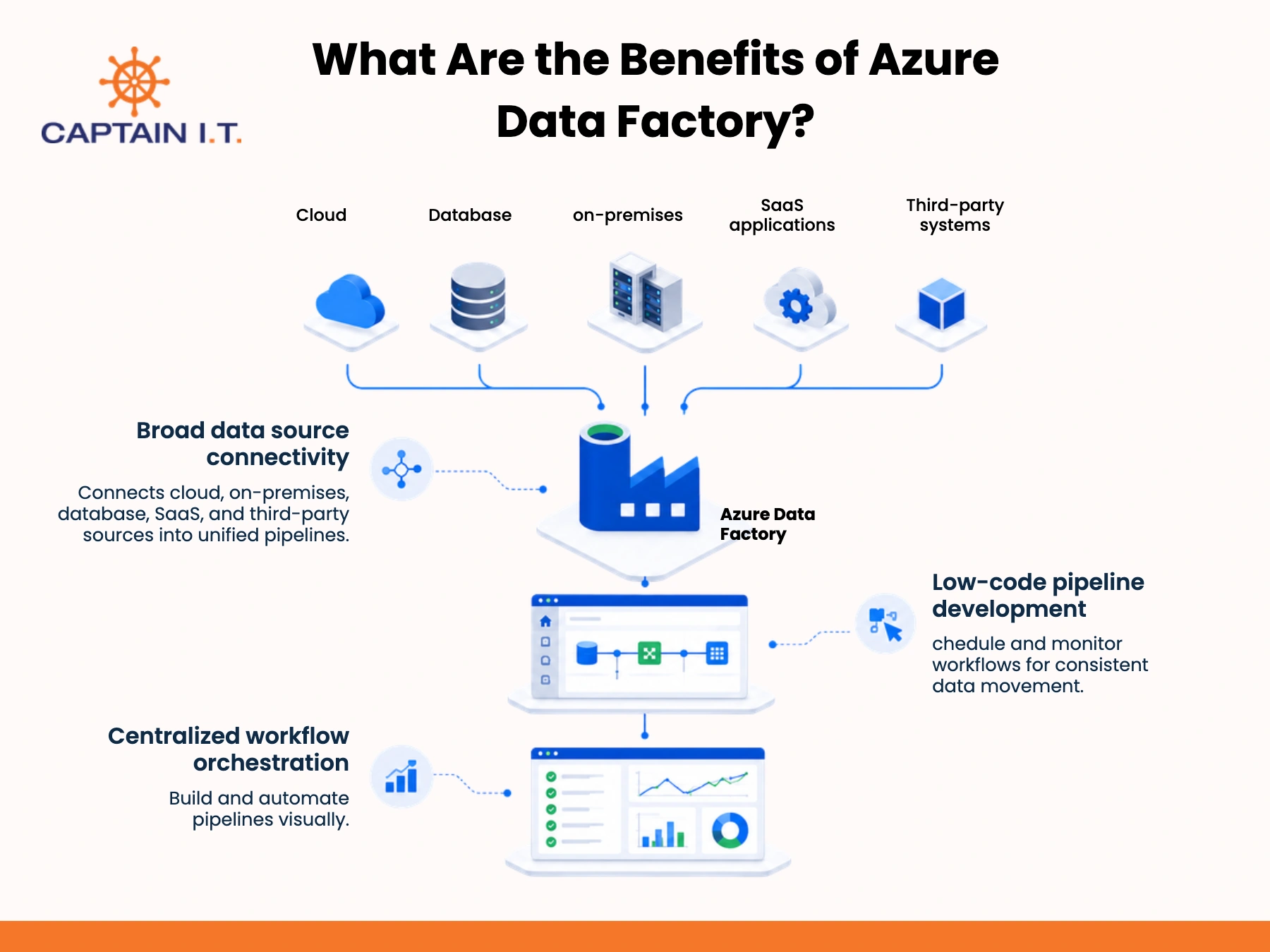
Benefits of Azure Data Factory include broad data source connectivity, low-code pipeline development, and centralized workflow orchestration. These advantages help businesses automate data integration and coordinate data movement across cloud, on-premises, and third-party environments.
- Broad data source connectivity: Azure Data Factory connects data from cloud, on-premises, databases, SaaS applications, and third-party systems into unified data pipelines.
- Low-code pipeline development: A visual interface enables teams to build, modify, and automate data pipelines with minimal coding.
- Centralized workflow orchestration: Azure Data Factory centrally schedules, monitors, and manages data workflows to improve operational visibility and ensure consistent data movement.
What Are the Benefits of Azure Functions?
Benefits of Azure Functions include reduced server management, event-triggered code execution, and automatic workload scaling. These capabilities help businesses build responsive applications without provisioning or maintaining dedicated infrastructure. Unlike traditional application hosting, Azure Functions executes code only when predefined events occur and automatically allocates compute resources based on workload demand.
- Reduced server management: Azure Functions eliminates the need to provision, patch, and maintain dedicated servers, allowing developers to focus on application logic.
- Event-triggered code execution: Functions automatically run when predefined events occur, enabling responsive and automated business processes.
- Automatic workload scaling: Azure Functions automatically adjusts compute resources based on workload demand to maintain application performance without manual intervention.
What Are the Benefits of Azure Key Vault?
The benefits of Azure Key Vault include centralized secret management, improved application security, and simplified certificate lifecycle management. Azure Key Vault helps businesses securely store, control, and monitor access to application secrets, encryption keys, and digital certificates from a single managed service. It also focuses on centralized credential storage, fine-grained access permissions, certificate management, and audit visibility.
- Centralized secret management: Azure Key Vault securely stores and centrally manages secrets, encryption keys, and certificates with controlled access permissions.
- Secrets kept out of code: Applications retrieve credentials securely from Azure Key Vault instead of storing sensitive information in source code or configuration files.
- Automated certificate renewal: Azure Key Vault automates certificate renewal and lifecycle management, reducing administrative effort and preventing service disruptions caused by expired certificates.
What Are the Benefits of Azure SQL Database?
Benefits of Azure SQL Database include Automated database administration, flexible workload scaling, and improved database security and availability. Azure SQL Database reduces the effort required to operate, scale, protect, and maintain cloud databases by automating routine management tasks. Unlike self-managed SQL Server, it provides automated patching, backups, high availability, elastic scaling, and built-in security controls as managed services.
- Automated database administration: Azure SQL Database automatically handles patching, backups, maintenance, and high availability, reducing routine administrative tasks.
- Independent compute scaling: Businesses can scale compute resources independently to support changing application workloads without disrupting database operations.
- Native AI workload support: Azure SQL Database supports modern AI-powered applications with built-in capabilities for vector search and AI integrations while maintaining managed database performance and security.
What Are the Benefits of Azure Synapse Analytics?
The benefits of Azure Synapse Analytics include unified data analytics, faster query performance, and integrated machine learning workflows. Azure Synapse Analytics is designed to analyze, query, and share data to generate actionable business insights. Azure Synapse Analytics helps businesses integrate data, warehouse data, process big data, and support business intelligence within a single analytics environment.
- Unified analytics workspace: Azure Synapse Analytics combines data warehousing, big data analytics, and reporting within a single collaborative workspace.
- Parallel query processing: Parallel processing enables large datasets to be analyzed more quickly, improving reporting speed and query performance.
- Integrated machine learning workflows: Built-in integration with machine learning services helps businesses develop predictive insights and AI-powered analytics within the same platform.
What Are the Benefits of Azure Backup?
Benefits of Azure Backup include ransomware protection controls, centralized backup administration, and flexible retention policies. Rather than replicating running workloads like Azure Site Recovery, Azure Backup is designed to protect business data through recoverable backups, centralized administration, and retention controls that strengthen recovery capabilities and reduce operational overhead.
- Ransomware protection controls: Azure Backup includes security controls to protect backup data from unauthorized deletion or modification and ransomware attacks.
- Centralized backup administration: Businesses can monitor, manage, and restore backups across multiple workloads from a single management platform.
- Flexible retention policies: Configurable retention policies allow organizations to retain backup data to meet operational, legal, and regulatory requirements.
What Are the Benefits of Azure HDInsight?
Azure HDInsight simplifies big data analytics by providing on-demand processing, managed open-source frameworks, and reduced cluster administration. Designed for Apache Spark, Hadoop, Kafka, Hive, and HBase workloads, it differs from Azure Synapse Analytics by focusing on scalable big data processing rather than unified analytics and data warehousing, helping organizations optimize performance and infrastructure costs.
- On-demand big data clusters: Azure HDInsight enables businesses to provision and scale big data clusters only when processing workloads require them.
- Decoupled compute storage: Compute and storage scale independently, allowing organizations to optimize performance and control infrastructure costs.
- Managed open-source frameworks: Azure manages Spark, Hadoop, Kafka, Hive, and HBase infrastructure, reducing administrative effort while supporting flexible big data processing.
What Are the Benefits of Azure Site Recovery?
Automated workload recovery, reduced downtime, and lower disaster recovery infrastructure costs are the benefits of Azure Site Recovery. Azure Site Recovery helps businesses maintain application availability by replicating workloads and coordinating recovery during planned or unexpected outages. This enables organizations to strengthen business continuity, increase confidence in disaster-recovery readiness, reduce service interruptions, and minimize the need for a dedicated secondary physical data center.
- Automated workload failover: Azure Site Recovery automatically orchestrates workload failover to minimize downtime during planned maintenance or unexpected outages.
- Non-disruptive recovery testing: Businesses can test disaster recovery plans without affecting production workloads, ensuring recovery readiness.
- Secondary datacenter cost reduction: Azure Site Recovery reduces the need to maintain a dedicated secondary datacenter by using Azure as a disaster recovery site.
What Are the Benefits of Azure Stack Hub?
The benefits of Azure Stack Hub include consistent hybrid cloud operations, local data control, and low-latency application performance. Azure Stack Hub enables businesses to run Azure services within their own data centers or disconnected environments while maintaining a consistent Azure management experience. This helps organizations meet regulatory requirements, improve edge performance, and manage hybrid workloads more consistently across cloud and on-premises infrastructure.
- Consistent hybrid cloud operations: Azure Stack Hub provides a consistent Azure management and development experience across cloud and on-premises environments.
- On-premises data sovereignty: Businesses can keep sensitive data within their own data centers to meet regulatory, security, and data residency requirements.
- Low-latency edge processing: Running applications closer to users and devices reduces latency and improves performance for time-sensitive workloads.
What are the Benefits of Azure for Startups?
The benefits of Azure for startups include startup-specific credits, Microsoft commercial marketplace access, and Microsoft co-selling support. Unlike small-business benefits that focus on IT operations, Azure supports startup growth by extending funding runway, accelerating product development, improving enterprise readiness, and creating opportunities to reach larger markets through Microsoft’s startup and partner ecosystem.
Here are the key benefits of Azure for startups:
- Azure startup credits: Provides early-stage founders with up to $150,000 in non-dilutive cloud funding via the Microsoft for Startups Founders Hub, extending operational runway while enabling teams to build, test, and deploy AI models and cloud infrastructure without burning venture capital.
- Microsoft Commercial Marketplace access: Gives B2B startups a direct distribution channel to list transactable SaaS solutions, allowing enterprise buyers to purchase products directly using their pre-committed Azure budgets (MACC burn-down) to bypass lengthy vendor onboarding and procurement friction.
- Microsoft co-selling support: Aligns startup sales teams directly with Microsoft’s global enterprise sales force through IP Co-Sell Acceleration, incentivizing Microsoft representatives to introduce qualified startup products to Fortune-level clients and close larger enterprise deals faster.
What are the Benefits of Azure for Small Businesses?
The benefits of Azure for small businesses include reduced server ownership, secure remote work, and simpler software integration. These advantages help small businesses modernize their IT operations without making significant upfront infrastructure investments. Azure provides access to enterprise-grade cloud services on a pay-as-you-go basis, enabling organizations to improve operational flexibility, strengthen security, and support business growth while keeping technology management simple and cost-effective.
3 major benefits of Azure for small businesses are:
- Reduced server ownership: Eliminates expensive physical server purchases, ongoing hardware maintenance, and costly 3-to-5-year hardware refresh cycles by migrating line-of-business applications and file storage into Microsoft’s cloud infrastructure. This shifts unpredictable capital expenses into a predictable monthly operational budget while relieving small IT teams from manually patching and servicing physical equipment.
- Secure remote work: Delivers enterprise-grade cybersecurity to small teams by utilizing Microsoft Entra ID and cloud-hosted environments to secure remote workforce access. Employees can safely access corporate files and business systems from any location or device without exposing internal networks or risking data loss from compromised physical endpoints.
- Reduced software integration complexity: Connects natively with existing Microsoft 365 environments, enabling small businesses to bridge productivity tools, identity systems, and cloud storage without paying for complex third-party software integrations. IT administrators can manage user identities, access permissions, and application policies seamlessly across both Microsoft 365 and Azure from a single, familiar administrative framework.
What are the Benefits of Azure for Medium-Sized Businesses?

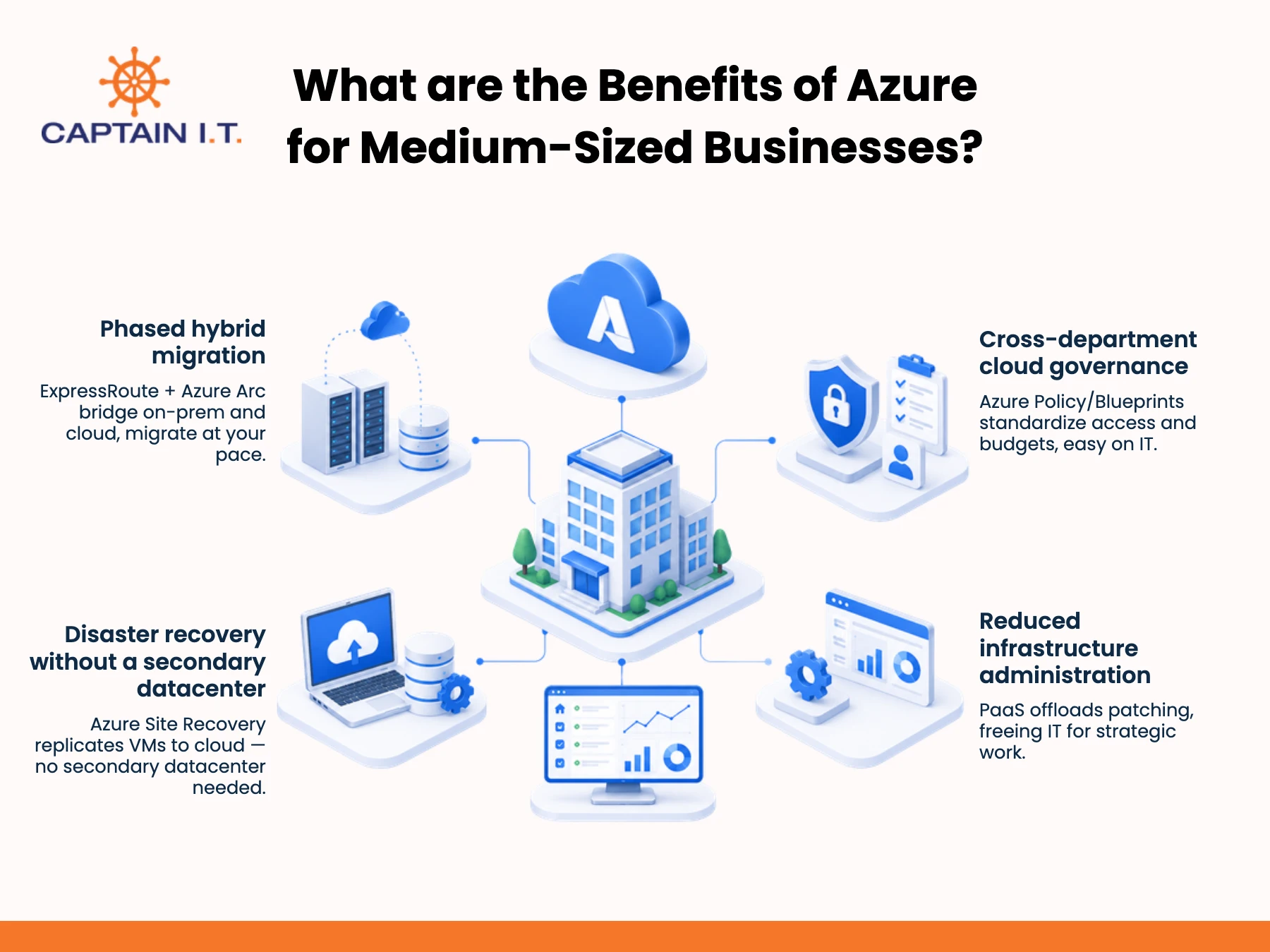
The benefits of Azure for medium-sized businesses include structured hybrid migration, cross-department cloud governance, disaster recovery, and reduced infrastructure administration. As businesses expand, they often manage a growing number of users, applications, departments, and compliance requirements, making IT operations more complex. Azure addresses these challenges by providing centralized management tools, hybrid cloud capabilities, governance controls, and managed infrastructure services that simplify day-to-day administration.
Some of the benefits of Azure for medium-sized businesses are:
- Phased hybrid migration: Enables mid-market companies to incrementally modernize their infrastructure by connecting existing on-premises data centers directly to the public cloud via Azure ExpressRoute and Azure Arc. This hybrid architecture allows IT teams to keep latency-sensitive core systems on-site while shifting scalable workloads to the cloud at a manageable pace.
- Cross-department cloud governance: Standardizes access controls, security policies, and resource allocation across growing internal business units through centralized tools like Azure Policy and Azure Blueprints. Mid-sized organizations can enforce strict budget limits and compliance boundaries across multiple teams without burdening central IT personnel with manual administrative tasks.
- Disaster recovery without a secondary datacenter: Eliminates the massive capital expenditure of leasing and maintaining physical failover sites by using Azure Site Recovery for cloud-native disaster protection. Mid-sized businesses can continuously replicate on-premises virtual machines directly to Azure storage, achieving aggressive Recovery Time Objectives (RTO) and Recovery Point Objectives (RPO) at a fraction of traditional hardware costs.
- Reduced infrastructure administration: Streamlines day-to-day maintenance through fully managed Platform-as-a-Service (PaaS) offerings like Azure App Service and Azure SQL Managed Instance. By delegating OS patching, database tuning, and routine provisioning to Microsoft’s underlying platform, lean mid-market IT departments can shift their focus from server maintenance to strategic, value-adding digital projects.
What Azure Setup Tips Should Businesses Follow?
Azure setup tips businesses should follow include proper resource hierarchy planning, separate environments, standardized naming conventions, consistent resource tagging, Multi-Factor Authentication (MFA), least-privilege access, network segmentation, and private endpoints. Following these best practices helps organizations build a secure, well-governed, and scalable Azure environment from the outset.
The 11 Azure Setup tips that Businesses should follow are explained below:
- Plan the resource hierarchy: Organize Azure resources into management groups, subscriptions, and resource groups, with clearly defined ownership boundaries. This creates a scalable structure that simplifies governance, administration, and cost management as the environment expands.
- Separate environments: Maintain separate development, testing, staging, and production environments to isolate workloads and reduce the risk of accidental changes affecting live business systems. Environment separation also supports safer testing and more controlled application releases.
- Standardize naming: Use consistent naming conventions that include environment labels, location identifiers, service names, and resource types. Standardized names improve resource identification, simplify administration, and support automation across Azure environments.
- Tag everything: Apply standardized tags such as department, owner, environment, project, and cost center to every resource. Tags improve cost allocation, reporting, governance, and resource ownership across the organization.
- Enforce MFA: Require multi-factor authentication for administrator accounts, privileged users, and business-critical systems to strengthen identity security. MFA adds an additional layer of verification that significantly reduces the risk of unauthorized account access.
- Least-privilege access: Assign users only the permissions required for their responsibilities and regularly review role assignments. Limiting access reduces security risks while maintaining stronger administrative control over Azure resources.
- Segment network traffic: Separate workloads using network segmentation and control inbound and outbound traffic between applications and services. This limits unnecessary communication between systems and strengthens overall network security.
- Use private endpoints: Connect supported Azure services through private endpoints instead of exposing them directly to the public internet. Private connectivity reduces external attack surfaces while improving secure internal communication.
- Centralize logs: Collect activity logs, security events, and performance data in a centralized monitoring solution with appropriate retention policies. Centralized logging improves troubleshooting, security investigations, compliance reporting, and operational visibility.
- Set budgets and cost alerts: Define spending thresholds, assign cost ownership, and configure alerts that notify responsible teams before costs exceed planned budgets. Early visibility helps businesses control cloud spending and respond quickly to unexpected usage.
- Use a cloud service provider: Businesses should consider hiring an Azure cloud service provider when planning a cloud migration, implementing a hybrid cloud environment, meeting regulatory or security requirements, or lacking in-house Azure expertise. An experienced cloud service provider can help design, deploy, secure, monitor, and optimize Azure environments while reducing implementation risks, improving governance, and ensuring cloud infrastructure aligns with long-term business goals.
What Are the Limitations of Microsoft Azure for Business?
The limitations of Microsoft Azure for business include setup complexity, cost management challenges, ongoing administration, legacy application migration, and dependence on reliable internet connectivity. Understanding these considerations before implementation helps businesses make informed decisions and build a more secure, cost-effective, and resilient Azure environment.
The 5 major limitations of Microsoft Azure for Business are explained below:
- Setup and skills complexity: Azure’s extensive services and configuration options require careful architecture planning, governance, and specialized technical knowledge. Businesses without experienced cloud professionals may need additional staff training or external expertise to design, deploy, and manage Azure effectively.
- Uncontrolled cloud spending: Without proper governance, oversized resources, idle services, weak budget controls, and unexpected workload growth can increase cloud costs. Regular cost monitoring, resource optimization, and spending alerts help businesses maintain financial control.
- Ongoing management requirements: Although Azure automates many infrastructure tasks, businesses remain responsible for monitoring workloads, reviewing security, managing identities, enforcing policies, and regularly evaluating cloud costs. Establishing operational processes helps maintain a secure and well-governed environment.
- Legacy workload migration issues: Some older applications may require compatibility testing, dependency assessments, downtime planning, or application refactoring before migrating to Azure. A phased migration strategy helps reduce operational disruption and deployment risks.
- Internet connectivity dependency: Because Azure services are cloud-based, reliable internet connectivity is essential for accessing applications and data. Businesses should plan for network redundancy, latency considerations, and contingency measures for outages to maintain service availability and business continuity.