Cloud storage helps SMBs improve data accessibility, security, collaboration, and operational efficiency through secure remote file storage, access from anywhere on any device, flexible storage scaling, and lower hardware and maintenance costs. Additionally, it helps protect business data with reliable backups, faster disaster recovery, easier file sharing, real-time collaboration, automatic device syncing, stronger access control, and better business continuity. Together, these capabilities help businesses, including SMBs, protect critical business data, support remote and hybrid work, reduce operational costs, and scale more efficiently as business needs evolve.
As businesses expand, many SMBs partner with managed service providers (MSPs) to optimize cloud storage performance, strengthen security, and simplify ongoing management. Cloud storage supports startups, small businesses, large enterprises, local businesses, and non-profits through flexible, secure, and scalable data management. While cloud storage offers advantages over traditional storage, businesses should evaluate factors such as reliance on the internet, compliance requirements, and vendor lock-in when selecting a solution.
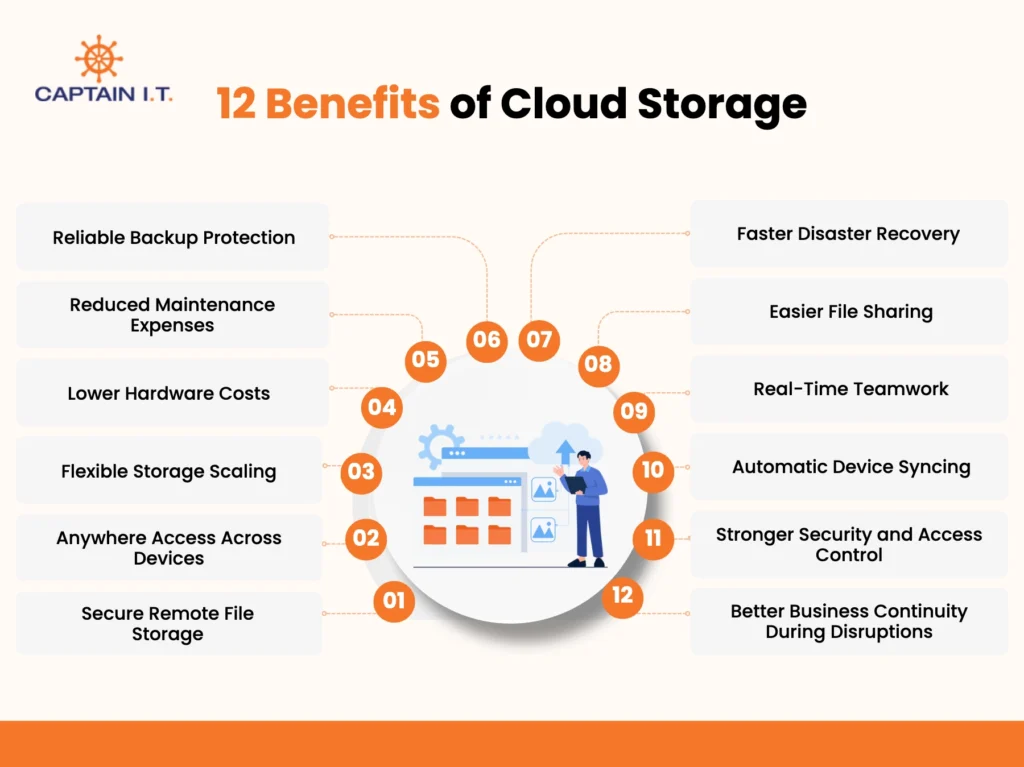
12 benefits of cloud storage include:
- Secure Remote File Storage
- Anywhere Access Across Devices
- Flexible Storage Scaling
- Lower Hardware Costs
- Reduced Maintenance Expenses
- Reliable Backup Protection
- Faster Disaster Recovery
- Easier File Sharing
- Real-Time Teamwork
- Automatic Device Syncing
- Stronger Security and Access Control
- Better Business Continuity During Disruptions
Secure Remote File Storage
By storing business files on secure remote cloud servers instead of local hardware, cloud storage provides secure remote file storage that protects sensitive data while enabling authorized users to access files safely from any location. Cloud providers protect files by encrypting data both while it is moving over the network (in transit) and while it sits on their servers (at rest). This ensures that even if data is intercepted, it remains unreadable to unauthorized parties.
45% of all data breaches now occur in cloud environments, making secure cloud file storage and robust access management a primary concern for business continuity, as organizations increasingly rely on these platforms for real-time collaboration and remote work ( source: SentinelOne). For SMBs, this combination of security, accessibility, and collaboration helps streamline operations while protecting critical business information.
Anywhere Access Across Devices
Cloud storage provides access from anywhere across devices, allowing users to securely retrieve, manage, and share files from any location with an internet connection. Because data is stored on remote cloud servers rather than local hardware, employees can access the same files from laptops, smartphones, tablets, or desktop computers without disruption. This flexibility is particularly valuable for SMBs that support remote and hybrid work environments.
Research shows that companies leveraging cloud-based infrastructure for flexible file access achieve a 19% increase in employee productivity, as teams can collaborate, update documents, and respond to business needs in real time from any location (Source: ZipDo). Team members can collaborate, update documents, and respond to business needs in real time regardless of their location. By ensuring consistent access to critical data across multiple devices, cloud storage improves productivity, supports business continuity, and creates a more agile work environment.
Flexible Storage Scaling
Flexible storage scaling is a key benefit of cloud storage, as it automatically expands storage capacity during periods of increased demand without requiring additional hardware investments or disrupting daily operations. As demand returns to normal, storage resources can be scaled back, ensuring the company only pays for what it uses. This flexible storage scaling is one of the key benefits of cloud storage, helping organizations adapt to changing business requirements while controlling costs.
Whether supporting rapid growth, large projects, or seasonal workloads, cloud storage provides the scalability, performance, and reliability needed to maintain smooth operations and continuous access to business data. SMBs can increase or reduce storage capacity as requirements change, ensuring they only pay for the resources they use while maintaining the flexibility to respond quickly to evolving business demands.
Lower Hardware Costs
Reduced hardware expenses are one of the primary benefits of cloud storage, allowing businesses to minimize investments in on-premises servers, storage arrays, and other physical infrastructure. Instead of purchasing, upgrading, and maintaining costly local storage devices, dedicated server rooms, and backup systems, businesses access storage on a subscription basis and pay only for the capacity they use. This shifts technology spending from capital expenses (CapEx) to predictable operational expenses (OpEx), improving budgeting and financial planning.
Migrating to the public cloud yields 15–50% in cost savings by shifting from capital-intensive (CapEx) hardware investments to a consumption-based operational expense (OpEx) model (source: US market). As storage requirements increase, businesses can scale capacity without buying new equipment, making cloud storage a cost-effective solution that simplifies budgeting, reduces infrastructure and maintenance expenses, and enables businesses to support growth without significant technology investments.
Reduced Maintenance Expenses
As an SMB grows, cloud storage reduces maintenance expenses by shifting hardware upkeep, software updates, performance monitoring, and troubleshooting to the cloud provider, eliminating the need for businesses to manage storage infrastructure internally. Cloud providers handle routine maintenance, security patches, system upgrades, and performance optimization, ensuring storage environments remain reliable and up to date.
Furthermore, it protects businesses from the financial volatility of unexpected hardware repairs or sudden equipment failures, replacing erratic emergency IT bills with a stable, managed service agreement in which the vendor handles all server replacements behind the scenes. By minimizing maintenance responsibilities, SMBs can allocate more time and resources to strategic initiatives, customer service, and business growth while benefiting from a dependable and efficiently managed storage environment.
Reliable Backup Protection
When unexpected data loss occurs, cloud storage provides reliable backup protection through automated backups and fast data recovery, helping businesses minimize disruption and maintain business continuity. This reliable backup protection is one of the key benefits of cloud storage, helping businesses safeguard critical information from hardware failures, cyberattacks, accidental deletions, and natural disasters.
According to IBM’s 2024 Cost of a Data Breach Report, the global average cost of a data breach reached USD 4.88 million, highlighting the financial impact of data loss and operational disruption. Cloud-based backup protection reduces downtime, enables rapid file recovery, and helps employees regain access to essential business data, ensuring operations continue with minimal interruption. Employees can quickly retrieve lost or affected files, helping maintain productivity and keep business processes running smoothly.
Faster Disaster Recovery
Cloud storage accelerates disaster recovery by automatically backing up and synchronizing data across secure remote servers, enabling businesses to quickly restore critical files and resume operations after unexpected disruptions. Automated backups, real-time syncing, and continuous updates ensure that the most recent versions of data remain available without lengthy manual recovery. This ensures employees can resume work quickly, limiting productivity losses and helping businesses maintain uninterrupted operations.
SMBs using cloud-managed backups and automated recovery tools can restore critical systems approximately 78 minutes faster than businesses relying on manual recovery methods, helping minimize operational disruptions and data loss. By streamlining data recovery and ensuring rapid access to business information, cloud storage helps maintain business continuity and recover from disruptions with greater confidence and efficiency.
Easier File Sharing
For teams that need to share documents quickly and collaborate across locations, cloud storage simplifies file sharing by providing secure access to files from a centralized platform. Users can share documents instantly, assign permissions such as view, edit, or download access, and collaborate on the same file in real time without relying on email attachments. SMBs with distributed teams can maintain organized workflows while ensuring that only authorized users can access sensitive information.
Email services and file storage are the predominant uses of cloud computing in the EU, with 66% and 53% of businesses using them, respectively, and file storage use has increased by 15% (source: WebinarCare). Consequently, cloud storage improves productivity, reduces version control issues, and supports efficient collaboration across multiple devices and work environments, enabling teams to work faster, maintain consistency across projects, and respond more effectively to changing business needs.
Real-Time Teamwork
When multiple team members need to contribute to the same project, cloud storage enables real-time teamwork through a shared workspace where users can access, edit, and manage files simultaneously. Everyone works from the most current version of a document, eliminating confusion caused by duplicate files, outdated attachments, or conflicting edits. Growing SMBs can streamline collaboration across departments and locations without relying on complex file-sharing processes.
Cloud storage enables multiple users to work on the same document simultaneously, eliminating duplicate file versions such as “v2” or “final edited” and ensuring everyone always accesses the latest version. By supporting seamless coordination across devices and teams, cloud storage helps organizations increase productivity and maintain alignment on critical business initiatives. Teams can collaborate more efficiently without delays caused by outdated files, duplicate versions, or fragmented communication channels.
Automatic Device Syncing
Switching between devices throughout the workday becomes far more efficient with cloud storage, which automatically synchronizes files across connected laptops, smartphones, tablets, and desktops in real time. When a user updates a document on one device, the changes are instantly reflected across all linked devices, ensuring access to the most current version at all times. Automatic synchronization also eliminates duplicate versions of files and prevents employees from working with outdated information.
If an employee updates a spreadsheet on an office desktop, the latest version is instantly available on their tablet or smartphone. This real-time synchronization improves productivity, enhances collaboration, and eliminates version conflicts. As a result, SMBs improve productivity, support seamless collaboration, and streamline workflows while reducing errors, communication gaps, and delays caused by outdated files.
Stronger Security and Access Control
Protecting sensitive business data from unauthorized access is one of the most valuable benefits of cloud storage, achieved through advanced encryption, multi-factor authentication, and role-based access controls. Encryption secures files during transmission and storage, reducing the risk of unauthorized access, while administrators can assign specific permissions to control who can view, edit, or share sensitive information.
SMBs handling customer records, financial data, or proprietary information benefit from these built-in security measures without investing heavily in specialized infrastructure. Many cloud providers also maintain highly secure data centers with continuous monitoring, restricted access, and compliance frameworks. Cloud storage helps businesses reduce security risks, protect critical assets, and maintain greater control over how data is accessed and shared across the business.
Better Business Continuity During Disruptions
Cloud storage strengthens business continuity by providing automated backups, remote access, and built-in failover capabilities that keep critical data available during unexpected disruptions. Automated backups continuously save data to secure cloud environments, reducing the risk of data loss and enabling faster recovery after hardware failures, cyberattacks, or natural disasters.
Because data and applications remain accessible outside of physical office locations, employees can continue working from virtually anywhere during disruptions. Growing SMBs benefit from this resilience by maintaining productivity, serving customers, and supporting daily operations even when local infrastructure is unavailable. This combination of data protection, remote accessibility, and rapid recovery improves operational stability and helps businesses adapt more effectively to unforeseen challenges while supporting long-term business continuity objectives.
What Are the Benefits of Cloud Storage for Different Types of Businesses?
The benefits of cloud storage include helping startups scale efficiently, supporting small businesses with cost-effective data management, enabling large enterprises to handle growing data demands, improving accessibility for local businesses, and providing non-profits with secure storage at lower operational costs. A reliable cloud service provider delivers the infrastructure, security controls, and scalable resources required to support these advantages while meeting the unique operational requirements of different business types.
What Are the Benefits of Cloud Storage for Startups?
The benefits of cloud storage for startups include lower costs, improved collaboration, scalable storage, enhanced security, remote accessibility, and stronger business continuity. These advantages help startups operate efficiently, support distributed teams, protect critical information, and adapt quickly to changing business requirements while focusing resources on growth and innovation.
Key benefits of cloud storage for startups include:
- Lower costs: Eliminates the need for servers, storage hardware, and large upfront technology investments.
- Improved collaboration: Enables team members to access, share, and edit files in real time from any location.
- Scalable storage: Allows startups to increase storage capacity as data volumes and business needs grow.
- Enhanced security: Protects sensitive data through encryption, access controls, and automated backups.
- Remote accessibility: Provides secure access to files and applications across multiple devices and locations.
- Business continuity: Helps maintain operations through reliable backups and disaster recovery capabilities.
What Are the Benefits of Cloud Storage for Small Businesses?
The benefits of cloud storage for small businesses include cost savings, enhanced security, improved collaboration and accessibility, scalable storage, and stronger business continuity. These positive outcomes allow small businesses to protect critical information, support remote and in-office teams, adapt to changing storage requirements, and maintain uninterrupted access to data without investing heavily in on-premises infrastructure.
Key benefits of cloud storage for small businesses include:
- Cost savings: Reduces upfront spending on servers, storage devices, and software licenses by providing predictable, subscription-based pricing.
- Enhanced security: Protects sensitive business data with encryption, access controls, ransomware protection, and automated backups.
- Improved collaboration and accessibility: Enables employees to access, share, and update files from any location using connected devices.
- Scalable storage: Allows businesses to increase or decrease storage capacity as operational needs change.
- Business continuity: Supports rapid data recovery and uninterrupted access to critical information during outages or unexpected disruptions.
What Are the Benefits of Cloud Storage for Large Enterprises?
The benefits of cloud storage for large enterprises include advanced data security, scalable storage infrastructure, seamless integration with enterprise systems, and support for global collaboration. These capabilities enable enterprises to protect sensitive information, accommodate growing data demands, streamline business processes, and ensure employees can securely access and share information from anywhere in the world.
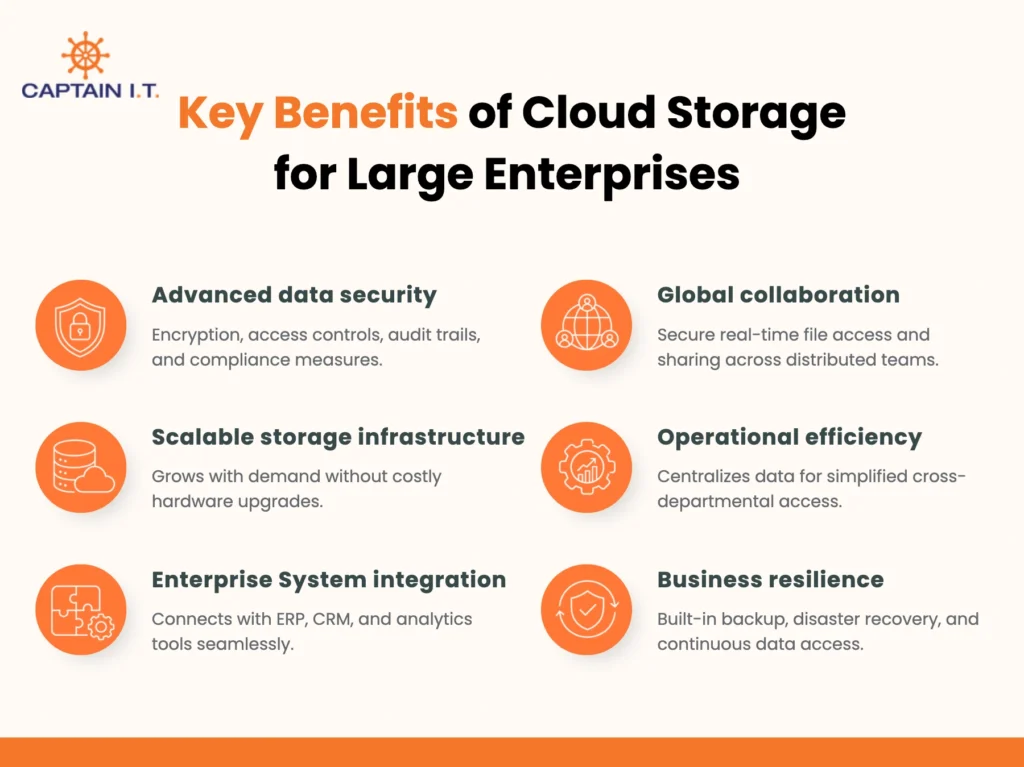
Key benefits of cloud storage for large enterprises include:
- Advanced data security: Protects sensitive data through encryption, access controls, audit trails, and compliance-focused security measures.
- Scalable storage infrastructure: Supports growing data volumes and user demands without requiring costly hardware upgrades.
- Enterprise system integration: Connects seamlessly with ERP, CRM, analytics, and other business applications to improve workflow efficiency.
- Global collaboration: Enables distributed teams to access, share, and edit files securely in real time across locations and time zones.
- Operational efficiency: Centralizes data management and simplifies access to business-critical information across departments.
- Business resilience: Supports backup, disaster recovery, and continuous access to essential data and applications.
What Are the Benefits of Cloud Storage for Local Businesses?
The benefits of cloud storage for local businesses include enhanced security, greater flexibility and accessibility, scalable storage, cost efficiency, automation, and improved collaboration. These advantages enable local businesses to protect critical information, support mobile and remote work, reduce technology expenses, and maintain efficient day-to-day operations without relying heavily on on-premises infrastructure.
Key benefits of cloud storage for local businesses include:
- Enhanced security: Protects sensitive business data through encryption, access controls, secure backups, and threat detection capabilities.
- Increased flexibility and accessibility: Allows employees to securely access files from any location and on any device with an internet connection.
- Scalable storage: Enables businesses to adjust storage capacity as operational and data requirements change.
- Cost-efficiency: Reduces spending on servers, hardware maintenance, and software upgrades through a pay-as-you-go model.
- Automation and efficiency: Simplifies routine tasks such as data backups, software updates, and storage management.
- Improved collaboration: Supports real-time file sharing, document editing, and teamwork across different locations.
What Are the Benefits of Cloud Storage for Nonprofits?
The benefits of cloud storage for non-profits include cost reduction, cost-effective storage management, scalability, data security, secure storage, accessibility, ease of access, and improved collaboration. These strengths allow non-profits to allocate more resources toward their mission, protect sensitive information, and support efficient operations across multiple locations and teams.
Key benefits of cloud storage for non-profits include:
- Cost reduction: Eliminates the need for expensive servers, storage hardware, and ongoing infrastructure maintenance.
- Cost-effective storage management: Enables organizations to pay only for the storage capacity they use.
- Scalability: Allows storage resources to scale up or down in response to changing program and data requirements.
- Data security: Protects donor records, financial information, and sensitive documents through encryption and access controls.
- Secure storage: Keeps critical files protected from hardware failures, theft, and local disruptions.
- Accessibility: Provides staff and volunteers with secure access to files from any location with an internet connection.
- Ease of access: Simplifies file retrieval and updates across laptops, smartphones, and tablets.
- Improved collaboration: Supports real-time file sharing, document editing, and coordinated teamwork across departments and locations.
What Are the Disadvantages of Cloud Storage?
The disadvantages of cloud storage include data security risks, dependency on internet connectivity, compliance challenges, limited control over data management, and vendor lock-in. These factors can affect data accessibility, regulatory compliance, and operational flexibility, particularly for businesses handling sensitive information or relying heavily on cloud-based infrastructure.
Key disadvantages of cloud storage include:
- Data security risks: Sensitive data stored in cloud environments is vulnerable to cyberattacks, unauthorized access, or security misconfigurations if proper safeguards are not in place.
- Dependency on internet connectivity: Access to files and applications depends on a reliable internet connection, which can disrupt operations during network outages or connectivity issues.
- Compliance challenges: Businesses operating in regulated industries often face strict requirements related to data privacy, residency, and regulatory compliance.
- Limited data control: Businesses store data on third-party-managed infrastructure, reducing direct oversight of storage environments and system configurations.
- Vendor lock-in: Moving large volumes of data between cloud providers can be complex, time-consuming, and expensive because of proprietary technologies and migration constraints.
- Potential service disruptions: Cloud provider outages or maintenance activities can temporarily affect access to critical files, applications, and business operations.
Cloud Storage vs Traditional Storage: Which Is Better for Your Business?
If your business needs scalability, remote accessibility, real-time collaboration, automated backups, and lower infrastructure costs, cloud storage is the better choice. Otherwise, businesses that require complete control over data, on-premises infrastructure, strict regulatory compliance, or limited dependence on internet connectivity may find traditional storage more suitable. The right option depends on your security requirements, operational priorities, budget, and long-term technology strategy.
Choose cloud storage when:
- Storage requirements frequently change, and scalability is important.
- Employees need secure access to files from multiple locations and devices.
- Real-time collaboration and file sharing support daily operations.
- Automatic backups and disaster recovery capabilities are a priority.
- Reducing upfront hardware and maintenance costs is a business objective.
- IT teams want to minimize infrastructure management and software updates.
Choose traditional storage if:
- Complete control over data, hardware, and storage infrastructure is required.
- Regulatory or data residency requirements restrict cloud adoption.
- Business operations depend on local storage when reliable internet access is unavailable.
- Existing investments in on-premises infrastructure remain sufficient.
- Internal security policies require data to stay within company-controlled environments.
- Long-term storage needs are predictable and do not require frequent scaling.
How to Choose the Right Cloud Storage for Your Business?
To choose the right cloud storage for your business, assess your storage requirements, evaluate security and integration capabilities, review scalability and support options, and compare pricing models. Selecting a solution that aligns with your operational needs and future growth plans helps ensure long-term value and performance.
Follow these steps to choose the right cloud storage solution:
- Assess your storage capacity and data management requirements.
- Identify security, compliance, and data protection needs.
- Verify encryption, access controls, and backup capabilities.
- Ensure compatibility with existing business applications and workflows.
- Evaluate file sharing and collaboration features.
- Choose a solution that supports future business growth and scalability.
- Review disaster recovery and business continuity options.
- Check customer support availability and response times.
- Compare pricing models, subscription plans, and additional fees.
- Consider provider reliability, uptime guarantees, and service performance.
- Test usability and accessibility across devices and locations.
- Select a solution that aligns with your budget, operational needs, and long-term business goals.