Small business backup solutions are cloud backup, on-premises backup, NAS backup, backup appliances, hybrid backup, SaaS application backup, server backup, virtual machine backup, endpoint and workstation backup, and managed backup services. These solutions help small and medium-sized businesses (SMBs) protect cloud applications, local servers, employee devices, and virtual infrastructure. The right choice depends on where business data resides, how quickly systems must recover, how much data loss is acceptable, and whether the business manages IT internally or relies on external support.
Because every SMB has different recovery priorities, selecting the right backup approach requires evaluating operational requirements instead of relying on a single solution for every environment. Remote-first organizations often benefit from cloud or endpoint backup, while SMBs with on-premises infrastructure may require server, NAS, or hybrid backup for faster recovery. Comparing recovery objectives, security capabilities, disaster recovery needs, and management requirements helps SMBs choose a backup solution that reduces downtime, strengthens data protection, and supports long-term business continuity.
10 Small Business Backup Solutions are:
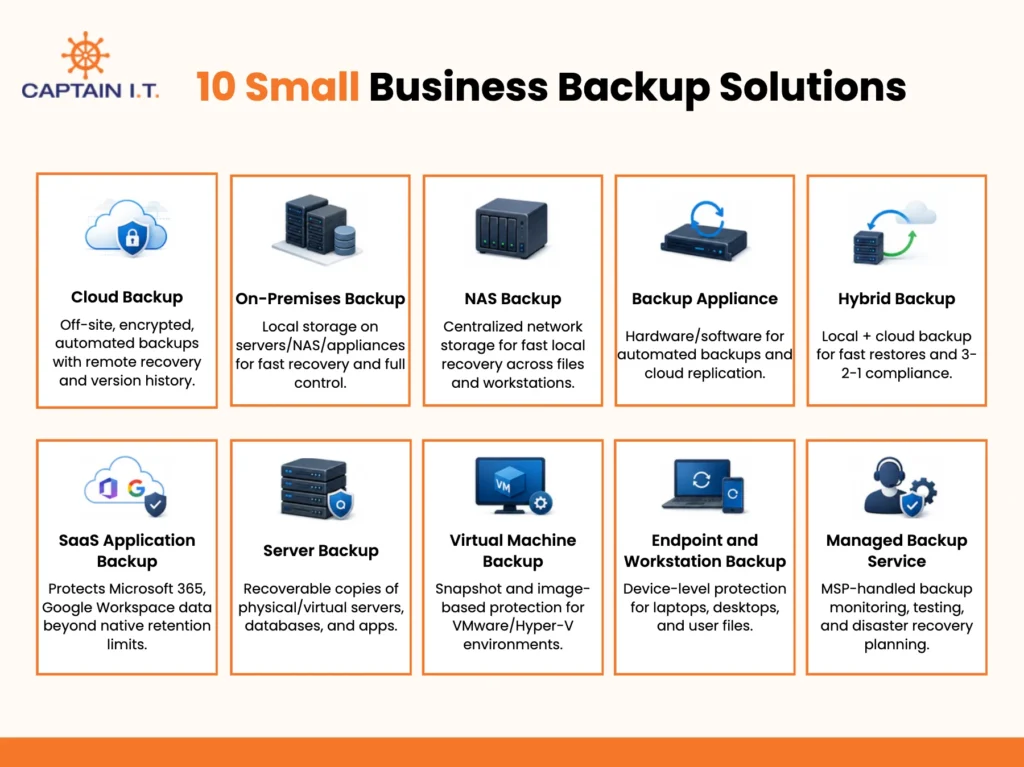
Cloud Backup: Stores business data in secure off-site cloud storage with automated backups, encrypted protection, remote recovery, version history, and scalable disaster recovery.
On-Premises Backup: Stores backup copies on local servers, NAS devices, or backup appliances for faster recovery and greater control over backup storage.
NAS Backup: Uses network-attached storage (NAS) to centralize backups for files, servers, and workstations while enabling fast local recovery across the office.
Backup Appliance: Combines dedicated backup hardware and software to automate backups, accelerate server recovery, and replicate data to the cloud.
Hybrid Backup: Combines local and cloud backup to deliver fast restores, off-site disaster protection, and compliance with the 3-2-1 backup strategy.
SaaS Application Backup: Protects Microsoft 365, Google Workspace, and other SaaS application data beyond native retention and recovery capabilities.
Server Backup: Creates recoverable copies of physical and virtual servers, databases, applications, and system images for complete server recovery.
Virtual Machine Backup: Protects VMware, Hyper-V, and other virtual environments using VM snapshots and image-based backups for full VM recovery.
Endpoint and Workstation Backup: Safeguards employee laptops, desktops, local files, and user profiles through device-level backup and recovery.
Managed Backup Service: Assigns backup management, monitoring, restore testing, and disaster recovery planning to a Managed Service Provider (MSP) for continuous protection.
- Cloud Backup
Cloud backup stores business data in secure off-site cloud storage and automatically protects it from data loss, ransomware, hardware failures, and other disruptions. It performs scheduled or continuous backups, supports remote recovery, maintains version history, encrypts data in transit and at rest, and scales as business data grows. Unlike cloud storage or file sync services, cloud backup protects entire systems, servers, databases, and business applications instead of simply storing or synchronizing files.It is well-suited for remote teams, laptop-heavy SMBs, and small offices that need reliable offsite protection without expanding local infrastructure. SMBs can restore files or complete systems after failures and maintain access to critical data during outages. Cloud backup provides strong protection but works best alongside local or hybrid backup solutions for faster recovery and stronger business continuity.
- On-Premises Backup
Small businesses use on-premises backup to store data on local servers, NAS devices, or dedicated backup appliances, giving them direct control over backup storage and faster recovery than cloud-only solutions. It creates local backup copies that protect against file loss, accidental deletion, and hardware failure while minimizing downtime during system restores. This approach is ideal for organizations with office servers, large files, or business-critical applications that require quick recovery.Fast local restores make on-premises backup a practical choice for design firms, engineering companies, and other businesses that depend on continuous access to data. Although it protects against everyday data loss and device failures, it cannot recover data if disasters such as fire, flooding, or theft affect the entire site. Pairing it with cloud or other off-site backups provides stronger disaster protection and supports SMBs’ continuity.
- NAS Backup
To create a shared local backup location, NAS backup uses network-attached storage (NAS) devices to store and protect business files, servers, and workstations across an office network. It centralizes backup data, simplifies backup management, and enables fast local file recovery after accidental deletion, hardware failure, or system issues. Many NAS systems support both server and workstation backups, allowing teams to protect shared files and maintain access to critical business data with minimal downtime.This solution is well-suited for small offices, businesses with local servers, and teams that need quick access to backed-up data. Since NAS backup stores copies on local storage, it cannot protect data if the entire site is affected by disasters such as fire, flooding, or theft. Combining NAS backup with cloud or other off-site backups provides stronger disaster protection and supports reliable business continuity.
- Backup Appliance
A backup appliance combines dedicated backup hardware with built-in backup software to simplify data protection and recovery. It stores backup data locally for fast server recovery and replicates backup copies to the cloud for off-site disaster protection. Automated backup scheduling, centralized management, and recovery features help protect servers, endpoints, and critical business data from hardware failures, ransomware, and other disruptions while reducing backup administration.Businesses with on-premises servers, high downtime risk, or strict recovery objectives benefit most from this solution, as it enables rapid restores and strengthens business continuity. The combination of local backup storage and cloud replication minimizes operational disruption during outages or disasters. Although backup appliances provide comprehensive protection, they are not the right choice for every small business and should be selected based on recovery requirements and existing IT infrastructure.
- Hybrid Backup
By storing backup copies in both local and cloud locations, a hybrid backup strategy provides fast recovery for everyday data loss while protecting businesses from site-wide disasters. It combines on-premises storage, such as NAS devices or backup appliances, with secure cloud backup to create multiple recovery points. This approach enables rapid local restores, maintains offsite copies for disaster recovery, and aligns with the 3-2-1 backup strategy by keeping multiple copies of data across different storage locations.SMBs with on-premises servers, large files, ransomware exposure, or low tolerance for downtime benefit most from this approach. Local backups reduce recovery time after hardware failures or accidental deletion, while cloud backups protect data if fire, theft, or other disasters affect the office. Together, these backup locations strengthen business continuity and provide more reliable protection than relying on a single backup method.
- SaaS Application Backup
Designed to protect cloud-based business applications, SaaS application backup secures Microsoft 365, Google Workspace, and other SaaS platforms by backing up emails, files, user accounts, Teams conversations, SharePoint content, and other cloud app data. It provides dedicated recovery options for business information that users accidentally delete, ransomware encrypts, or malicious insiders modify. Unlike server or endpoint backups, SaaS backups focus specifically on protecting cloud application data.Although SaaS providers keep applications available, they do not replace third-party backup or guarantee long-term data recovery. Limited retention periods and the shared responsibility model mean that deleted or corrupted data may become unrecoverable after a certain time. Businesses that depend on Microsoft 365, Google Workspace, or similar cloud applications should implement dedicated SaaS backup to maintain continuous data protection, meet compliance requirements, and ensure reliable recovery in the event of data loss.
- Server Backup
Server backup protects physical, virtual, file, application, and database servers, as well as system images, by creating complete copies for recovery. Unlike endpoint backup, it protects the entire server environment, including the operating system, application configurations, and business-critical data, instead of only user files. This system-level protection enables businesses to restore an entire server after hardware failures, ransomware attacks, or system corruption with minimal data loss.Organizations that run on-premises servers, accounting systems, shared databases, or business applications rely on server backup to maintain business continuity and reduce downtime. Full-server recovery helps restore business operations quickly without rebuilding servers from scratch or reinstalling applications. As part of a broader backup strategy, server backup strengthens disaster recovery planning and ensures that critical systems and data remain recoverable in the event of unexpected failures.
- Virtual Machine Backup
Instead of backing up individual files, a virtual machine (VM) backup protects the entire virtual machine, including the operating system, applications, system configurations, and business data. It uses VM snapshots and image-based backups to create recoverable copies that support full VM recovery after hardware failures, ransomware attacks, system corruption, or accidental changes. This approach restores complete virtual environments without rebuilding servers or reinstalling applications.Small businesses that use VMware, Hyper-V, hosted servers, or virtualized business applications benefit most from VM backups because they minimize downtime and data loss. Unlike traditional file-based backups, VM backups restore the entire virtual environment, allowing critical workloads to resume quickly after an outage. As part of a broader backup strategy, it improves business continuity by protecting virtual infrastructure and ensuring reliable recovery when unexpected system failures disrupt business operations.
- Endpoint and Workstation Backup
Employee laptops, desktops, and workstations often store important business files that require dedicated protection beyond centralized systems. Endpoint and workstation backup create backup copies of local files and user profiles, allowing businesses to restore an entire device after accidental deletion, hardware failure, ransomware, or other data loss events. It supports device-level recovery, helping employees resume work quickly without having to rebuild their systems from scratch.Organizations with remote teams, laptop-heavy operations, or large numbers of employee devices benefit most from this backup approach because it protects data stored directly on user devices. Unlike server backup, which protects shared systems and centralized business data, endpoint backup focuses only on individual devices and local files. It should be combined with server and SaaS application backups to provide comprehensive protection across business systems rather than relying on endpoint backup alone.
- Managed Backup Service
Managed backup services place backup management in the hands of a Managed Service Provider (MSP), which handles backup setup, continuous monitoring, failed-backup alerts, restore support, backup testing, and disaster recovery planning. This approach shifts ongoing backup responsibilities away from the business while helping maintain reliable data protection and recovery readiness.These services are ideal for businesses without internal IT staff or those with strict recovery, compliance, or uptime requirements. Many MSPs follow the 3-2-1 backup strategy by maintaining multiple backup copies across different storage locations, including an off-site copy. By delivering proactive monitoring and expert recovery support, managed backup services strengthen business continuity while reducing the operational burden on internal teams.
What is the 3-2-1 Backup Strategy for Small Businesses?
The 3-2-1 Backup Strategy for small businesses is a backup framework that requires businesses to keep 3 copies of their data, store them on 2 different storage types, and maintain 1 copy offsite. Separating backup copies across local and offsite locations reduces the risk that a single failure prevents recovery, while regular restore testing ensures backups remain usable after hardware failures, ransomware attacks, accidental deletions, or site-wide disasters.
Small businesses can meet the 3-2-1 standard by combining local, NAS, cloud, or hybrid backups rather than relying on a single backup method. For example, production data remains in business systems, a local backup enables fast recovery, and an off-site cloud copy protects against disasters. Adding immutable backups further safeguards recovery points from ransomware, improving recovery readiness, reducing downtime, and strengthening long-term business continuity.
What are the Benefits of Small Business Backup?
The benefits of small business backup include protecting data from ransomware, recovering deleted files, preventing data loss from hardware failures, restoring operations after outages, supporting compliance, automating backups, and controlling storage costs. Together, these benefits reduce downtime and strengthen business continuity, with effectiveness depending on the backup solution, recovery speed, regular testing, and the choice of local, cloud, hybrid, or managed backups to meet recovery objectives.
8 Benefits of Small Business Backup are:
Protect Data from Ransomware: Maintains isolated, immutable backup copies that enable recovery without paying ransom after cyberattacks.
Restore Operations Fast After Failures: Reduces downtime by restoring files, applications, or complete systems after hardware, software, or power failures.
Recover Accidentally Deleted Files: Restores deleted documents, emails, and business files using version history and granular file recovery.
Safeguard Data During Hardware Failure: Protects critical business data with recoverable backup copies when servers, storage devices, or hard drives fail.
Keep Offsite Copies for Disaster Protection: Stores backup copies at remote locations to recover data after a fire, flood, theft, or other site-wide disasters.
Meet Compliance and Security Requirements: Supports regulatory compliance through encryption, immutable storage, access controls, audit logs, and retention policies.
Automate Backups Without Manual Work: Performs scheduled or continuous backups automatically, monitors backup jobs, and reduces human error.
Control Storage and Recovery Costs: Optimizes storage, recovery performance, and infrastructure costs by selecting the right backup architecture.
- Protect Data from Ransomware
Backup protects small-business data from ransomware by preventing encrypted files from becoming permanent data loss or from forcing ransom payments. Attackers can lock critical systems and disrupt daily operations, but isolated backup copies provide clean recovery points that remain beyond their reach. The strongest protection comes from immutable, offsite, and regularly tested backups, making hybrid and managed backup environments more resilient than relying on a single backup location.
- Restore Operations Fast After Failures
With original data available in backup, fast recovery after unexpected failures helps small businesses reduce downtime and resume operations sooner. Hardware failures, ransomware, software issues, or power outages can interrupt critical workloads, but reliable backups restore files, applications, or complete systems before disruptions become prolonged. Recovery speed depends on the backup architecture, with local and hybrid solutions generally providing faster restores than cloud-only environments, thanks to features such as bare-metal recovery or instant virtualization.
- Recover Accidentally Deleted Files
Accidental file deletion does not have to result in permanent data loss when recoverable backup copies are available. Employees frequently remove documents, emails, or project files by mistake, disrupting ongoing work and customer service. Backup platforms with version history and granular recovery restore individual files without affecting the rest of the system. The level of protection depends on retention policies and backup capabilities, which vary between cloud, hybrid, and business-grade backup solutions.
- Safeguard Data During Hardware Failure
When servers, storage devices, or hard drives fail unexpectedly, separate backup copies keep critical business data recoverable. Full-system and image-based backups restore operating systems, applications, configurations, and files without having to rebuild systems from scratch. Hybrid and managed backup deployments provide broader protection by combining rapid local recovery with secure offsite copies, while local-only backups offer more limited protection against larger failures.
- Keep Offsite Copies for Disaster Protection
Maintaining off-site backup copies protects business data when disasters affect the primary office. Fire, flooding, theft, or other site-wide incidents can destroy production systems and local backups stored in the same location. Cloud and hybrid backup strategies reduce this risk by storing recoverable copies in remote locations, allowing businesses to restore data even when the office becomes inaccessible. Local-only backups cannot provide the same level of disaster resilience.
- Meet Compliance and Security Requirements
Strong backup security helps businesses satisfy compliance requirements while protecting sensitive information from unauthorized access or loss. Regulations such as HIPAA, GDPR, or SOC 2 often require secure data retention, encryption, and controlled access to protected information. Backup platforms that provide immutable storage, role-based access controls, audit reporting, and configurable retention policies make compliance easier, though the available features vary by provider.
- Automate Backups Without Manual Work
Reducing manual backup tasks lowers the risk of missed schedules, incomplete copies, and human error. Employees can easily overlook routine backups during busy workdays, leaving recent business data unprotected. Automated cloud, managed, and hybrid backup services perform scheduled or continuous backups, monitor backup jobs, and generate alerts when failures occur. The level of automation depends on the backup platform and management approach selected.
- Control Storage and Recovery Costs
Managing backup costs becomes increasingly important as business data grows and recovery requirements intensify. Storage capacity, retention periods, recovery objectives, and infrastructure choices all influence long-term expenses. On-premises deployments require hardware investment, cloud backup follows usage-based pricing, and hybrid strategies balance both models. Choosing the right backup architecture helps businesses control ongoing costs without sacrificing recovery performance or business continuity.
How Should Small Businesses Choose the Right Backup Solution?
Small businesses should choose the right backup solution by identifying critical data, defining recovery goals, verifying coverage for servers, comparing local, cloud, and hybrid backups, reviewing security and recovery features, and evaluating monitoring, restore testing, and support. These factors help align backup capabilities with business risks, recovery requirements, IT resources, and long-term business continuity goals, ensuring reliable protection for critical data sources.
7 Steps to Choose the Right Small Business Backup Solution
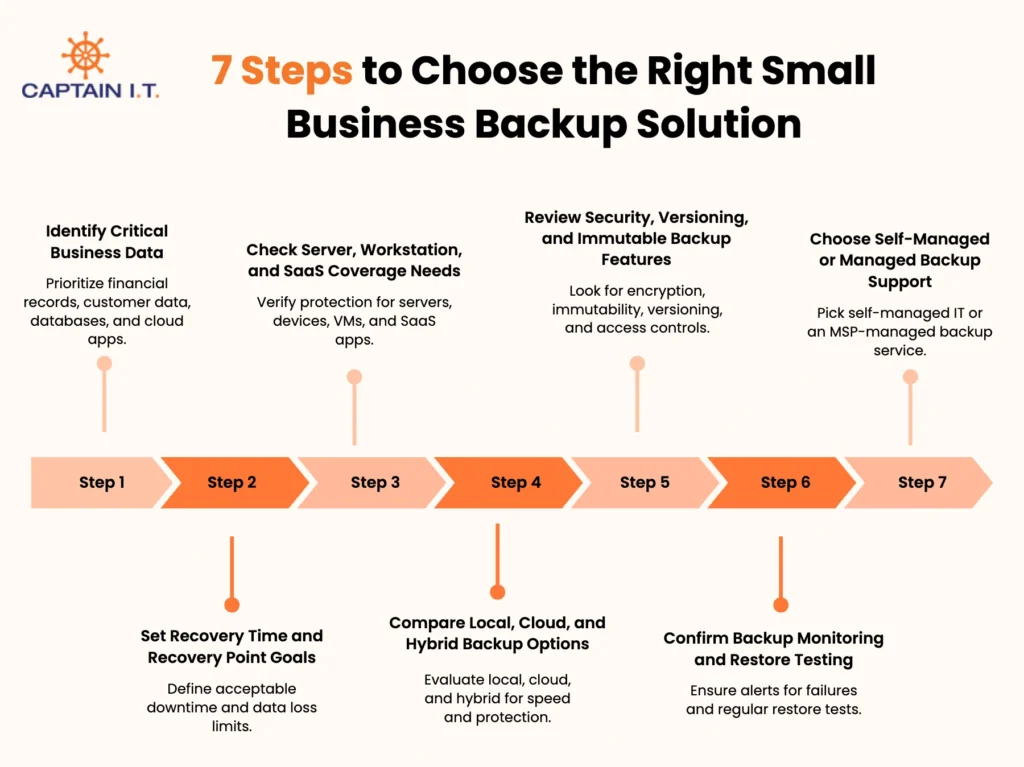
Identify Critical Business Data: Prioritize financial records, customer data, databases, and cloud applications to determine the backup coverage your business requires.
Set Recovery Time and Recovery Point Goals: Define Recovery Time Objective (RTO) and Recovery Point Objective (RPO) to determine acceptable downtime and data loss.
Check Server, Workstation, and SaaS Coverage Needs: Verify the solution protects servers, employee devices, virtual machines, and SaaS applications without leaving recovery gaps.
Compare Local, Cloud, and Hybrid Backup Options: Evaluate recovery speed, disaster protection, storage location, and business requirements to select the most suitable backup architecture.
Review Security, Versioning, and Immutable Backup Features: Look for encryption, immutable storage, version history, and access controls to strengthen data protection and ransomware recovery.
Confirm Backup Monitoring and Restore Testing: Ensure the solution provides continuous monitoring, alerts for failed backups, and regular restore testing to verify recoverability.
Choose Self-Managed or Managed Backup Support: Select self-managed backups for experienced IT teams or a managed backup service from an MSP for monitoring, recovery support, and disaster recovery planning.
- Identify Critical Business Data
Begin by identifying the business data that would have the greatest operational impact if lost. Financial records, customer information, operational documents, databases, and Microsoft 365 data often require different levels of protection based on where they are stored and how quickly they must be recovered. Mapping critical data helps determine whether local, cloud, or hybrid backup provides the right coverage for your business environment and recovery priorities.
- Set Recovery Time and Recovery Point Goals
Define recovery objectives before selecting a backup solution because they determine how the environment should recover after data loss. Recovery Time Objective (RTO) specifies how quickly systems must recover, while Recovery Point Objective (RPO) defines how much data loss the business can tolerate. Shorter RTOs and RPOs usually require faster recovery methods, more frequent backups, or hybrid architectures that minimize downtime for critical workloads.
- Check Server, Workstation, and SaaS Coverage Needs
Evaluate every system that stores business data instead of focusing on a single environment. Local servers, employee workstations, virtual machines, and SaaS platforms such as Microsoft 365 each require different protection because recovery methods vary across workloads. Identifying all data sources helps ensure the backup solution provides complete coverage across on-premises infrastructure, remote endpoints, and cloud applications, eliminating recovery gaps.
- Compare Local, Cloud, and Hybrid Backup Options
Compare backup architectures based on recovery speed, disaster resilience, and operational requirements rather than cost alone. Local backup provides the fastest restores but cannot protect against site-wide disasters, while cloud backup delivers secure off-site protection with longer recovery times. Hybrid backup combines both approaches, making it well-suited for businesses that require rapid local recovery, reliable disaster protection, and alignment with the 3-2-1 backup strategy.
- Review Security, Versioning, and Immutable Backup Features
Review backup security features carefully because they determine whether backup data remains recoverable after cyberattacks or accidental changes. Encryption, multi-factor authentication, version history, immutable storage, and configurable retention policies protect backup copies from unauthorized access, ransomware, and data corruption. Businesses with compliance obligations or higher cyber risk should prioritize solutions that combine strong security controls with reliable recovery capabilities instead of basic backup functionality.
- Confirm Backup Monitoring and Restore Testing
Confirm that the backup solution continuously monitors backup jobs and verifies recovery through regular restore testing. Failed backup alerts, automated monitoring, and scheduled recovery tests help identify problems before data loss occurs and confirm that backup copies remain usable. Businesses with strict uptime or compliance requirements should prioritize solutions that provide centralized monitoring and consistent recovery validation, rather than relying solely on successful backup completion.
- Choose Self-Managed or Managed Backup Support
Select a support model that matches your internal IT capacity and recovery requirements. Businesses with experienced IT teams can manage backup monitoring, restore testing, and disaster recovery internally. Those with limited technical resources or strict uptime requirements often benefit from a managed backup service from an MSP, which offers continuous monitoring, alerts for failed backups, restore support, backup testing, and disaster recovery planning. This approach reduces operational risk while improving recovery readiness.
What Backup Mistakes Should Small Businesses Avoid?
The backup mistakes SMBs should avoid include relying solely on cloud storage, keeping only one local backup, using manual USB backups, skipping Microsoft 365 backups, failing to test restore speed, and overlooking failed backup monitoring. These mistakes often result from assuming data is protected without verifying recovery, increasing the risk of permanent data loss, extended downtime, ransomware exposure, compliance issues, and failed restores when businesses need their backups most.
8 Backup Mistakes Small Businesses Should Avoid are:
- Relying Only on Cloud Storage
Cloud storage alone cannot guarantee reliable data recovery because file-sync services mirror every change, including accidental deletion, corruption, and ransomware encryption. Many businesses mistake synchronization for backup, only discovering the gap during recovery. Maintaining separate, protected, and regularly tested backup copies ensures critical business data remains recoverable when cloud storage cannot.
- Keeping Only One Local Backup
A single local backup creates a single point of failure that can leave a business without any recoverable data. Hardware failures, ransomware, theft, or fire can destroy both the production data and its only backup. Keeping separate off-site copies and following the 3-2-1 strategy significantly improves recovery reliability and business continuity.
- Using Manual USB Backups
Manual USB backups often fail because successful protection depends entirely on consistent human action. Missed schedules, outdated copies, damaged drives, or misplaced devices can leave businesses without a usable recovery point during an incident. Automating backups and maintaining separate offsite copies reduces human error and strengthens recovery readiness.
- Skipping Microsoft 365 Backup
Microsoft 365 keeps applications available but does not guarantee recovery of deleted, corrupted, or ransomware-affected business data. Assuming built-in retention is enough can result in permanent loss of emails, files, Teams conversations, and SharePoint content. Dedicated Microsoft 365 backup preserves independent recovery points while supporting compliance and reliable business recovery.
- Ignoring Ransomware-Resistant Backup
Without ransomware-resistant backups, attackers can encrypt or delete both production data and backup copies, leaving businesses with no reliable recovery option. Many organizations assume every backup can withstand ransomware, but only immutable or isolated backups provide that protection. Maintaining protected, offsite, and tested backup copies significantly reduces recovery failures and eliminates dependence on ransom payments.
- Not Testing Restore Speed
Backups provide little value if they cannot restore data within the required recovery timeframe. Many businesses assume successful backups guarantee fast recovery without testing actual restore performance. Slow, incomplete, or corrupted restores can extend downtime and disrupt operations. Regular recovery testing verifies backup integrity, identifies performance bottlenecks, and confirms recovery objectives remain achievable.
- Not Monitoring Failed Backups
Backup failures often go unnoticed until a recovery attempt reveals that critical data was never protected. Assuming backups always complete successfully creates a false sense of security and increases the risk of permanent data loss. Continuous monitoring, automated failure alerts, and routine verification help detect issues early, ensuring backup copies remain complete, recoverable, and ready when needed.
- Not Matching Backups to Disaster Recovery Needs
Choosing backups without considering disaster recovery requirements can leave businesses unable to restore operations within acceptable timeframes. Many organizations focus on storing data rather than meeting Recovery Time Objectives (RTOs) and Recovery Point Objectives (RPOs). Aligning backup architecture with recovery goals ensures that data remains recoverable while minimizing downtime following ransomware attacks, hardware failures, or site-wide disasters.